
The features that turn a website into a lead source are a fast mobile load, a hero section with one clear call-to-action, click-to-call visibility, dedicated pages for each service, a real project gallery, verifiable trust signals like reviews and licenses, and a short inquiry form tied to a follow-up system. Everything else — blogs, social feeds, extra animations — matters less. Get these seven right first, and the rest becomes optimization instead of triage.
TL;DR:
- A single slow-loading gallery or unoptimized hero image can cost contractors potential leads, as over half of mobile visitors abandon pages after three seconds.
- Each core service should have its own page with detailed descriptions, process steps, realistic timelines, local SEO markup, and actual project photos to rank better and convert more visitors.
- Only show verifiable trust signals like actual reviews, license numbers, and certifications, as anonymous or fake-looking reviews diminish credibility with homeowners.
- A contact form with three fields, integrated into a CRM system, increases inquiries and ensures timely follow-up, reducing lead loss from delays or missed messages.
- Website speed, clear calls-to-action, and a mobile-friendly design take priority over extra content, branding, or complex features when aiming to generate booked jobs.
Table of Contents
- Why Your Homepage Hero Decides Whether Visitors Call You
- Mobile Speed and Performance: The Feature Most Contractors Ignore
- Should Every Service Get Its Own Page?
- What Makes a Contractor Portfolio Actually Convince Someone?
- Trust Signals That Actually Get Checked
- How Should Your Contact Form Actually Work?
- Local Signals That Help People Find You
- Why CRM Integration Belongs on Your Website Checklist
- Are SSL Certificates and Data Protection Really Necessary?
- Do You Need Social Media on Your Website?
- Should Contractors Bother With a Blog?
- What Contractors Get Wrong About Website Priorities
- How Kirk & Co Builds Contractor Sites That Book Jobs
- Sources
- FAQ
Why Your Homepage Hero Decides Whether Visitors Call You
Visitors decide whether to stay or leave your homepage within 10 to 20 seconds, so your hero section carries most of the conversion weight on the entire site. A high-converting service homepage pairs an outcome-led headline with proof and a repeated call-to-action, not a vague tagline about quality or craftsmanship.
Your headline should say what you do and who you serve, in plain language a homeowner would use. "Licensed Electricians Serving Central Indiana" beats "Powering Your Vision" every time.
- Write one specific primary CTA, like "Request a Free Estimate," and repeat it in the header and hero.
- Make your phone number a tap-to-call link, visible without scrolling on mobile.
- Add a quick link to your service pages and portfolio directly beneath the hero.
Pro Tip: Test your hero on your own phone before you approve it. If you have to scroll to find your phone number or the estimate button, so will every visitor.
Mobile Speed and Performance: The Feature Most Contractors Ignore
Google found that 53% of mobile visitors abandon a page that takes longer than three seconds to load. For a contractor site, that means a slow gallery page or an unoptimized hero image is quietly costing you estimate requests before anyone reads a word of copy.
Aim for a sub-2 to sub-3 second mobile load, and treat it as a hard requirement, not a nice-to-have.
- Compress and serve scaled images in WebP format instead of full-size JPEGs.
- Lazy-load photos and videos below the fold so they don't compete with your hero for bandwidth.
- Defer non-critical scripts like chat widgets and tracking pixels until after the page renders.
- Choose a performant host and limit third-party plugins that each add their own loading delay.
Core Web Vitals, Google's measurable speed and stability metrics, factor directly into local search rankings. A faster site improves both SEO visibility and conversion rate at the same time, which is rare in web design.
Should Every Service Get Its Own Page?
Yes. A single "Services" page that lists roofing, siding, and gutters in three paragraphs tells Google nothing specific, and tells a homeowner even less. One page per core service, built around a real search phrase like "deck builder Bloomington," ranks better and converts better because it matches exactly what someone typed.
Each service page should include:
- A clear description of the service and who it's for
- The typical process, step by step, so buyers know what to expect
- Realistic timelines and cost ranges, even as broad estimates
- Photos from actual jobs in that category
- FAQs that pre-answer objections like permits, warranties, or cleanup
- A note on your service area for that specific trade
Adding LocalBusiness or Service schema markup, structured data that helps search engines understand your business type and location, gives Google extra context to match your page to local searches. A dedicated home services page built around this structure tends to outperform a generic one every time.
What Makes a Contractor Portfolio Actually Convince Someone?
Real project photos beat stock imagery and rendered mockups every time, and before-and-after shots plus in-progress images build the kind of credibility a paragraph of marketing copy never will. Prospects want to see the mess before they trust you to fix it.
- Document the problem first. A photo of a rotted deck or a cracked foundation gives context to the "after" shot.
- Write a short case study for each project. Cover the scope, timeline, materials used, and outcome in a few sentences.
- Include a client quote when you have one. Even one sentence attached to a name adds weight a generic testimonial page can't match.
- Organize by service or project type, not by date, so a visitor looking for kitchen remodels doesn't have to dig through roofing photos.
- Show at least 6 to 12 strong examples. Fewer than that reads as thin; padding it with weak photos hurts more than it helps.
Trust Signals That Actually Get Checked
Not all social proof carries the same weight. Named video testimonials rank highest, followed by written testimonials that include a name and photo, with anonymous quotes and stars-only ratings trailing well behind. A five-star badge with no name attached is easy to fake and visitors know it.
- Display your Google review rating and total count prominently, not buried in a footer link.
- Show your license number and insurance carrier where a homeowner can actually verify them.
- List manufacturer or trade certifications relevant to your work, like a roofing manufacturer's installer program.
- Skip decorative trust badges that don't link to anything checkable.
Pro Tip: If a visitor can't verify a claim with a two-second Google search, it won't build the trust you're hoping for. Verifiable beats impressive.
How Should Your Contact Form Actually Work?
Keep your primary form to three fields: name, phone or email, and a short project summary. Cutting the number of fields works better than splitting them across multiple steps, since fewer fields at the point of first contact reduce friction more reliably than a slicker multi-step wizard. Ask qualifying questions like budget range or timeline after they've committed, not before.
- Make your phone number clickable everywhere, especially in the header and footer.
- Add a booking calendar on service pages for jobs that lend themselves to scheduled estimates.
- Offer a lightweight chat or after-hours form so evening inquiries don't go cold.
- Route every submission into a CRM immediately, then send an automatic confirmation.
- Follow up with a scheduling link within 24 hours, while the homeowner still remembers requesting it.
Pro Tip: A lead that sits unanswered for two days is often a lead you've lost to whoever called back first. Speed of follow-up is a feature too.
Local Signals That Help People Find You
Put your contact information in the header and footer of every page, and name the specific towns and neighborhoods you actually serve rather than a vague "greater metro area." Buyers searching locally want to confirm you cover their street before they'll pick up the phone.
- Keep your name, address, and phone number identical across your website, Google Business Profile, and every directory listing.
- Optimize your Google Business Profile with accurate categories, service areas, and regular photo updates.
- Build separate landing pages for high-value service areas when you cover multiple towns or counties.
- Add LocalBusiness schema so search engines can match your listing to nearby searches.
- Embed a project example from each major service area to reinforce local relevance.
Why CRM Integration Belongs on Your Website Checklist
A contact form that dumps inquiries into an inbox is where most contractor leads quietly die. Someone submits a request, it gets buried under twelve other emails, and by the time you respond, they've already booked with a competitor who called back first.
Connecting your website's forms directly to a CRM, customer relationship management software that tracks inquiries and follow-ups in one place, solves that gap. Instead of hoping someone checks the inbox, every submission lands in a pipeline with a timestamp, contact details, and project notes attached. Tools like Kirk CRM are built specifically for small service businesses to capture inquiries and track follow-ups without a training manual.
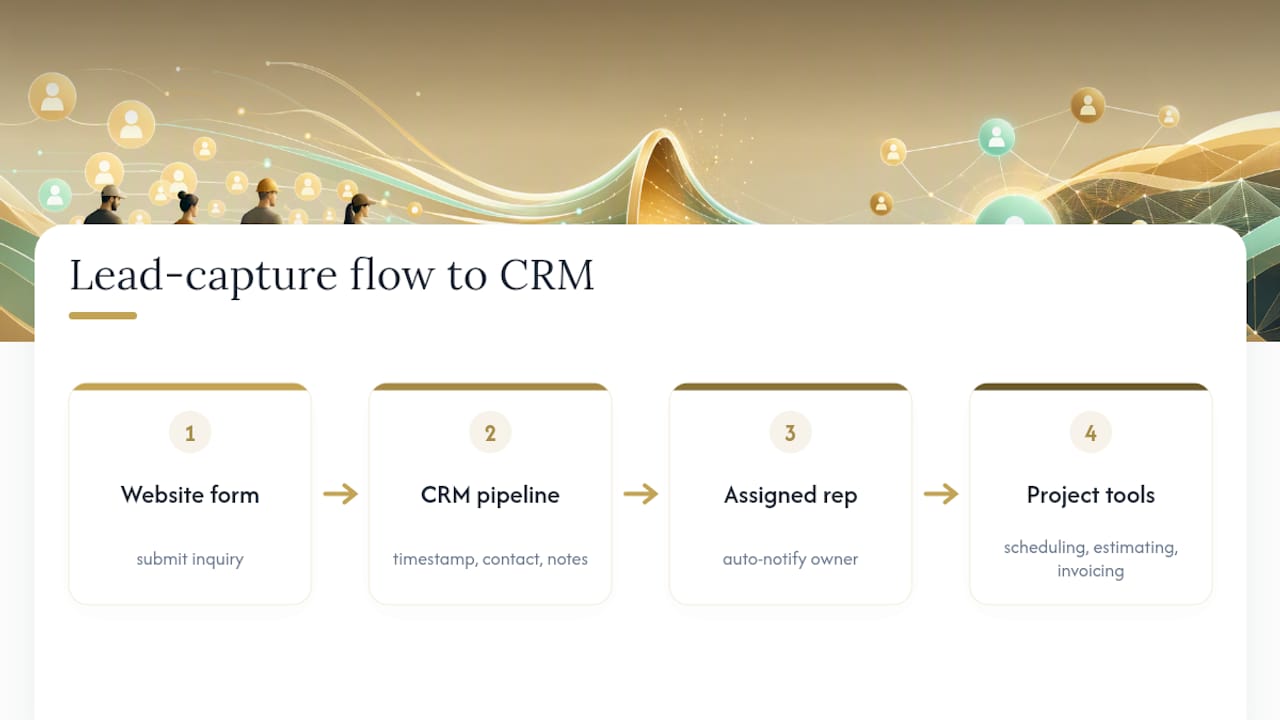
Project management integration matters just as much once a lead becomes a job. If your scheduling, estimating, and invoicing tools don't talk to each other, you end up re-entering the same customer information three times, and details get lost between the sales conversation and the actual work order. A website that feeds directly into your CRM keeps client history, revenue visibility, and job status in one view instead of scattered across email threads and sticky notes.
The practical test: when a lead fills out your form, does it automatically reach the person who needs to call them back, with enough context to make that call useful? If the answer involves manually checking multiple inboxes, that's a feature gap worth fixing before you spend money on anything else.
Are SSL Certificates and Data Protection Really Necessary?
Yes, and it's not optional anymore. An SSL certificate, the technology that encrypts data between a visitor's browser and your server, is what turns your web address from "http" to "https" and shows a padlock icon in the browser bar. Without it, browsers flag your site as "Not Secure," which is a fast way to make a homeowner second-guess whether to submit their phone number to you.
Beyond the padlock, SSL affects how search engines treat your site. Google has treated HTTPS as a ranking signal for years, so a contractor site without it is fighting local search visibility with one hand tied behind its back.
Data protection goes further than the certificate itself. If your contact forms collect names, phone numbers, and project details, that information needs to be stored securely, not sitting in a plain-text spreadsheet a former employee still has access to. Practical steps include:
- Using a hosting provider that manages SSL renewal automatically, so it never lapses unnoticed.
- Encrypting stored customer data, especially if you collect anything beyond basic contact details.
- Limiting who on your team has access to submitted lead information.
- Keeping your website software and plugins updated, since outdated code is the most common entry point for a breach.
None of this needs to be complicated for a contractor site. It needs to be handled correctly once, by whoever builds or maintains your site, and then left alone.
Do You Need Social Media on Your Website?
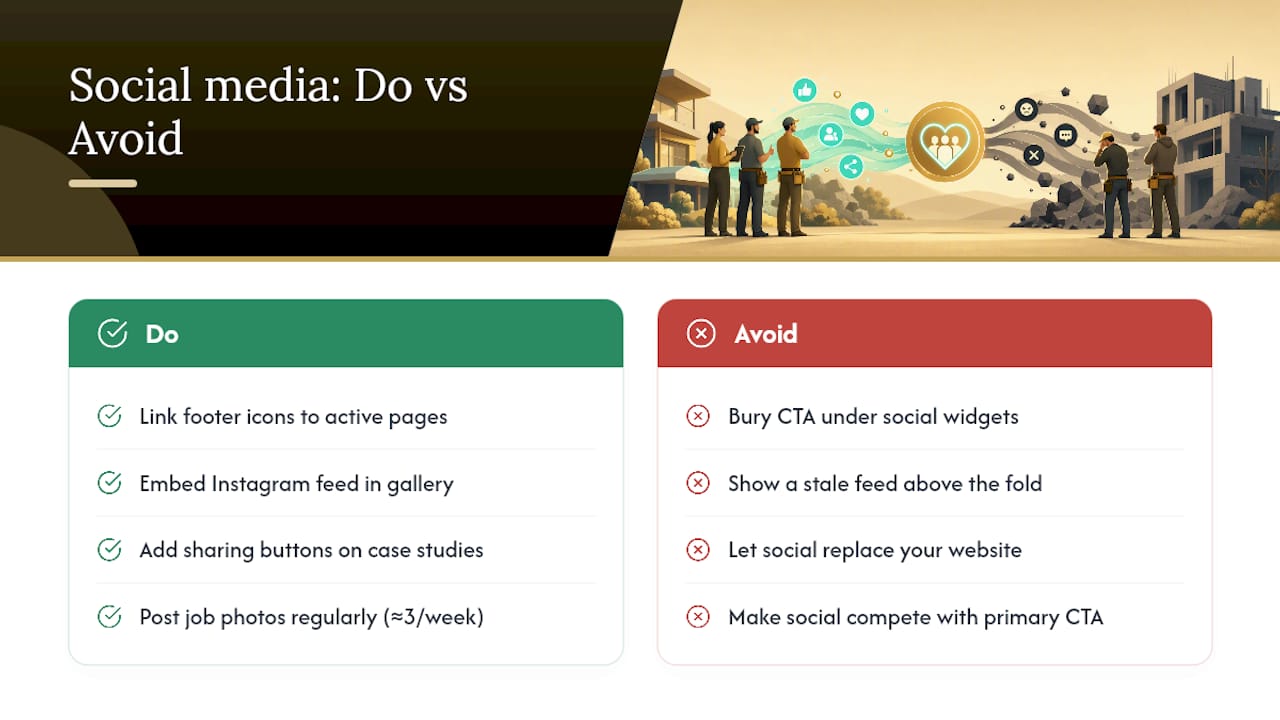
You need it in moderation, and it should point traffic toward your site, not pull attention away from it. Social icons in your footer that link to an active Facebook or Instagram page give visitors another way to see recent work, especially if you post job-site photos regularly.
Where social integration adds real value is in your project gallery. If you're already photographing finished jobs for Instagram, a simple feed embed on your portfolio page keeps that content fresh without extra work on your part. Sharing buttons on individual case studies also let a satisfied customer post your work to their own network, which functions as a referral you didn't have to ask for.
Where it backfires is when a homepage buries its call-to-action under a wall of social widgets, or when a stale feed with a six-month-old post sits above the fold. That signals neglect, not activity. Keep social links visible but secondary, positioned in the footer or a dedicated section, never competing with your primary CTA for attention.
The practical rule: social media supports your website, it doesn't replace what your website needs to do. A contractor who posts three job photos a week to Instagram gets more mileage embedding that feed than one who has an account with four posts from two years ago.
Should Contractors Bother With a Blog?
A blog or news section earns its place when it answers the questions your customers already ask before they call. Posts like "How Much Does a Bathroom Remodel Cost in [Your Region]?" or "What to Expect During a Roof Replacement" do double duty: they give search engines fresh, keyword-relevant content to index, and they give hesitant homeowners the information that moves them from browsing to inquiring.
The mistake most contractors make is either skipping it entirely or treating it as an afterthought, publishing once and abandoning it. Neither extreme helps. A blog doesn't need weekly posts to be worthwhile. Four or five well-written articles addressing your most common customer questions, updated occasionally with new project types or seasonal service reminders, outperforms a neglected feed with generic filler.
Content that works particularly well for contractors includes:
- Seasonal maintenance guides tied to your trade (gutter cleaning before winter, HVAC tune-ups before summer)
- Cost breakdowns and what affects pricing for your core services
- Permit and code explanations specific to your service area
- Recent project write-ups that double as portfolio content and blog posts at once
A blog also gives you something worth sharing on social media and linking to from service pages, which reinforces the local SEO signals covered earlier. It's a supporting feature, not a headline one, but it's the difference between a site that looks finished and one that looks actively maintained.
What Contractors Get Wrong About Website Priorities
Most contractors invest in professional photography before fixing a slow, confusing homepage, which is backwards. Fix your hero, your mobile load time, and your contact flow first. Photography and extra pages matter, but they can't rescue a site that loses visitors in the first ten seconds.
Templates make sense when budget and speed matter more than differentiation. Custom builds earn their cost when local SEO and site performance are part of your growth strategy, not an afterthought. Quick wins: compress images, add click-to-call, shorten your form. Bigger investments: case studies, CRM integration, professional photography, in roughly that order.
— Elijah
How Kirk & Co Builds Contractor Sites That Book Jobs
Some web design companies offer hand-coded builds that aim to provide faster load times than template-based sites carrying bloated theme code, direct implementation of click-to-call and lead capture forms, and service pages structured around local search terms customers actually use.

Every project can pair with Kirk CRM, so submitted forms flow straight into a pipeline instead of an inbox someone forgets to check. If your current site is slow, hard to navigate on a phone, or missing a clear way to request an estimate, that's exactly the gap this addresses. Take a look at the contractor web design portfolio for examples of finished work, then check pricing for the Starter Business Manager plan at $49/month or Business Manager Premium at $79/month, both bundling hosting, maintenance, and local SEO. Request a free audit of your current site to see which of these features are already costing you calls.
Sources
- Google: 53% of mobile users abandon sites that take over 3 seconds to load
- High-Converting Service Websites 2026 | Foundgrove
- 14 General Contractor Website Examples That Win Bids (2026)
- Contractors can build their own websites using these best practices
FAQ
What Are the Most Important Contractor Website Features?
A fast mobile load, a clear hero with one primary call-to-action, click-to-call visibility, dedicated service pages, a real project gallery, and verifiable trust signals like licenses and reviews drive the most booked jobs.
What Are the 7 C's of a Website?
Definitions vary by source, but the concept generally covers clarity, content, credibility, contact, calls-to-action, consistency, and connectivity, all of which map directly onto the features covered above.
What Are the 5 Major Components of a Web Page?
Most web pages break down into a header with navigation, a hero section, a body with core content, trust or proof elements, and a footer with contact details and secondary links.
What Are 5 Important Things Every Contractor Website Needs?
A mobile-optimized fast load, clickable contact information, a real photo portfolio, service-specific pages, and a short lead-capture form tied to a follow-up system cover the essentials.
How Fast Should a Contractor Website Load on Mobile?
Aim for a sub-2 to sub-3 second load time, since 53% of mobile visitors abandon pages that take longer than three seconds.
Does Kirk & Co Software Include CRM Tools for Contractors?
Yes, Kirk & Co pairs website builds with Kirk CRM, which captures inquiries and tracks follow-ups so leads from your site don't sit unanswered.