
Your website is either earning its keep or quietly draining your budget. The standard ROI formula makes that clear fast: (Revenue attributed to website − Total website investment) ÷ Total website investment × 100. A positive number means your site is working. A negative number means something needs to change, and this guide tells you exactly what.
Here's your three-step immediate check:
- Find your monthly website leads or sales. Pull the last 90 days from GA4, your CRM, or even a manual log. Divide by three for a monthly average.
- Estimate revenue contribution. Multiply monthly leads by your close rate, then by average customer value. That's your attributed monthly revenue.
- Total your website costs. Add monthly hosting, maintenance, and any paid tools. Amortize your build cost over 36 months and add that monthly slice. Plug both numbers into the formula above.
Quick benchmark: A healthy conversion rate for most B2B and service-based small businesses sits between 2–5%. If yours is below 1%, the site has a real problem worth fixing this month, not next quarter.
Key Takeaways
A well-configured, performance-first website can deliver positive ROI within 6–18 months when you track the right KPIs, apply the standard formula consistently, and fix messaging and speed before spending more on traffic.
| Point | Details |
|---|---|
| ROI formula | (Attributed revenue − Total website cost) ÷ Total website cost × 100; amortize build costs over 36 months. |
| Top 3 KPIs to watch | Conversion rate, revenue per visitor, and customer acquisition cost drive the most useful ROI signals. |
| Healthy conversion benchmark | 2–5% for service and B2B sites; below 1% requires immediate attention to messaging, design, or traffic quality. |
| Optimize vs. rebuild | Optimize messaging and CTAs first; rebuild only when the site is over four years old or fails Core Web Vitals at the platform level. |
| Kirk-co advantage | Hand-coded, conversion-focused sites built for local businesses with ongoing maintenance to protect long-term ROI. |
Table of Contents
- Website ROI for small businesses starts with the right KPIs
- What "good" actually looks like for small-business websites
- How to calculate website ROI: a step-by-step worked example
- What to include in "cost": website investments and amortization
- Attribution and timeline: when to expect returns
- Tools and setup to measure website ROI accurately
- What to fix first when website ROI is low
- How a hand-coded, performance-first site raises ROI
- What small-business owners should actually prioritize
- Your next step toward a website that earns its keep
- Sources
Website ROI for small businesses starts with the right KPIs
Tracking the wrong numbers gives you a false sense of security. These are the metrics that actually feed an accurate ROI calculation.
- Conversion rate: Visitors who complete a goal (form submit, call click, purchase) divided by total visitors. Your single most important lever.
- Revenue per visitor (RPV): Attributed revenue divided by total visitors. RPV combines conversion rate and order value into one number, making it easy to calculate the dollar value of additional traffic before you spend on ads or SEO.
- Customer acquisition cost (CAC): Total website spend divided by customers acquired through the site. Compare this to your average contract or order value to know whether the math works.
- Customer lifetime value (LTV): The total revenue a typical customer generates over their relationship with you. A high LTV justifies a higher CAC and a larger website investment.
- Leads and goal completions: Raw volume of contact forms, quote requests, phone call clicks, and chat starts tracked as GA4 conversion events.
- Average order or contract value: The revenue per transaction. A small change here multiplies across every conversion.
Service businesses should prioritize conversion rate, CAC, and lead volume. eCommerce and retail sites need RPV and average order value front and center. Local trades (plumbers, contractors, landscapers) often rely on phone call clicks and form submissions as their primary conversion events, so those must be set up as GA4 goals before any ROI calculation is meaningful.
| KPI | How to measure it | What a failing number tells you |
|---|---|---|
| Conversion rate | GA4 conversion events ÷ sessions | Messaging, offer, or UX problem |
| Revenue per visitor | CRM revenue ÷ GA4 sessions | Pricing or traffic-quality issue |
| CAC | Monthly website spend ÷ new clients | Site cost is too high or close rate is too low |
| LTV | Average contract value × repeat purchase rate | Retention or upsell opportunity |
| Leads / goal completions | GA4 conversion event count | CTA, form, or traffic volume problem |
| Average order value | CRM or eCommerce revenue ÷ transactions | Pricing or product-mix opportunity |
What "good" actually looks like for small-business websites
Benchmarks give you a reality check, but they only mean something when you know what drives them.
- 2–5% conversion rate is the healthy range for most B2B and service-based sites. Local service businesses (HVAC, roofing, legal) often see rates at the higher end because visitors arrive with strong intent.
- Below 1% is a red flag. At that level, the site is likely losing leads to a competitor with a clearer message or faster load time.
- eCommerce averages lower, typically 1–3%, because browsing behavior is different from service-inquiry behavior. Don't compare your retail site to a contractor's lead-gen page.
- Payback period: A well-built business website typically pays back its investment within 6–18 months. Well-optimized sites often return several times their total cost over a three-year window.
Several factors legitimately shift these benchmarks. High-ticket services (custom construction, legal retainers, enterprise software) carry lower conversion rates because the sales cycle is longer and buyers do more research before contacting anyone. Seasonal businesses will see conversion rates spike during peak months and drop otherwise. Sites with very low traffic (under 300 monthly visitors) produce statistically unreliable conversion rates, so fix the traffic problem before obsessing over conversion percentages.
Statistic to remember: A 1% conversion-rate improvement on a site with 5,000 monthly visitors and a $500 average order adds roughly $25,000 in annual revenue. Small optimizations compound quickly.
How to calculate website ROI: a step-by-step worked example
The formula is straightforward. Executing it accurately requires clean data inputs.
Step 1: Collect your visitor and conversion data. Pull 90 days of sessions and conversion events from GA4. Divide by three for monthly averages.
Step 2: Calculate attributed revenue. Monthly conversions × close rate (for leads) × average customer value = monthly attributed revenue.
Step 3: Total your website investment. Add monthly hosting, maintenance, subscriptions, and content costs. Amortize your build cost over 36 months (or your expected site lifespan) and add that monthly figure.
Step 4: Apply the formula. (Monthly attributed revenue − Monthly website cost) ÷ Monthly website cost × 100, equals Monthly ROI %.
Step 5: Interpret the result. Negative means the site is not yet covering its costs.
Worked example:
That result looks dramatic, but it reflects a realistic scenario for a local service business with a solid close rate and a meaningful average contract.
Attribution caveat: If you can't tie revenue directly to the website, use a conservative attribution approach: survey new clients with "how did you find us," match CRM contacts to web form submissions, or apply a reasonable percentage to web-influenced deals. Be explicit about your assumptions so the number is defensible.
What to include in "cost": website investments and amortization
Most small businesses undercount their website investment, which makes ROI look better than it is. Count everything.
Cost categories to include:
- Initial build or design fees
- Hosting and domain registration
- Monthly maintenance and support plans
- Paid plugins, themes, or SaaS tools (form builders, chat widgets, booking software)
- Content production (copywriting, photography, video)
- Paid traffic directly tied to web conversions (Google Ads, Meta Ads)
- Third-party integrations (CRM connectors, email marketing platforms)
Amortization explained: A one-time build cost should be spread across the site's useful life, typically 3–5 years. Dividing a $6,000 build by 36 months gives you $167 per month. Dividing a $15,000 build by 48 months gives you $313 per month. This approach lets you compare annual ROI fairly without distorting year-one numbers.
| Cost item | One-time or monthly | Amortization example |
|---|---|---|
| Custom website build ($6,000) | One-time | $167/month over 36 months |
| Hosting + domain | Monthly | $30/month as incurred |
| Maintenance plan | Monthly | $100–$300/month as incurred |
| Paid tools / subscriptions | Monthly | $20–—/month as incurred |
| Content production | Periodic | Spread over 12 months |
Agency-built websites vary widely in price, with many small-business projects under $10,000 and larger agency engagements reaching tens of thousands. That range makes measuring ROI non-optional. A $3,000 site that generates $40,000 in annual revenue is a very different investment than a $40,000 site generating the same amount.
Don't omit ongoing costs. Maintenance, security updates, and content refreshes are real expenses. A site that costs $200 per month to maintain adds $2,400 per year to your investment total, and leaving that out inflates your ROI figure.
Attribution and timeline: when to expect returns
Patience and realistic expectations are part of the measurement strategy.
- 6–18 months is the typical payback window for a well-built business website. Organic search takes time to build authority, so measuring ROI at 30–60 days almost always produces a misleading negative result.
- Paid traffic sites can show positive ROI within weeks, but only if the conversion rate and offer are already dialed in.
- Local SEO-focused sites often see meaningful organic traffic gains at the 4–6 month mark, with compounding returns through month 12 and beyond.
Attribution models in plain language:
- Last-click: Credits the final touchpoint before conversion. Simple, but undervalues content and organic search that introduced the buyer.
- First-click: Credits the first touchpoint. Better for understanding how people discover you, but ignores the nurture path.
- Data-driven (GA4): Distributes credit across all touchpoints based on actual conversion patterns. The most accurate model for businesses with enough data (roughly 300+ conversions per month to be statistically reliable).
Practical recommendation: Use GA4 data-driven attribution as your primary model. Run a first-click check for organic content to understand which blog posts or landing pages are actually introducing new visitors. Supplement both with a simple "how did you find us?" question in your intake form or onboarding call.
Pro Tip: If you launched your site in the last six months, set a calendar reminder to evaluate ROI at the six-month mark. Judging a new site at 60 days is like judging a garden two weeks after planting.
Tools and setup to measure website ROI accurately
The measurement gap most small businesses face isn't a tool problem. It's a configuration problem. You likely already have access to everything you need.
Prioritized tools:
- GA4 (Google Analytics 4): Free, powerful, and the foundation of any ROI measurement setup. Install via Google Tag Manager for cleaner event management.
- Google Search Console: Shows which search queries drive traffic and clicks. Free and essential for understanding organic ROI.
- CRM (HubSpot, Zoho, Salesforce, or a spreadsheet): Tracks leads from first contact to closed deal, enabling revenue matchback to web sources.
- UTM parameters: Tag every link in emails, social posts, and ads with UTM source/medium/campaign strings. Without them, GA4 lumps everything into "direct" traffic.
- Heatmapping tools (Hotjar or Microsoft Clarity): Show where visitors click, scroll, and drop off. Microsoft Clarity is free and integrates directly with GA4.
- SEO tools (Ahrefs, Google Search Console): Track keyword rankings and organic traffic trends over time.
Step-by-step setup sequence:
- Install GA4 via Google Tag Manager on every page of your site.
- Define and mark conversion events (form submits, phone call clicks, purchase completions, chat starts).
- Enable enhanced measurement in GA4 to capture scroll depth, outbound clicks, and file downloads automatically.
- Link GA4 to your CRM or export lead data weekly for manual matchback.
- Set up a UTM naming convention and apply it to every campaign link before launch.
- Install Microsoft Clarity (free) and link it to your GA4 property for session recordings and heatmaps.
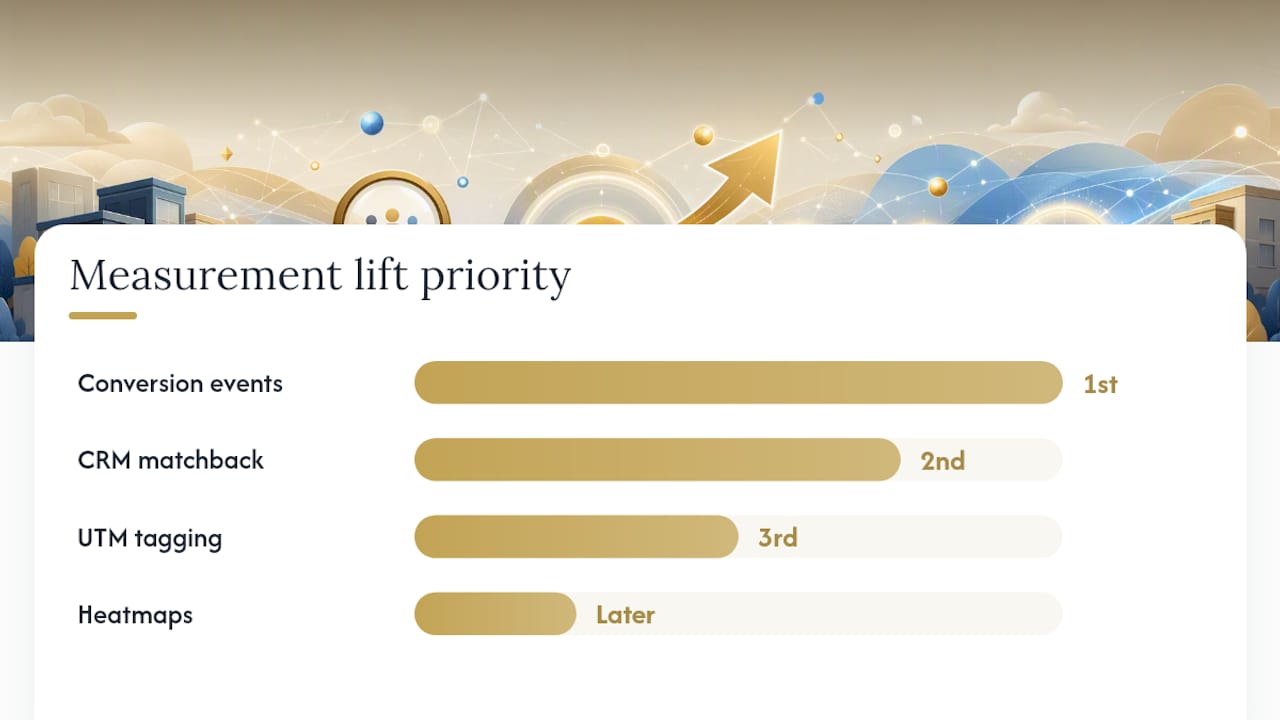
Biggest lift, in order: Setting up conversion events correctly delivers the most measurement value immediately. CRM matchback comes second. UTM tagging comes third. Don't skip to heatmaps before the first two are solid.
Common gaps to fix:
- Phone calls not tracked: Add a call-tracking number or use GA4's phone link click event.
- Offline conversions missing: Match CRM closed deals back to web source monthly.
- Form submissions firing but not marked as conversions: Check GA4 event configuration and mark the event as a conversion in the GA4 admin panel.
For a broader look at measuring website success with KPIs and tools, that partner resource covers additional measurement frameworks worth bookmarking.
What to fix first when website ROI is low
Low ROI usually has one of five causes. Work through this diagnostic before spending money on ads or a full rebuild.
Rapid diagnostic checklist:
- 5-second test: Show your homepage to someone unfamiliar with your business. Can they tell what you do, who you serve, and what to do next in five seconds? If not, messaging is the first fix.
- CTA visibility: Is there a clear, specific call to action above the fold on every key page? "Contact us" is weak. "Get a free quote in 24 hours" is specific.
- Mobile performance: Pull your site on a real phone. Does it load in under three seconds? Is the CTA tappable without zooming?
- Core Web Vitals: Check Google Search Console's Core Web Vitals report. Failing LCP (Largest Contentful Paint) or CLS (Cumulative Layout Shift) scores hurt both rankings and conversions.
- Tracking and attribution: Are conversion events firing correctly in GA4? Run a test submission and verify it appears in real-time reports.
- Traffic quality: Is your traffic actually from your target market? High bounce rates from irrelevant geographies or keywords inflate session counts without adding revenue.
- Social proof: Do you have visible reviews, testimonials, or case results on key landing pages? Buyers need evidence before they contact you.
Prioritization matrix:
Optimize vs. rebuild: Optimize when the site is under four years old, loads reasonably well, and the issues are messaging or CTA-related. Consider a rebuild when the site is older than four years, fails Core Web Vitals in ways the current platform can't fix, or runs on a restrictive page builder that limits speed and SEO customization. Website performance optimization can resolve many speed and Core Web Vitals issues without a full rebuild.
Three quick experiments to run this month:
- Rewrite your homepage headline to name the specific outcome you deliver and the audience you serve.
- Change your primary CTA from a generic phrase to a specific, benefit-led action ("Get your free site audit" instead of "Contact us").
- Shorten your contact form to three fields maximum and measure whether submission rate improves.
How a hand-coded, performance-first site raises ROI
Kirk-co builds every site by hand, without page-builder templates. That distinction matters in practice because template-based sites carry code bloat that slows load times, and slower sites convert at lower rates.

What the Kirk-co approach delivers:
| Factor | Kirk-co hand-coded approach | Typical template/builder site |
|---|---|---|
| Page load speed | Optimized at the code level | Often slowed by unused scripts and plugins |
| Local SEO implementation | Built into the site structure from day one | Requires additional plugins and configuration |
| Conversion-focused design | Custom UI/UX matched to business goals | Generic layouts not tailored to conversion |
| Ongoing maintenance | Monthly plan with performance and SEO updates | Owner-managed or neglected post-launch |
| Core Web Vitals | Targeted during build | Varies; often requires post-launch remediation |
Kirk-co's small-business web design process starts with local SEO structure, fast load performance, and a conversion-first layout, then adds an ongoing maintenance plan so the site doesn't drift as search algorithms and browser standards evolve.
The case for hand-coded performance: A site that loads in under two seconds and passes Core Web Vitals gives your business a measurable advantage in both search rankings and visitor-to-lead conversion. Every second of load time delay reduces conversions. A hand-coded site removes the overhead that template platforms can't.
For real project examples, the Kirk-co portfolio shows live sites built for Indiana local businesses, including the NWTAG project, which demonstrates the firm's approach to local business web presence.
What small-business owners should actually prioritize
Most articles on website ROI tell you to measure everything. That's the wrong starting point for a small team with limited hours.
Start with one thing this week: set up GA4 conversion events correctly. Nothing else in your measurement stack works without that foundation. You can't calculate ROI, run experiments, or justify a rebuild without knowing how many people are actually converting.
This month, add CRM matchback. Connect your web leads to your closed deals, even manually in a spreadsheet. That single step usually reveals whether your site is contributing to revenue or just generating traffic noise.
This quarter, run the three experiments listed in the diagnostic section above. Headline, CTA, and form length are the highest-leverage, lowest-cost tests available to any small business. Many sites see meaningful conversion-rate movement from these alone, and a 1% improvement at reasonable traffic volumes translates to real revenue.
Defer the full rebuild conversation until you have at least 90 days of clean conversion data. Rebuilding without data is expensive guessing. Rebuilding with data, knowing exactly which pages fail and why, is a targeted investment with a predictable return.
If you're working with a small team, assign one person to own the monthly ROI review. It takes about 30 minutes once the tracking is set up. Pull GA4 conversions, match to CRM revenue, update the formula, and flag anything that moved more than 20% in either direction.
Your next step toward a website that earns its keep
Kirk-co builds custom-coded websites for local businesses without templates or page builders. Every site is hand-coded for speed, structured for local SEO from the first line of code, and designed around the specific conversion goals of your business. The monthly maintenance and support plan keeps performance and SEO current after launch, so you're not starting over in two years.

You've done the math in this guide. Now you know what your site should be producing. If the numbers aren't there, view Kirk-co's pricing and services or request a quote to see what a conversion-focused, hand-coded site would cost for your business.
Sources
- What Is a Good Conversion Rate? | Lucky Orange blog
- Clutch
- Website ROI: How to Measure What Your Site Earns You | Neel Networks
- How To Measure Website ROI: Step-by-Step Guide (2026) | Stackzeno
- Website ROI Calculator - TD Merus Technologies
Set a recurring monthly calendar block of 30 minutes to review your ROI calculation. Measurement only improves your results when you do it consistently.