
An appointment request form lets a client submit their contact details, availability, and reason for wanting to meet without locking in a slot. That distinction matters: a request form collects options for you to confirm, while a booking form reserves a specific time automatically. Use a request form whenever you want to triage inquiries, screen new clients, or capture leads before you commit staff time.
TL;DR:
- Most appointment request forms should limit required fields to reduce friction and prevent follow-up calls, focusing on essentials like contact info and preferred times.
- Multi-step forms with progress indicators and validation are recommended when collecting more than five fields or including file uploads, especially on mobile devices.
- Connecting forms to calendar, email, and payment tools enhances automation, with confirmation and reminder emails significantly reducing no-shows.
- Embedding forms on your website, sharing via hosted links, or using QR codes ensures broad access and timely follow-up on incoming inquiries.
- Using a CRM like Kirk allows automatic logging, tracking, and faster confirmation of appointments, boosting efficiency for small service businesses.
Table of Contents
- What Is an Appointment Request Form (And How Templates Speed Setup)?
- What Fields Belong on an Appointment Scheduling Request?
- Should You Build a Single-Page or Multi-Step Form?
- How Do You Connect Calendar, Email, and Payment Tools?
- What Copy and Design Choices Cut No-Shows?
- How Should You Share Your Form and Follow Up on Requests?
- How Kirk CRM Turns a Submitted Form Into a Confirmed Job
- Template Now, or Build Custom? A Quick Checklist
- How Kirk & Co Software Helps You Skip the DIY Setup
- Sources
- FAQ
What Is an Appointment Request Form (And How Templates Speed Setup)?
A request form is a screening tool, not a scheduler. It gathers who wants to meet, when they're generally free, and why, then leaves the final time slot to you or your staff. That's the opposite of a booking widget, which pulls from a live calendar and confirms instantly. If you run a service business where every job is a little different, a request form gives you room to ask qualifying questions before you commit a technician, stylist, or consultant to a time.
Ready-made templates from providers like Jotform typically come in three flavors: embeddable widgets you drop into your existing site, downloadable DOCX or PDF samples for paper intake or email attachments, and prebuilt online forms hosted on the provider's own domain. Here's how the common variations break down:
- Basic request template: name, email, phone, and a general availability window. Fastest to set up, best for simple service inquiries.
- Medical/intake request: adds insurance details, reason for visit, and file upload for referrals or photos.
- Salon or beauty appointment request: includes a service selector and a stylist preference field.
- Consultation or B2B meeting request: built around agenda notes, meeting duration, and document uploads.
Pick the template closest to your industry, then trim or add fields. Editing an existing form almost always beats building one from a blank canvas.
What Fields Belong on an Appointment Scheduling Request?
Every field you add is friction. Every field you skip is a follow-up phone call. The goal is a short list that gets you what you need to confirm a time without making the requester work for it.
- Full name, email, and phone number, plus a preferred contact method
- Preferred date and time, with two or three backup options or a time range
- Purpose of visit (a dropdown works better than a blank text box)
- Optional notes field for special requests or context
- Staff or location preference, if your business has more than one option
- File upload, only if the appointment type genuinely requires it (referrals, photos, contracts)
- A short privacy notice and a line stating when the requester should expect a reply
Pro Tip: Put your response time right on the form itself, like "We reply within one business day." It cuts down on anxious follow-up emails and sets expectations before anyone hits submit.
Should You Build a Single-Page or Multi-Step Form?
A single-page form works for simple requests. A multi-step form works better once you're collecting more than five or six fields, adding file uploads, or applying conditional logic based on earlier answers. Multi-step forms reduce cognitive load by breaking a long intake into smaller, less intimidating chunks, and per-step validation catches mistakes before the requester reaches the end.
If you go multi-step, build in these features:
- A progress indicator so people know how many steps remain
- Validation at each step, not just at final submission
- A review step that shows every answer before the requester submits, which cuts errors and builds confidence
- Save-progress functionality using session storage, so a dropped connection doesn't erase someone's work
Whichever pattern you choose, test it on a phone first. Most appointment requests now happen on mobile, and a form that requires pinch-zooming to read a label loses requesters before they finish the first field.
How Do You Connect Calendar, Email, and Payment Tools?
A form that just sits in an inbox isn't much better than a sticky note. Real value comes from what happens after submission.
- Decide your calendar approach. Either show live availability pulled from a calendar, or collect a few preferred windows and assign the exact time yourself. The first is faster for the client; the second gives you more control over staffing.
- Set up confirmation and reminder emails. Send an immediate autoresponder acknowledging the request, then a confirmation once you've picked a time, then a reminder 24 to 48 hours before the appointment.
- Use conditional logic to route requests. A dropdown for "reason for visit" or "service needed" can automatically direct the submission to the right staff member's queue.
- Decide when payment happens. Some businesses collect a deposit at confirmation; others wait until the appointment itself. Pick one and apply it consistently across services.
- Cover basic security. Use SSL on any hosted form, keep data retention minimal, and post a clear privacy notice near the submit button.
Saving progress with localStorage or sessionStorage is one of the simplest fixes for abandoned forms, and it costs almost nothing to add if you're already building multi-step.
What Copy and Design Choices Cut No-Shows?
Most no-shows aren't a scheduling problem. They're a communication problem that starts on the form itself.
- Label date and time fields with the format you expect (
MM/DD/YYYY), not just a blank box - Keep required fields to the minimum you actually need to confirm a time
- Show a confirmation message immediately after submission, stating what happens next and when
- Attach a calendar file (.ics) to the confirmation email so the appointment lands directly on the requester's phone
- Send one reminder 24 to 48 hours out. It's the single easiest lever for cutting no-shows
Pro Tip: Change one thing at a time when you're testing your form, like moving the phone field earlier or shortening the notes label. If you change five things at once, you won't know which one moved your completion rate.
How Should You Share Your Form and Follow Up on Requests?
Getting the form built is half the job — Get Google and ChatGPT Traffic on Autopilot to drive appointment requests automatically. Getting it in front of the right people, and then acting on what comes back, is the other half.
- Embed it on your site if you want it to feel native to your brand and stay off a third-party domain.
- Use a hosted link when you need to share the form fast through email, text, or social media, with no development work required.
- Generate a QR code for print materials, business cards, or in-person signage. Most template providers include this option automatically.
- Send a short confirmation email the moment a request comes in, then a second email once you've assigned a time.
- Assign an owner internally for every request, with a clear response-time goal (same day or within 24 hours works for most service businesses).
- Track requests, confirmations, and no-shows so you know whether your form and follow-up process are actually working.
How Kirk CRM Turns a Submitted Form Into a Confirmed Job
Here's the practical version of the workflow: someone fills out your appointment request form, and instead of that submission sitting in an inbox, Kirk CRM logs it as a lead, timestamps it, and creates a follow-up task automatically. Your team sees exactly who's waiting on a reply and how long they've been waiting.
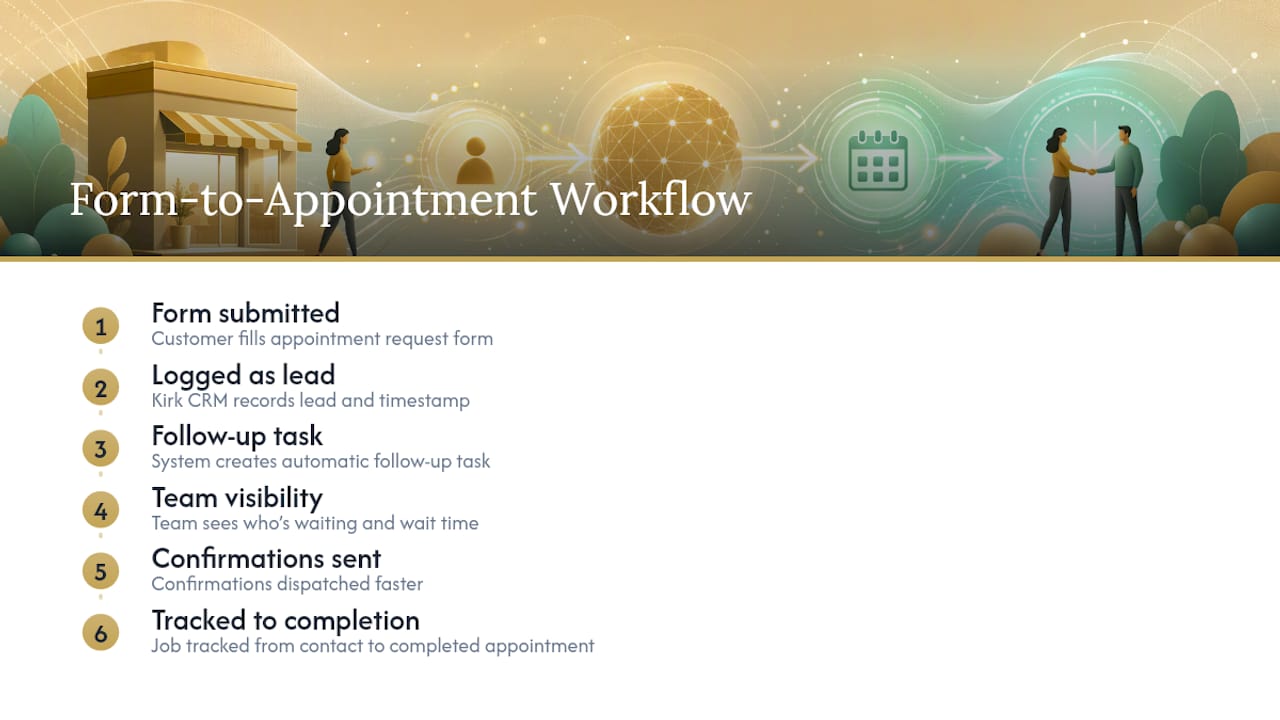
That structure eliminates the phone tag that comes with sticky notes and shared inboxes. Confirmations go out faster, jobs get tracked from first contact to completed appointment, and nothing falls through because someone forgot to check a folder. If you're currently running requests through a personal email account, this is the upgrade most small service businesses feel the fastest.
Template Now, or Build Custom? A Quick Checklist
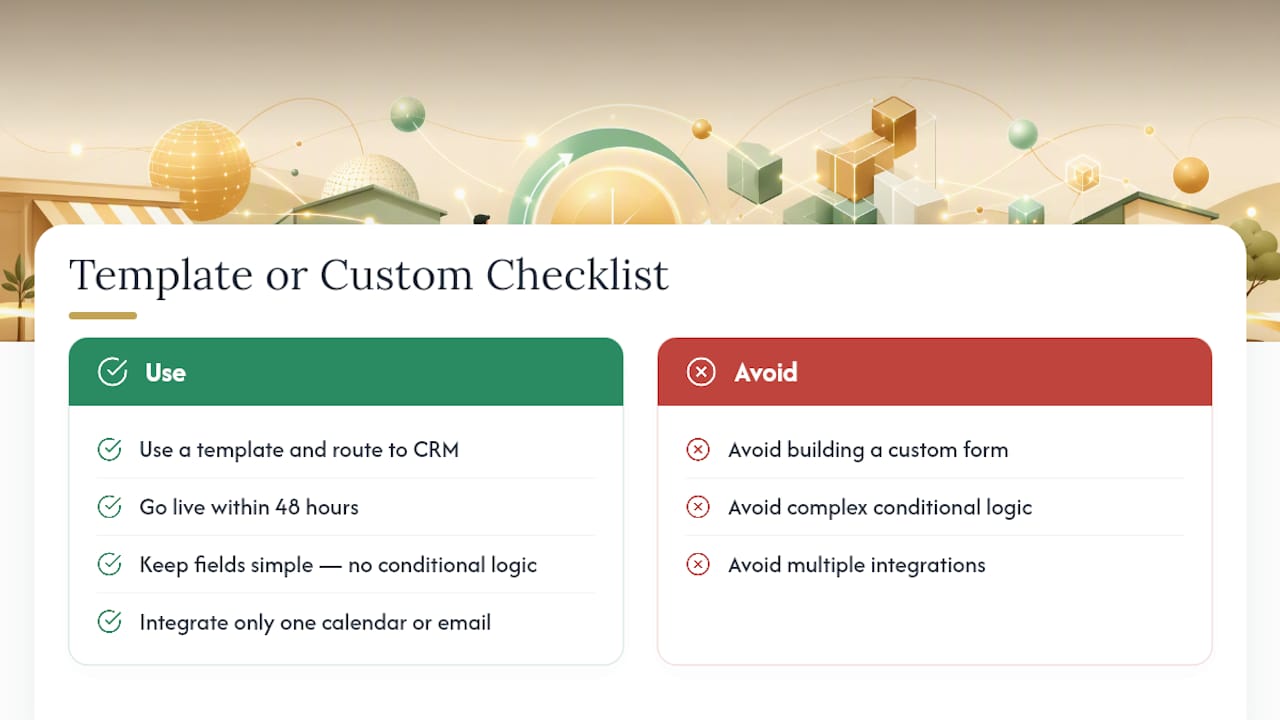
Ask yourself three things: Do you need this live in the next 48 hours? Are your fields simple, with no complex conditional logic? Do you only need one integration, like a single calendar or email address?
If you answered "yes" to all three, use a template and route submissions into a CRM. That combination gets most small service businesses running fast without sacrificing the follow-up structure that actually confirms appointments.
— Elijah
How Kirk & Co Software Helps You Skip the DIY Setup
If you'd rather not stitch together a form widget, a calendar sync, and a separate spreadsheet to track it all, that's exactly the gap Kirk & Co Software closes. We build the appointment request form directly into your site, connect it to routing logic that sends each submission to the right person, and pair it with Kirk CRM so every request becomes a tracked lead instead of an email you have to remember to answer.

Plans start with the Starter Business Manager, with Business Manager Premium available for businesses juggling more staff or locations. Both are detailed on our pricing page. If your current site can't support form embedding or you're not sure where to start, our small business web design team can build it around your exact workflow. Reach out and we'll walk you through what a done-for-you setup looks like for your business.
Sources
- Free Appointment Request Form – 2026 Editable Sample
- Appointment Request Form Template | Jotform
- How to create multi-step forms with vanilla JavaScript and CSS
- Multi-step form design considerations
FAQ
How Do You Write an Appointment Request?
State who you are, what you're requesting, and your availability in the first two sentences. Keep it short: name, reason for the appointment, two or three time options, and your preferred contact method.
What Is an Appointment Request, Exactly?
It's a submission asking to meet at a time the requester proposes, which the provider then confirms or adjusts. It differs from a booking, which reserves a specific slot immediately without needing separate approval.
How Do You Write a Letter Requesting an Appointment?
Open with a clear subject line stating the purpose, then a brief paragraph with your name, reason for the request, and two or three preferred times. Close with your contact information and a polite line inviting a reply.
How Do You Professionally Ask for an Appointment?
Use direct, courteous language: state the purpose, propose specific times rather than a vague "whenever works," and thank the recipient for their time. Avoid over-explaining. A short, clear request gets answered faster than a long one.
Does Kirk & Co Software Offer Appointment Request Forms?
Yes. Kirk & Co Software builds custom appointment request forms directly into client websites and connects them to Kirk CRM for lead tracking and follow-up. Pricing starts at $49 per month for the Starter Business Manager plan.