
Core Web Vitals measure three things Google tracks on your site: how fast your main content loads (LCP), how quickly it responds when someone taps or clicks (INP), and whether the page jumps around while loading (CLS). For most small-business sites, the fastest path to passing scores starts in one place: your hosting speed and the hero image on your busiest pages. Fix those two things before anything else.
Here's what "good" looks like, according to Google's own thresholds, measured at the 75th percentile of your visitors:
- LCP (Largest Contentful Paint): under 2.5 seconds
- INP (Interaction to Next Paint): under 200 milliseconds
- CLS (Cumulative Layout Shift): under 0.1
Before you touch a line of code, run three quick checks. Open Google Search Console's Core Web Vitals report to see which pages Google already flags as poor. Run PageSpeed Insights on your homepage and your top two or three converting pages, whether that's a quote request form, a booking page, or a product listing. Then prioritize whatever shows up red on the pages that make you money. That's the whole starting move, and it takes about fifteen minutes.
Key Takeaways
Passing Core Web Vitals for a small-business site comes down to fixing server speed and hero-image LCP first, then INP and CLS, and verifying with real user data instead of waiting on monthly reports.
| Point | Details |
|---|---|
| Fix TTFB before anything else | Slow hosting caps every other metric, so server response time comes first in the workflow. |
| Prioritize LCP on top pages | LCP is the most commonly failed metric, so start with your homepage and highest-converting pages. |
| Verify with RUM, not just Search Console | RUM shows changes the same day; CrUX and Search Console take 2 to 4 weeks to update. |
| Treat Core Web Vitals as a tiebreaker | Page experience influences rankings, but content relevance still matters more. |
| Get help when the fix requires code | Kirk-co audits existing sites and builds hand-coded replacements when a template can't keep up. |
Table of Contents
- What Is Core Web Vitals for Small Businesses, and Why Does It Matter?
- Which Tools Should You Use to Check Your Scores?
- What's the Right Order to Fix Core Web Vitals Issues?
- What Quick Fixes Can You Make Yourself?
- What Technical Fixes Should You Ask a Developer to Handle?
- How Long Does It Take to See Improvement?
- Why Is Your Site Failing, and How Do You Diagnose It Fast?
- How Does Kirk-co Help Small Businesses Pass Core Web Vitals?
- What Should You Actually Expect From a Core Web Vitals Fix?
- Get a Core Web Vitals Audit for Your Business Website
- Where Can You Learn More or Run Your Own Checks?
- Sources
What Is Core Web Vitals for Small Businesses, and Why Does It Matter?
Each of the three metrics measures a different kind of frustration, and each one shows up differently depending on what your website does.
LCP tracks how long it takes for the biggest visible element (usually a hero image, banner, or headline block) to finish rendering. If you run a home service business and your homepage hero photo takes four seconds to appear, visitors bounce before they see your phone number. The threshold is under 2.5 seconds.
INP measures the delay between a user's action (clicking "Get a Quote," tapping a menu) and the page actually responding. A booking form that freezes for half a second after someone clicks "Submit" is an INP problem. The threshold is under 200 milliseconds.
CLS catches the visual jumping that happens when images load without reserved space, or when a pop-up shoves your content down right as someone starts reading. Nothing kills a mobile conversion faster than a "Buy Now" button that shifts right as a thumb taps it. The threshold is under 0.1.
These three metrics feed into what Google calls page experience signals. They are not the main event in your rankings. Content relevance, backlinks, and topical authority still carry far more weight. But when two competing local businesses have similarly relevant pages, Core Web Vitals can act as the tiebreaker, and a slow, jumpy site is an easy way to lose that tiebreaker to a competitor with a faster one.
- LCP problems usually trace back to server speed or oversized images.
- INP problems usually trace back to heavy JavaScript, especially from third-party scripts.
- CLS problems usually trace back to missing image dimensions or late-loading banners.
Which Tools Should You Use to Check Your Scores?
Different tools answer different questions, and picking the wrong one wastes time. Here's the breakdown.
Google Search Console's Core Web Vitals report shows field data collected from real visitors across your entire site, grouped by URL pattern. It's the best starting point because it tells you which templates (not just which pages) are failing, so fixing one template can fix dozens of URLs at once, according to Search Console's own documentation.
PageSpeed Insights gives you both field data (if your site has enough traffic to qualify) and a lab test for any single URL you enter. It's the tool to run when you want to diagnose one specific page right now.
Lighthouse is the lab-testing engine that powers PageSpeed Insights, and it's built into Chrome DevTools. It simulates a page load under controlled conditions and hands you a prioritized list of fixes.
Chrome User Experience Report (CrUX) is the massive, anonymized dataset of real Chrome users that feeds Search Console and PageSpeed Insights. You don't query it directly very often, but understanding that it exists explains why your scores update slowly (more on that below).
The web-vitals JavaScript library lets you build your own real user monitoring (RUM) directly into your site's analytics. Google's own guidance on Core Web Vitals recommends it for anyone who wants to see performance data in real time instead of waiting on Google's reporting cycle.
| Tool | Data Type | Best Use Case |
|---|---|---|
| Search Console | Field (28-day rolling) | Site-wide diagnosis, prioritizing by template |
| PageSpeed Insights | Field + lab | Diagnosing one specific URL |
| Lighthouse | Lab | Pre-launch testing, DevTools deep dives |
| CrUX | Field (raw dataset) | Powers the tools above; rarely queried directly |
| web-vitals JS | Field (custom RUM) | Real-time monitoring after you ship a fix |
The distinction between lab and field data matters more than it sounds. Lab data is a single simulated test, useful for catching obvious problems before launch. Field data is what actually determines your Core Web Vitals assessment, and it reflects real visitors on real devices, including the guy checking your site on three bars of LTE in his truck. Because CrUX and Search Console use a 28-day rolling window, a fix you ship today won't fully register in Search Console for a few weeks. That's exactly why RUM through web-vitals JS matters: it shows you the improvement immediately, instead of leaving you guessing for a month.
What's the Right Order to Fix Core Web Vitals Issues?
Small businesses rarely have a dedicated developer on staff, so the fix order matters as much as the fixes themselves. Working the wrong metric first wastes hours you don't have.
- Assess. Pull your Search Console Core Web Vitals report and note which URL groups are marked "poor" or "need improvement."
- Prioritize. Rank the failing pages by traffic and conversion value. A slow homepage or a slow contact page outranks a slow blog post from three years ago.
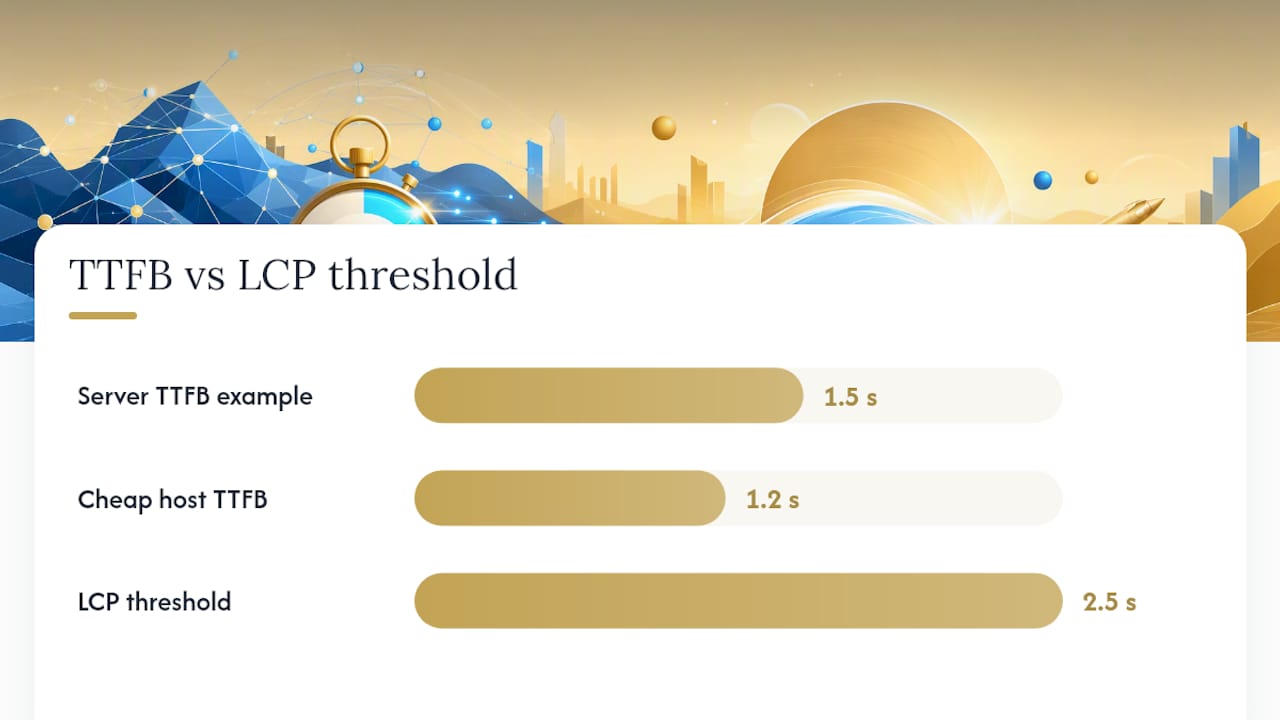
- Fix TTFB first. Time to First Byte is your server's response speed. If your host is slow, every other metric suffers, because nothing on the page can start loading until the server responds.
- Fix LCP. Target the largest visible element on your priority pages, almost always a hero image or banner.
- Fix INP. Address heavy scripts and long-running JavaScript tasks that delay button and form responses.
- Fix CLS. Lock down image dimensions and reserve space for anything that loads late.
- Verify with field data. Check RUM immediately, then recheck Search Console in a few weeks.
- Monitor. Set a recurring calendar reminder, monthly at minimum, since new plugins or scripts can quietly undo your progress.
This assess-prioritize-fix-verify-monitor sequence mirrors the workflow outlined by Corewebvitals, and the "fix TTFB first" step is not optional. If your server takes 1.5 seconds just to respond, no amount of image compression will get you under a 2.5 second LCP threshold.
Pro Tip: Fix your hosting and TTFB before touching anything else. A cheap shared-hosting plan with a 1.2 second server response time will cap every other improvement you make, no matter how well you compress your images.
What Quick Fixes Can You Make Yourself?
Some of the highest-impact changes take less than an hour and don't require touching your site's code structure.
- Resize and compress your hero image, and convert it to WebP format. A large PNG hero photo is one of the single biggest causes of slow LCP on small-business homepages.
- Set explicit width and height attributes on every image so the browser reserves space before the image loads, which directly reduces CLS.
- Remove lazy-loading from your LCP image specifically. Lazy-loading is great for images below the fold, but applying it to your hero image delays the exact element Google is timing.
- Add
fetchpriority="high"to your hero image tag. In one documented test, this single change improved LCP from 2.6 seconds to 1.9 seconds. - Turn on caching at the server or plugin level, and put a free CDN in front of your site if you don't already have one.
Here's what those changes look like in practice. A contractor site with an uncompressed 3.8MB hero photo and no caching might sit at a 5.2 second LCP. Compress that image to under 300KB, enable page caching, and add a CDN, and it's realistic to land under 2 seconds without writing a single line of new code.
If you're not comfortable making these changes yourself, hand your host or contractor a short, specific list:
- Ask what your server's average TTFB is, and ask them to get it under 400 milliseconds.
- Ask whether page caching and a CDN are already active, and if not, request both.
- Ask them to compress and convert your top three images to WebP.
- Ask them to confirm width and height attributes exist on every image tag.
One thing to avoid: don't let anyone talk you into stripping out functionality your customers actually use just to chase a perfect score. A 15 point Lighthouse improvement isn't worth losing the form that generates your leads.
What Technical Fixes Should You Ask a Developer to Handle?
Some fixes require someone comfortable in your site's code or server configuration. If you're working with a contractor or agency, this is the list to hand them directly.
- Tune server response time to a target TTFB under 200 to 400 milliseconds, whether that means upgrading hosting tiers or configuring server-side caching.
- Make the LCP resource discoverable directly in the initial HTML, rather than loading it through JavaScript, which web.dev's own optimization guidance lists as one of the single most effective fixes available.
- Inline critical CSS so the page can start rendering before the full stylesheet downloads.
- Defer noncritical JavaScript so it loads after the visible content, not before.
- Break up long JavaScript tasks into smaller chunks to improve INP responsiveness.
- Set width and height attributes at the template level, not just page by page.
- Self-host and preload your web fonts instead of pulling them from a third-party server on every page load.
- Reserve fixed space for pop-ups, cookie banners, and chat widgets so they don't shove content around when they appear.
Ask your developer to measure before and after every single change, not just at the end of the project. Staging changes one at a time makes it obvious which fix actually moved the needle, and it makes rollbacks painless if something breaks.
Third-party scripts deserve their own warning. Chat widgets, review plugins, ad pixels, and font embeds are common third-party additions that quietly load extra JavaScript on every page. Each one is a small tax on your INP score, and they add up fast. If a script isn't earning its keep, ask your developer whether it can be removed, replaced with a lighter alternative, or deferred until after the page finishes loading.
How Long Does It Take to See Improvement?
Verification happens on two different clocks, and mixing them up leads to false alarms.
- Run your web-vitals RUM setup immediately after deploying a fix. You'll see real numbers the same day.
- Run a Lighthouse lab test right after deployment to catch any obvious regressions before they reach visitors.
- Recheck PageSpeed Insights on your priority URLs within 24 hours.
- Watch Search Console's Core Web Vitals report over the following weeks, not days.
The gap between those two timelines comes down to how CrUX collects data. Because CrUX and Search Console use a rolling 28-day window, a fix you ship on a Tuesday won't fully reflect in your official assessment for two to four weeks. That's normal, not a sign something's wrong.
For continuous monitoring, three tools cover nearly everything a small business needs: Search Console for the official, Google-facing assessment; PageSpeed Insights for spot-checking individual pages after any site update; and the web-vitals JS library paired with a RUM provider for day-to-day confidence between Search Console's monthly refreshes. As one industry note puts it, Core Web Vitals aren't vanity metrics; a failing score is a genuine proxy for visitor frustration, and that frustration often shows up as a higher mobile bounce rate before it ever shows up in a ranking drop.
Why Is Your Site Failing, and How Do You Diagnose It Fast?
Each metric has a short list of usual suspects, and matching the symptom to the cause saves hours of guessing.
LCP failures almost always come from one of three places: an oversized hero image, slow TTFB from cheap or overloaded hosting, or render-blocking CSS and JavaScript sitting between the browser and your main content.
INP failures typically trace back to long-running JavaScript tasks, and third-party scripts are the most common offender: chat widgets, tracking pixels, and embedded review carousels all compete for the browser's attention when someone clicks a button.
CLS failures usually come from missing width and height attributes on images, banners or pop-ups that insert themselves after the page has already loaded, or fonts that swap in late and reflow the surrounding text.
To diagnose fast, run this checklist:
- Open PageSpeed Insights on the failing URL and read the specific flagged element, not just the score.
- Open Chrome DevTools' Performance panel to see exactly which script or resource is blocking the main thread.
- Check Search Console to see whether the failure applies to one URL or an entire template.
That last check matters more than it seems. If the same issue appears across dozens of URLs that share a template, header, or theme, you're looking at a template-level fix that solves everything at once. If it's isolated to a single page, you're chasing a one-off, and DebugBear's guidance on failed assessments confirms the fastest recovery path is identifying which specific metric is failing and fixing it on your highest-traffic pages first, rather than trying to optimize everything simultaneously.
How Does Kirk-co Help Small Businesses Pass Core Web Vitals?
Kirk-co builds hand-coded websites for local Indiana businesses specifically because templated builders carry bloat that most small-business owners never asked for: extra plugins, unused CSS frameworks, and JavaScript libraries loaded on every page whether the page needs them or not. A custom-coded site skips that overhead entirely, which is a large part of why hand-coded builds tend to post faster load times than off-the-shelf alternatives.
A typical Kirk-co performance engagement covers:
- A full Core Web Vitals audit across your priority pages, using the same Search Console and PageSpeed Insights tools covered above.
- Hosting and CDN configuration to bring TTFB down to a healthy range.
- Image and font optimization across your existing templates.
- A JavaScript and CSS audit to catch render-blocking resources and unnecessary third-party scripts.
- Ongoing monitoring under a maintenance plan, so a new plugin or embedded widget doesn't quietly undo the work months later.
Local business owners often come to us after a template-based site has quietly slowed down over a year of add-ons and plugins nobody remembers installing. The fix usually isn't one dramatic change. It's removing everything that shouldn't have been there in the first place.
If you commission a new build rather than a repair, that same hand-coded approach applies from day one instead of being retrofitted later.
What Should You Actually Expect From a Core Web Vitals Fix?
The biggest surprise for most owners isn't the metrics themselves. It's how much of a homepage's slowness traces back to things nobody thought to check: a hero video embedded from a third-party host, a review widget loading on every single page including ones with no reviews, or a booking calendar plugin that pulls in its own separate JavaScript bundle. Third-party script creep is real, and it accumulates slowly enough that nobody notices until the site feels sluggish.
Here's the honest timeline. UX improvements from image compression, caching, and a CDN can feel immediate to visitors within hours. But the CrUX-reportable numbers Google actually uses for its assessment won't fully update for two to four weeks, because of that 28-day rolling window. Don't panic if Search Console still shows "poor" the week after a fix ships. Check your RUM data instead, and give the official report time to catch up.
As for who should handle this: if your issue is a single oversized image or a caching plugin that isn't enabled, that's a DIY fix, maybe an afternoon of work. If your issue spans multiple templates, involves server configuration, or requires touching JavaScript you didn't write, that's when hiring outside help makes sense. And if your site tends to accumulate new plugins, embeds, or scripts every few months (which most active small-business sites do), a monthly maintenance plan is usually cheaper than paying for a full audit every time something breaks.
Get a Core Web Vitals Audit for Your Business Website
If your site is stuck failing LCP or CLS and you don't have the time to chase down render-blocking scripts yourself, Kirk-co's website performance optimization service is built specifically for that problem. Unlike a generic speed plugin or a one-size-fits-all builder theme, Kirk-co audits your actual hand-coded or existing site, prioritizes fixes by what's actually costing you visitors, and hands you a plan instead of a wall of jargon.

An audit typically includes a full Core Web Vitals report across your priority pages, a prioritized fix list ranked by impact and effort, and a straightforward cost estimate before any work begins. From there, you can choose a one-time fix or roll ongoing monitoring into a maintenance plan so new scripts and plugins don't undo the progress. If you're evaluating a full rebuild instead of a repair, custom website development starts every project hand-coded and fast, without the bloat a template carries in from day one. Request an audit to see exactly which metric is holding your site back and what it takes to fix it.
Where Can You Learn More or Run Your Own Checks?
A handful of official resources cover everything discussed here in more technical depth, and each one serves a different purpose.
- Google Search Console's Core Web Vitals report shows your site's real-world field data, grouped by URL, and it's the source of truth for your official assessment.
- PageSpeed Insights is the fastest way to test any single URL right now and get a prioritized fix list.
- Lighthouse, built into Chrome DevTools, is best for pre-launch testing and catching regressions before they reach visitors.
- web.dev's official guidance explains the reasoning behind every threshold and technique referenced in this guide.
- The Chrome UX Report (CrUX) documentation explains how the underlying field dataset works, useful if you want to understand why your numbers lag behind your fixes.
Remember the two clocks: RUM tools confirm a fix worked within hours, while CrUX and Search Console need roughly 28 days of rolling data before the official numbers catch up. If you're pairing performance work with a broader look at site speed's effect on conversions, this breakdown of speed and SEO is a useful next read, and business owners wanting the broader technical-SEO picture beyond Core Web Vitals alone can start with this small business guide to technical SEO.
Sources
- Understanding Core Web Vitals and Google search results
- How To Pass Core Web Vitals: Step by Step (2026)
- How To Fix A Failed Core Web Vitals Assessment | DebugBear
- Web