
Yes, JavaScript can block indexing, and it happens more often than most teams realize. If your title tags, H1, main content, or structured data only appear after a script runs, that may pose a risk to indexing. Server-rendered HTML is the safe baseline for anything you need ranked.
Run this test right now: pull the raw HTML with curl or view-source, before any script executes, and check whether your titles, headings, body copy, and schema markup are actually sitting in that response. If they're missing, you're relying on a render pass that may not happen on your timeline.
- Fetch the page with
curl -A "Googlebot" [url]or open view-source in your browser. - Search the output for your title tag, H1, primary content block, and any JSON-LD structured data.
- If any of those are absent, confirm the gap with Google Search Console's URL Inspection tool as your next step.
We've hand-coded enough Indiana small-business sites to know this test catches problems that generic audits miss. A contractor site we reviewed had a beautifully rendered homepage in the browser and an almost empty <body> tag in the raw response.
Pro Tip: Keep a saved curl command in your notes for every production domain you manage. Running it after each deploy takes ten seconds and catches regressions before Google does.
Key Takeaways
Fixing javascript seo issues comes down to one principle: put every crawler-critical element (titles, headings, links, structured data) into the HTML your server returns before any script executes.
| Point | Details |
|---|---|
| Test raw HTML first | Curl or view-source your pages to see exactly what exists before JavaScript runs. |
| Rendering is queued, not instant | Google's second-pass render can take minutes to weeks depending on page priority. |
| Map symptoms to causes | Empty HTML, onClick links, and injected metadata each point to a specific fix. |
| Diff raw vs. rendered HTML | Use Search Console URL Inspection and DevTools to spot exactly what depends on scripts. |
| Choose rendering per route | SSG for stable pages, SSR for dynamic ones, CSR only for logged-in app areas. |
| Hand-coded builds avoid the risk | Kirk & Co Web Design codes sites so SEO-critical content ships in the initial HTML by default. |
Where to Verify These Fixes and Keep Learning
- Google Search Central's JavaScript SEO documentation for official guidance and the URL Inspection tool.
- CrawlSense's rendering and hydration breakdown and SystemsArchitect's pitfalls guide for deeper technical detail.
- TrackJS's overview of crawler-triggered errors, plus Screaming Frog, Sitebulb, and Puppeteer for hands-on crawling and rendering tests.
- A partner website audit checklist for a broader, non-developer-focused audit workflow.
Table of Contents
- Why JavaScript SEO Issues Start With How Googlebot Renders Pages
- What Are the Most Common JavaScript SEO Issues?
- How Do You Diagnose JavaScript Rendering Issues?
- What Fixes Actually Resolve JavaScript SEO Problems?
- A Prioritized Checklist for Fixing JavaScript SEO Issues
- How Kirk & Co Web Design Prevents JavaScript SEO Problems
- Frequently Asked Questions
- Sources
Why JavaScript SEO Issues Start With How Googlebot Renders Pages
Googlebot doesn't read your page once. It reads it twice, and the gap between those two passes is where most JavaScript SEO issues live.
The first pass grabs your raw HTML immediately, whatever your server sends back before any script runs. The second pass loads that page into a headless Chromium instance, executes the JavaScript, and captures the resulting DOM. Google confirmed this queued approach in its own JavaScript SEO documentation, which recommends making sure critical resources aren't blocked so the renderer can actually do its job.
The timing gap between those two passes is the part developers underestimate. Rendering isn't instant. Depending on a page's priority and your site's crawl budget, that second pass can take from minutes to an extended period. A high-authority homepage might render within the hour. A deep product page on a low-traffic site could sit in the render queue for a month.
Google's renderer runs on an evergreen version of Chromium, so it generally supports modern JavaScript features. But "supported" and "prioritized" aren't the same thing. Rendering is computationally expensive at Google's scale, so pages that are slow, script-heavy, or low-priority get pushed further back in the queue.
Here's the detail that catches teams off guard: most other crawlers don't render at all.
- Many secondary search engines execute JavaScript inconsistently or not at all.
- AI crawlers like GPTBot, ClaudeBot, and PerplexityBot typically download your JavaScript files but don't execute them, meaning client-side-only content is effectively invisible to those systems.
- Social media link-preview bots and many SEO crawling tools default to raw HTML unless explicitly configured otherwise.
If your content only exists after JavaScript executes, you're not just risking a delayed Google index. You're opting out of an entire and growing set of discovery channels. The practical implication is straightforward: anything you need indexed, cited, or previewed belongs in the HTML your server sends on the first request, not in a script that runs later.
What Are the Most Common JavaScript SEO Issues?
Most JavaScript SEO issues trace back to one of seven recurring patterns. Match your symptom to the list below before you start debugging blindly.
- Empty or near-empty raw HTML. If curl returns a shell
<div id="root"></div>with no visible content, your page depends entirely on client-side rendering, and anything not in that shell risks delayed or missed indexing. - Blocked JavaScript or CSS files. A robots.txt disallow rule or an overly strict Content Security Policy can stop Googlebot's renderer from loading the very scripts it needs to build the page, leaving it stuck with the bare shell.
- Unhandled JavaScript exceptions. A script error partway through hydration can halt rendering entirely, meaning everything scheduled to render after that point in the script never appears in the DOM Google captures.
- Links implemented as onClick handlers. If your navigation fires a JavaScript function instead of pointing to a real
href, crawlers that don't execute scripts, and even Google's renderer in some cases, simply can't follow that link or pass authority through it. - Lazy-loaded or interaction-gated content. Content that only loads on scroll, hover, or click assumes a real user is present. Crawlers don't scroll or click, so anything gated behind an interaction may never render.
- Client-side routing with incorrect status codes. Single-page applications often return a 200 status for every route, including ones that should be 404s, which confuses crawlers about what actually exists and dilutes crawl budget on dead pages.
- JavaScript-injected metadata. Titles, canonical tags, and structured data added by a script after page load are absent during the raw first pass, and if the render pass is delayed or fails, that metadata may never get indexed at all.
Pro Tip: If you're using a component library that lazy-loads images, check whether it also defers your actual page copy. A lot of "SEO-friendly" lazy-loading tutorials focus on images and skip the fact that text content shouldn't ever be lazy-loaded this way. Our guide on lazy loading images for SEO covers patterns that keep images fast without hiding text from crawlers.
How Do You Diagnose JavaScript Rendering Issues?
Diagnosing JavaScript rendering issues comes down to comparing what your server sends against what actually gets crawled and rendered. Run these six checks in order.
- Fetch the raw HTML. Use
curl -A "Mozilla/5.0 (compatible; Googlebot/2.1)" [url]or view-source in your browser, then search the output for your title tag, H1, main content, and structured data. This is your first-pass baseline. - Run URL Inspection in Search Console. Click "Test Live URL," then open "View Tested Page" to see both the rendered HTML and a screenshot of what Googlebot's renderer actually produced. Compare that screenshot against your raw HTML output from step one.
- Disable JavaScript in DevTools. Open Chrome DevTools, go to the command menu, and select "Disable JavaScript," then reload the page. This approximates the first-pass experience directly in your browser without needing a terminal.
- Crawl with and without rendering. Tools like Screaming Frog and Sitebulb let you run a JavaScript-rendering crawl alongside a standard HTML-only crawl, then diff the two result sets to see exactly which pages, titles, or links depend on script execution.
- Check robots.txt, CSP headers, and server status codes. Confirm your JS and CSS files aren't disallowed, that your Content Security Policy permits the renderer to execute what it needs, and that your server returns accurate 200, 301, or 404 codes rather than a blanket 200 for every route.
- Review error monitoring for crawler noise. Bot traffic running through simplified JavaScript engines routinely throws errors that don't reflect real user problems. Filter known crawler user agents out of your alerting and watch for trends across real sessions instead of reacting to a single flagged incident.
- Save the raw HTML and the rendered HTML from each test so you have a before-and-after record for every deploy.
- Re-run this full sequence after any framework upgrade, routing change, or third-party script addition. Regressions here are quiet and easy to miss until traffic drops.
What Fixes Actually Resolve JavaScript SEO Problems?
The fix for almost every javascript seo issue traces back to one rule: critical metadata and main content need to exist in the HTML your server returns, before any script runs. Everything else is a variation on how you get there.
Rendering strategy should be decided route by route, not site-wide. Static site generation (SSG) fits content that rarely changes, like marketing pages or evergreen articles. Server-side rendering (SSR) fits pages with frequently updated or personalized content. Incremental static regeneration or edge caching splits the difference, serving a cached static version while regenerating it in the background on a schedule. Client-side-only sites consistently trail server-rendered equivalents in organic visibility because rendering is queued and can simply fail partway through.
If a full framework migration isn't realistic right now, partial fixes still move the needle:
- Convert your highest-traffic content routes to server rendering first, and leave authenticated app sections as client-side rendered since they don't need to appear in search results.
- Adopt an islands architecture, where most of the page is static HTML and only specific interactive components hydrate with JavaScript, cutting the bundle cost that slows rendering.
- Defer hydration on below-the-fold components so the browser and crawler both get usable content faster.
Prerendering services like prerender.io, or a custom Puppeteer setup that snapshots pages and serves that snapshot to bots, can work as a short-term bridge while you plan a real migration. Treat this as temporary. Prerendering adds an extra layer to maintain, and serving a meaningfully different HTML response to crawlers than to users edges close to cloaking if it's not implemented carefully.
A handful of tactical fixes close out most remaining gaps:
- Use real
<a href="...">elements for every internal link, never a<button>or<div>with an onClick handler. - Make sure your server returns the correct HTTP status code for every route, including 404s for pages that don't exist.
- Avoid fragment-only URLs (anything after a
#) for content you want indexed separately; use proper paths instead. - Confirm structured data ships in the initial HTML rather than getting injected by a script after load, as Google's own guidance recommends.
- Trim JavaScript bundle size, apply long-lived caching with content fingerprinting, and defer non-critical CSS and polyfills to keep both render time and Core Web Vitals in check.
Pro Tip: Run a Core Web Vitals check every time you add a new third-party script. A single poorly optimized chat widget or analytics tag can quietly push your Largest Contentful Paint past Google's threshold, and you won't notice until rankings shift weeks later.
A Prioritized Checklist for Fixing JavaScript SEO Issues
Work through this list in order. Each step catches problems the next step assumes are already fixed.
- Curl your top ten pages and compare the raw HTML against Search Console's rendered HTML output for the same URLs.
- Confirm your robots.txt file allows crawler access to JavaScript, CSS, and any CDN-hosted assets those files depend on.
- Audit internal links site-wide and convert any onClick-based navigation to real anchor tags with proper hrefs.
- Verify your server returns correct status codes for every deep URL, not a blanket 200 for routes that should 404.
- Add hydration-mismatch checks to your CI pipeline and treat hydration warnings as build failures, not warnings to ignore.
- Rank your routes by business value and convert the highest-value ones (home, category, product, or flagship article pages) to SSR or SSG first.
Our SEO-friendly web design checklist walks through the template-level details that pair well with this list, and if you're planning a platform change, the site migration SEO checklist covers what to re-test once the new architecture ships.
How Kirk & Co Web Design Prevents JavaScript SEO Problems
Every site we build starts from hand-coded HTML rather than a template engine layered with client-side JavaScript, which is exactly why hand-coded builds keep critical content and metadata in the initial server response instead of buried behind a render step.
- Hand-coded architecture means there's no bloated framework bundle standing between a crawler and your content.
- Monthly maintenance plans catch hydration regressions and third-party script failures during routine checks, before they show up as a ranking drop.
- Practical guidance from our own blog, covering lazy loading, mobile-first indexing, and migration checklists, reflects the same diagnostic approach we run on client sites.
When Is Client-Side JavaScript Actually Fine for SEO?
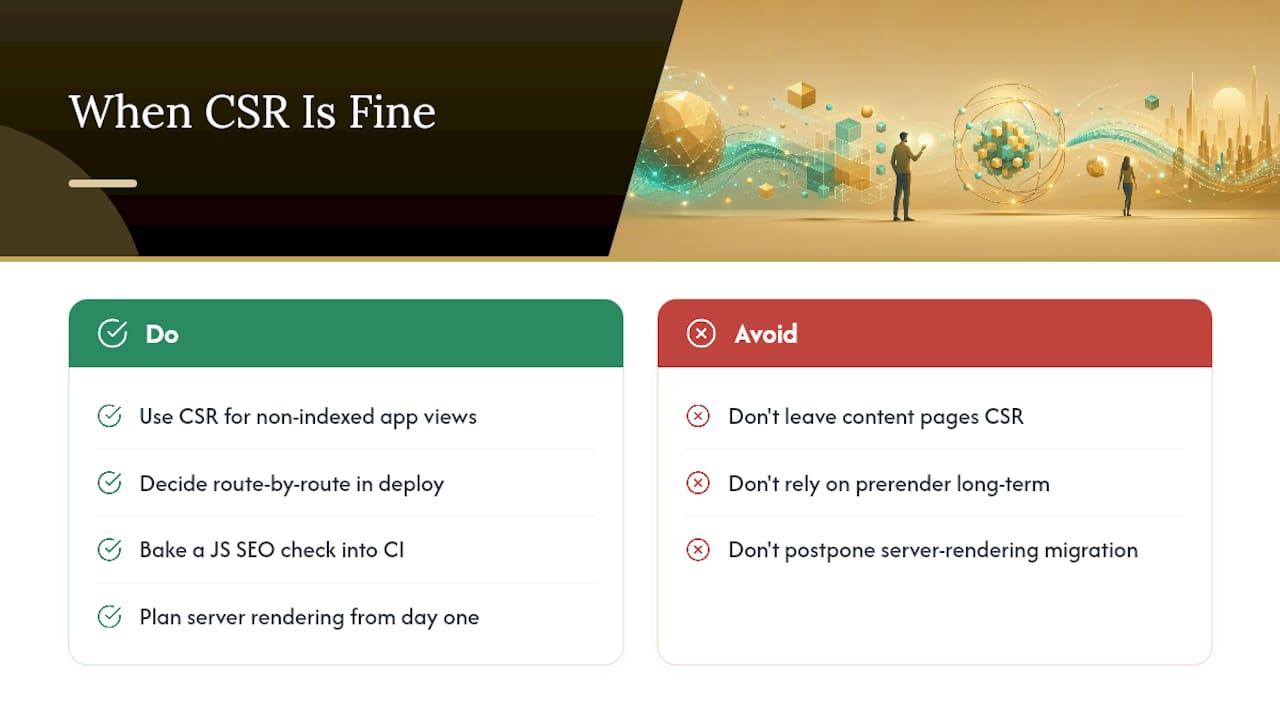
Client-side rendering isn't wrong everywhere. It's wrong for pages you need ranked. Authenticated dashboards, internal tools, and logged-in app views can stay fully CSR since search engines never need to index them.
The discipline is deciding this route by route and enforcing it in your deploy pipeline, not just at launch. Bake a JavaScript SEO check into CI so a routing change can't silently flip a content page back to client-only rendering. Prerendering has a place, but only as a bridge. If content needs to rank long-term, plan the migration to real server rendering from day one, not as a someday project.
Get a JavaScript SEO Audit for Your Site
If your business runs on a JavaScript-heavy site and you're not sure how much of it Google can actually see, that uncertainty costs you customers who never find you in search results. Kirk & Co Web Design builds custom-coded sites from scratch specifically so this problem never starts: content and metadata live in the HTML your server sends, not behind a render queue you can't control.

A first engagement typically runs three stages: a technical audit that flags exactly where your current site leans on client-side rendering, a prioritized list of fixes ranked by impact, and a deployment with monitoring in place to catch regressions before they hurt rankings. For businesses starting fresh or replacing a site that's fighting its own JavaScript, our custom website development service builds server-friendly pages from the ground up. If your existing site just needs speed and rendering fixed without a full rebuild, website performance optimization targets exactly that. Reach out for a technical audit and see precisely where your site's JavaScript is costing you visibility.
Frequently Asked Questions
Does Google penalize sites for using JavaScript? No. Google doesn't penalize JavaScript itself. The risk is indirect: if critical content or links depend on scripts that render slowly, fail, or get blocked, that content simply may not get indexed in time, which looks like a ranking problem but is really a visibility problem.
How long does it take Google to render a JavaScript page? It varies widely. High-priority pages on established domains can render within hours, while low-priority or newly launched pages may sit in the render queue for days or weeks. There's no fixed timeline, which is exactly why server-rendered HTML matters for anything time-sensitive.
Is server-side rendering always better than client-side rendering for SEO? For any page you need indexed and ranked, yes, server-rendered or statically generated HTML removes the rendering-delay risk entirely. Client-side rendering remains fine for authenticated app views, dashboards, and other pages that were never meant to appear in search results.
Can I just use a prerendering service instead of rebuilding my site? Prerendering tools work as a temporary bridge, but they add an extra layer of infrastructure to maintain and can edge toward cloaking if the served snapshot diverges too far from the live user experience. Treat it as a stopgap, not a permanent architecture.
How do I know if my hydration is causing SEO problems? Compare your raw HTML output against the rendered DOM in Search Console's URL Inspection tool. If content that exists in the raw HTML disappears or changes after hydration, your client-side state is overwriting server-rendered content, which can leave crawlers with a blank or broken page.
Sources
- CrawlSense — JavaScript SEO: Rendering, Hydration, Googlebot
- TrackJS — How search engine spiders, bots, and web crawlers trigger JS errors
- SystemsArchitect — JavaScript SEO: Rendering, Indexing & Pitfalls
- Google Search Central — Understand JavaScript SEO basics