
A website performance audit measures three things: how fast your pages load, how your site behaves under Google's Core Web Vitals, and where technical drag is costing you SEO rankings and conversions. If you fix nothing else this month, fix these three priorities first: Core Web Vitals scores, oversized images, and third-party scripts you forgot were even running.
Here's your one action right now: open PageSpeed Insights, enter your homepage URL, and write down your Largest Contentful Paint (LCP), Interaction to Next Paint (INP), and Cumulative Layout Shift (CLS) scores. That single report tells you more about your site's health than most business owners learn in a year of guessing.
- LCP measures how fast your main content appears
- INP measures how responsive your site feels when someone clicks or taps
- CLS measures whether your layout jumps around while loading
Pro Tip: Run the test on your homepage and your busiest service page separately. A homepage can pass while a service page, loaded down with a booking widget or a review plugin, fails badly.
Key Takeaways
A website performance audit succeeds when Core Web Vitals scores, resource weight, and continuous monitoring all get tracked together instead of checked once and forgotten.
| Point | Details |
|---|---|
| Start with PageSpeed Insights | Run it first to get combined lab and field data on LCP, INP, and CLS in minutes. |
| Match tools to the task | Use quick scanners for triage and WebPageTest or sitespeed.io for deep waterfall diagnostics. |
| Test authenticated pages too | Public scanners miss logged-in dashboards and checkout flows, where real bottlenecks often hide. |
| Fix by impact and effort | Prioritize images, third-party scripts, and caching before tackling harder JavaScript refactors. |
| Monitor continuously | Set performance budgets and alerts so regressions get caught before they hurt rankings. |
Table of Contents
- Core Web Vitals and the Metrics That Actually Matter
- Which Tools to Run, and When to Run Them
- How to Run a Website Performance Audit Step by Step
- The Fixes Behind Most Failed Audits
- Keeping Your Site From Sliding Backward
- How Kirk-co Turns Audit Findings Into Real Gains
- What Actually Moves the Needle on Site Speed
- Frequently Asked Questions
- Sources
Core Web Vitals and the Metrics That Actually Matter
Google grades every site against three Core Web Vitals, and each one maps to a real human frustration. LCP should land under a recommended threshold defined by Google to ensure good user experience. INP, which replaced First Input Delay in 2024, should stay under the recommended threshold defined by Google to ensure good user experience. CLS should stay under 0.1. These aren't arbitrary numbers. Core Web Vitals get scored against Google's p75 threshold, meaning 75% of your real visitors need to hit "Good" before Google treats your page as fast.
Beyond the big three, a handful of supporting metrics round out the picture:
- Time to First Byte (TTFB): how long your server takes to respond before anything renders
- First Contentful Paint (FCP): when the first pixel of content shows up
- Speed Index: how quickly the page visually fills in, on average
- Total page weight and request count: the raw amount of data and files a browser has to fetch
Most audit tools bucket your score into three bands: Good, Needs Improvement, or Poor. A score in the Poor band on mobile is the single most common reason local business sites lose ranking position to slower-looking competitors that simply load faster.
Which Tools to Run, and When to Run Them
Not every audit needs the same tool, and running the wrong one wastes time. Match the tool to the question you're actually asking.
For a same-day gut check, run these:
- PageSpeed Insights for a free score that blends Lighthouse lab data with real-world Chrome User Experience Report (CrUX) field data
- Website Grader for a plain-language score a non-technical stakeholder can understand in ten seconds
- Pingdom for a quick breakdown of load time by content type and by domain, which surfaces the heaviest asset categories fast
When the quick score flags a problem, move to deep diagnostics:
- WebPageTest for waterfall charts, filmstrip views, and DNS/TCP/TLS timing breakdowns that remain the industry standard for granular performance analysis
- sitespeed.io for scripted, repeatable batch runs you can wire into a build pipeline
- DebugBear for authenticated tests behind a login wall and real-user monitoring (RUM) data over time
A single test run only tells you what happened at that moment. Lab data from Lighthouse shows a controlled simulation; field data from CrUX shows what real visitors on real connections actually experienced. You need both, and you need them repeated over weeks, not once.
How to Run a Website Performance Audit Step by Step
A structured audit workflow keeps you from chasing the wrong fix first. Follow this order every time.
- Triage fast. Run PageSpeed Insights and Pingdom on your three highest-traffic pages. Screenshot the LCP, INP, and CLS scores plus the resource breakdown.
- Go deep on flagged pages. Feed any page scoring Poor into WebPageTest for a waterfall view, then check sitespeed.io if you want a scripted, repeatable version of the same test.
- Check the main thread. Look for long JavaScript tasks blocking the browser during page load. These usually explain a bad INP score even when LCP looks fine.
- Test what's behind the login. Public scanners never see your booking dashboard or checkout flow. DebugBear supports authenticated and scripted runs that expose the bottlenecks hiding in logged-in journeys, which are commonly worse than the public homepage.
- Score every issue by impact and effort. A slow hero image is high impact, low effort. A rebuilt checkout flow is high impact, high effort. Rank accordingly.
- Assign an owner and a deadline. An issue with no owner never gets fixed. Attach a rough cost and timeline to each item so stakeholders can approve the work.
Pro Tip: Screenshot every test before you fix anything. Without a "before" baseline, you can't prove the fix worked, and you definitely can't show a boss or client the improvement.
The Fixes Behind Most Failed Audits
Almost every audit uncovers the same handful of culprits, and the fixes are well understood.
- Oversized images: Convert to WebP or AVIF, add
srcsetfor responsive sizing, and lazy-load anything below the fold. High impact, low-to-medium effort, and usually the single biggest LCP win available. - Third-party scripts: Chat widgets, ad pixels, and review plugins load scripts you don't control. Defer non-critical ones and isolate the rest inside a tag manager. Medium-to-high impact.
- Bloated JavaScript bundles: Render-blocking scripts delay everything behind them. Code-splitting and deferring non-essential JavaScript deliver a high-impact fix, though the effort varies with how tangled the codebase already is.
- Missing compression and caching: Enabling Brotli or gzip compression plus CDN-level caching is usually a low-effort, high-impact change that a templated site builder often can't fully control.
- Web font loading and layout shift: Poor
font-displaysettings cause visible text jumps. Settingfont-display: swapor preloading key fonts fixes most CLS complaints tied to typography.
A site built on a rigid template often can't touch half of this list because the underlying code isn't accessible. Custom-coded performance optimization starts exactly here, at the code level, instead of hoping a plugin setting helps.
Keeping Your Site From Sliding Backward
An audit is a snapshot, not a guarantee. Sites regress constantly: a new plugin update, a fresh third-party pixel, a busy holiday traffic spike, and your LCP creeps back up within weeks. Ongoing monitoring catches this before it costs you rankings, because performance data changes with every content update and every new script someone adds.
Build these habits into your routine:
- Set a performance budget (for example, LCP under 2.5 seconds) and an alert when a page crosses it
- Ship metrics to a dashboard using Grafana or InfluxDB paired with sitespeed.io, or use a hosted monitoring option through DebugBear
- Combine lab data with real-user monitoring so you're reacting to actual visitor experience, not just a simulation
- Automate a performance check inside your CI/CD pipeline so every release gets tested before it ships
How Kirk-co Turns Audit Findings Into Real Gains
Most local business sites run on templates that cap how much of this checklist you can actually fix. Kirk-co hand-codes every site from scratch specifically for Indiana businesses, which means audit fixes like script deferral, image pipeline rebuilds, and render-blocking cleanup happen at the source instead of fighting a plugin's limitations.
- Faster load times translate directly into better user engagement and stronger conversion rates for clients
- No template constraints means every fix from your audit checklist is actually implementable
- Portfolio examples show what a rebuilt, hand-coded site looks like after the same audit process
| Audit Finding | Kirk-co Advantage |
|---|---|
| Template limits block fixes | Hand-coded builds allow full control over every performance lever |
| Slow load times hurt conversions | Custom code targets rapid load times as a baseline, not an afterthought |
| Local SEO signals weak | SEO implementation is built into the site structure from day one |
If your audit turned up more problems than your current site can solve, custom website development built around your actual audit findings is worth a look, and Kirk-co's pricing page lays out what a rebuild plan typically costs. For businesses that want the checklist done for them on an ongoing basis, website maintenance and support plans keep audits running in the background instead of piling up once a year.

What Actually Moves the Needle on Site Speed
Most performance advice treats every fix as equally urgent, and that's where the conventional checklist falls apart. In practice, image optimization and third-party script cleanup solve the majority of Poor scores, while teams waste weeks rebuilding JavaScript architecture that was never the real bottleneck. Effort should follow evidence, not assumption.
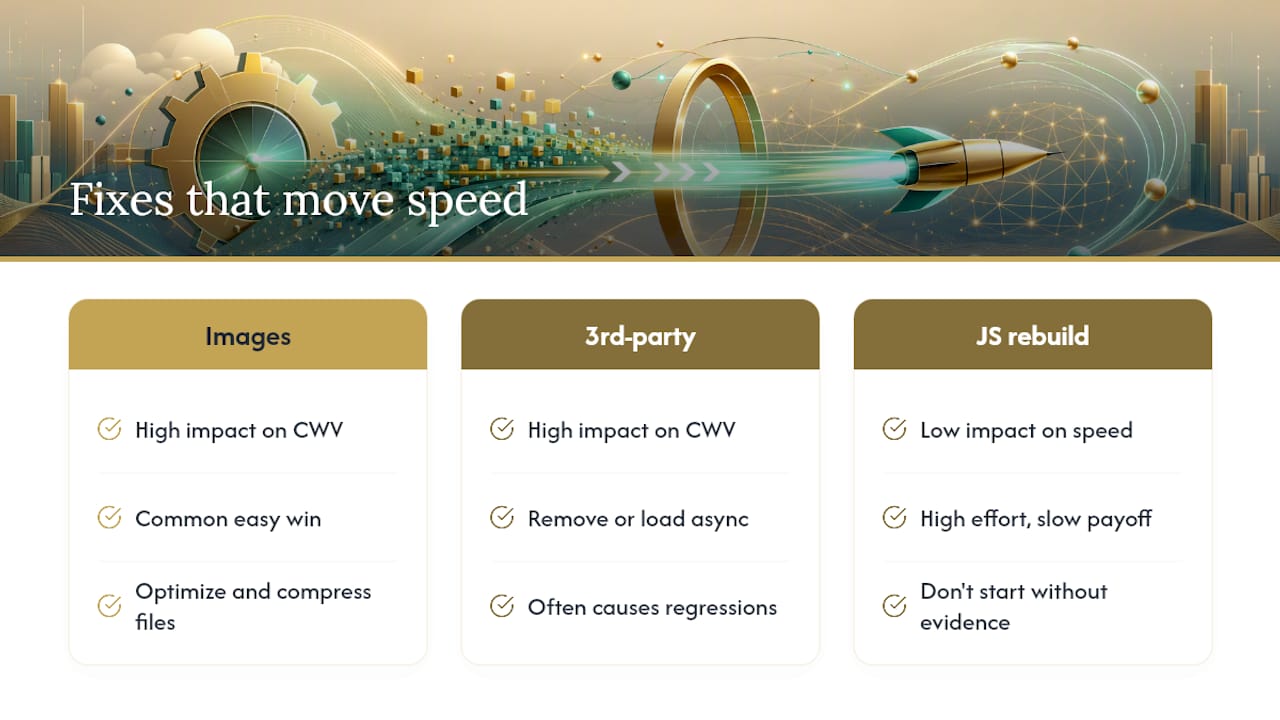
The bigger blind spot is monitoring. Business owners run one audit, fix a handful of items, and walk away satisfied. Then a marketing team adds a new chat widget six months later, and the LCP score quietly creeps back into Poor territory with nobody watching. A single audit is a snapshot; a monitored site is a system. If you only take one thing from this, take that.
Templates make the whole problem worse than it needs to be. If your platform won't let you touch compression settings, script loading order, or font delivery, you're auditing a car with the hood welded shut. Fix what you can control first, and be honest about when the platform itself is the ceiling.
For a broader SEO-focused view on why audits matter beyond speed alone, this checklist-style breakdown of audit benefits is worth a read.
Frequently Asked Questions
How often should I run a website performance audit? Run a full audit quarterly at minimum, with lightweight checks after any major content update, plugin install, or design change. Continuous monitoring catches regressions between formal audits.
What's the difference between a website speed audit and a full performance audit? A speed audit focuses narrowly on load time metrics like LCP and TTFB. A full performance audit adds SEO signals, user experience factors like CLS, and often a review of third-party scripts and caching configuration.
Do I need both lab data and field data? Yes. Lab data from tools like Lighthouse shows a controlled test run, while field data from CrUX shows what real visitors experienced on real networks and devices. Relying on only one gives you an incomplete picture.
How much does a performance audit and fix plan typically cost? Costs vary widely depending on site complexity and whether fixes require a full rebuild versus targeted patches. A templated site often needs more workaround fixes, while a custom-coded rebuild addresses root causes directly, which is why many businesses pair an audit with a custom website development conversation early.
Can I audit a site I didn't build myself? Yes. Every tool listed here works on any live URL regardless of who built the original site, which makes an audit a useful first step before deciding whether to repair or rebuild.