
Most business websites take 10 to 14 weeks from kickoff to launch, landing pages can go live in 1 to 2 weeks, and custom web apps often run 12 to 20+ weeks. The one rule that governs all of it: your timeline is built from scope, content readiness, and how fast your team approves work, not from a launch date you picked because it sounded good. Phases overlap constantly, and the slowest link, almost always content or sign-offs, sets your real finish line.
TL;DR:
- Content readiness is the primary cause of delays, with 38.5% of designers citing poor content as their top issue, highlighting the need for early approval before development.
- Clear decision ownership and setting a 48 to 72-hour feedback window significantly reduce schedule slippage by preventing approval stalls and miscommunications.
- Building a detailed task-level schedule, including dependencies and buffers, enables more accurate project timelines, whether for landing pages or complex web apps.
- Most projects benefit from scheduling discovery and scope sign-offs within the first two weeks to prevent downstream ambiguity and scope creep later in the process.
- Using visual tools like Gantt charts and Kanban boards keeps teams aligned, while early content testing and phased launches help avoid delays from last-minute surprises.
Table of Contents
- Building Your Website Project Timeline Phase by Phase
- How to Build a Realistic Website Development Schedule
- Sample Website Build Timelines by Project Type
- What Causes Website Timeline Delays (and How to Prevent Them)
- Which Tools Help You Track a Web Development Schedule?
- Real Website Timelines: What Kirk & Co Projects Show
- Where These Website Timeline Benchmarks Come From
- Why Most Website Timelines Fail Before Development Even Starts
- Get a Website Timeline You Can Actually Trust
- Sources
- FAQ
Building Your Website Project Timeline Phase by Phase
A website project timeline isn't one big block of "build the site." It's a chain of phases, and each one has its own rhythm, deliverables, and person responsible for saying "yes, move forward." Understanding what happens at each stage is the difference between a schedule you can trust and one you're just hoping holds.
Discovery and strategy (1 to 4 weeks). This is where scope gets defined: goals, target pages, sitemap, and the KPIs you'll measure success against. The business owner or project lead signs off here, and skipping this step is the single fastest way to blow up your later timeline, because every downstream phase inherits whatever ambiguity you left unresolved.
Information architecture and wireframes (1 to 2 weeks). The sitemap gets finalized, and low-fidelity wireframes map out where content and functionality live on each template. Sign-off at this stage should come from whoever owns the content strategy, since wireframes without real content assumptions tend to fall apart later.
Visual design (2 to 4 weeks). Mockups and a style guide take shape here, typically with two or three revision rounds. According to Forbes Advisor, website design commonly takes two to three weeks on its own, though revision cycles can stretch that if feedback comes in piecemeal instead of consolidated.
Content creation (4 to 6 weeks, running in parallel). This is the phase most owners underestimate, and it's frequently the true bottleneck. Forbes found content creation alone can take four to six weeks, and it's rarely idle time. Writing, photography, and metadata all need someone qualified to approve them, and that someone is usually the business owner, not the design team.
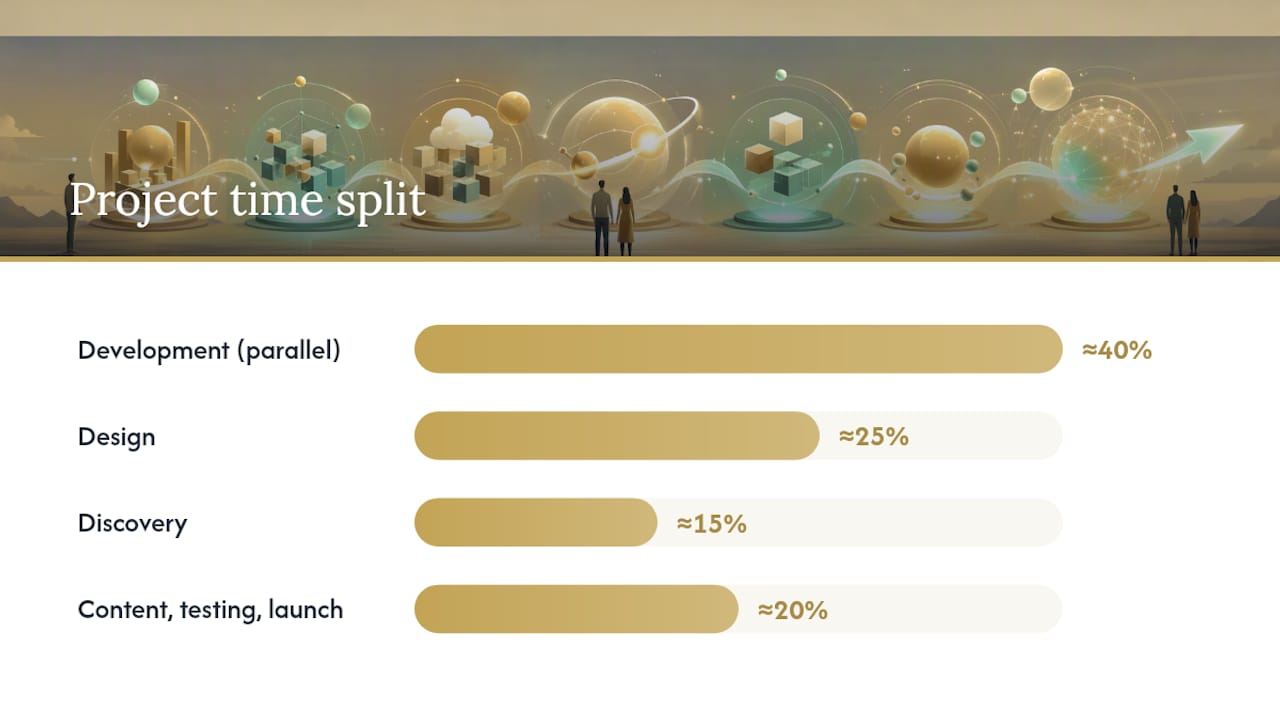
Development (the longest single phase). Benchmarks from WERZ put development at roughly 40% of total project time, with design around 25% and discovery near 15%. Front-end build, CMS setup, and third-party integrations happen here, often in parallel tracks if you have more than one developer.
Testing and QA (1 to 2 weeks). Device and browser checks, accessibility passes, and user acceptance testing (UAT) all happen before anyone touches the launch button.
Launch and hand-off. Deployment, a short monitoring window, and training on the CMS close out the active build.
Where the time actually goes: across many agency projects, development eats about 40% of the schedule, design takes roughly 25%, and discovery accounts for about 15%, according to WERZ's timeline benchmarks. The remaining share splits between content, testing, and launch.
Here's a quick reference for what gets signed off, and by whom:
- Discovery: scope document and sitemap, approved by the project owner.
- Wireframes: page layouts and content structure, approved by the content lead.
- Design: visual mockups and brand system, approved by the decision maker (ideally one person, not a committee).
- Content: final copy and images, approved before development starts, not during.
- Development milestones: staging site review, approved against the original wireframes.
- QA: bug list cleared to an agreed threshold, approved by the project owner.
- Launch: go-live checklist confirmed, approved jointly by developer and owner.
How to Build a Realistic Website Development Schedule
Phase ranges only get you so far. Turning "design takes 2 to 4 weeks" into an actual calendar date requires a process, and it's the same process whether you're planning a five-page brochure site or a multi-sprint web app.
- Break each phase into discrete tasks. "Development" isn't one task, it's homepage build, CMS setup, contact form integration, and payment gateway testing. Estimate each piece separately, because vague phase-level guesses hide the tasks that actually run long.
- Map dependencies. Some tasks can only start once another finishes (development can't begin until wireframes are approved), while others can run side by side. Practitioners increasingly run content writing and initial UI design in parallel, which frequently saves calendar time when responsibilities and approval authority are already clear.
- Add buffers where risk actually lives. Instead of tacking a lump sum onto the end of the project, build small buffers into individual phases, plus a short pre-QA catch-up window. That keeps your critical path visible instead of masking a slip until the final week.
- Set feedback service-level agreements. Give stakeholders 48 to 72 hours to review and respond to any deliverable. Beyond that window, the task is considered blocking.
- Name one decision owner. Timelines shorten measurably when a single named person, not a committee, holds sign-off authority, according to Forbes Advisor's reporting on agency practices.
- Rebaseline when scope changes. If a stakeholder adds a feature mid-project, document the change, estimate its time impact, and update the whole schedule, not just the phase it touches.
Pro Tip: Run a five-minute "scope freeze" conversation before development starts. Ask every stakeholder directly: "Is there anything else you want added?" It's far cheaper to hear "yes" on day one than in week nine.
Sample Website Build Timelines by Project Type
Ranges are useful, but a week-by-week example is what actually helps you build a calendar. Here's how four common project types typically break down.
- Landing page (1 to 2 weeks): One or two rounds of copy and design, minimal integrations. Hitting the 1-week end requires content delivered on day one and a single-person approval chain.
- Small business site, 5 to 10 pages (4 to 6 weeks): Verlua's build-time analysis puts small business sites at four to six weeks when content and stakeholder feedback stay on schedule. Add two to four weeks if content isn't ready at kickoff.
- E-commerce site (8 to 12 weeks): Product catalog setup, payment gateway integration, and shipping configuration add real time beyond a standard brochure build. Testing the checkout flow across devices deserves its own dedicated week, not a rushed pass.
- Custom web app (12 to 20+ weeks): According to WERZ's benchmarks, web apps commonly run 12 to 20 weeks or longer, structured in development sprints with requirement gates between each one. Larger, fully custom builds can extend to three to six months depending on integration complexity.
Team size changes these numbers meaningfully. A solo freelancer working sequentially will land toward the long end of every range above. A small team running design, content, and early development in parallel can compress a small business site into the 4-week mark instead of 6, provided approvals don't stall the handoffs between them.
What Causes Website Timeline Delays (and How to Prevent Them)
Content readiness causes more schedule slippage than any other factor. One industry survey found roughly 38.5% of designers cite poor content as their top source of delay, a pattern Verlua's build-time research confirms across project sizes. The fix isn't complicated, it's sequencing: content has to be ready before development starts, not delivered alongside it.
- Content readiness: confirm all copy, images, and metadata are approved before the developer opens a code editor.
- Approval stalls: enforce the 48 to 72 hour feedback window and route every decision through one named owner.
- Scope creep: require a short change request form with a time-impact estimate before any new feature gets added mid-build.
- Integration surprises: test third-party APIs and payment gateways in a sandbox environment during development, not the week before launch.
- QA backlog: schedule a dedicated UAT window and reserve a short bug-fix sprint immediately after launch instead of assuming testing will finish early.
Pro Tip: Launch with roughly 80% of your full vision live and push the remaining 20% into a phase-two sprint. Waiting for a perfect site before launch is one of the most common, and most avoidable, reasons launches slip by weeks.
Which Tools Help You Track a Web Development Schedule?
You don't need enterprise software to run a tight timeline, but the right category of tool for each job matters.
- Gantt charts (for the master schedule): best for visualizing how a delay in one task shifts every downstream date. Practical timeline templates built around weekly review cycles keep everyone looking at the same version of the plan.
- Kanban boards (for daily task tracking): useful for development and QA phases where tasks move through clear stages.
- Design and prototyping tools: for sharing wireframes and mockups where stakeholders can comment directly instead of emailing feedback across five threads.
- Content collaboration docs: shared, commentable documents prevent the content bottleneck from becoming a black box no one can see into.
To turn ranges into real dates, work backward from your target launch date using a timeline estimator, and start planning two to three times earlier than your estimated build time to leave room for content, approvals, and pre-launch marketing prep. Keep a copyable content checklist (copy, images, metadata, SEO titles) and a launch checklist (DNS, redirects, analytics, backups) so nothing gets missed in the final rush.
Real Website Timelines: What Kirk & Co Projects Show
A recent small business website project moved through discovery in two weeks, design in three, and development in four, with a one-week buffer built in ahead of QA rather than tacked onto the end. The buffer absorbed a late content revision without pushing the launch date, which is exactly what phase-level buffers are supposed to do.
Coordinating that many moving pieces, client inquiries, revision rounds, approval status, used to be the hardest part of running a predictable schedule. Tracking each project's stage inside Kirk CRM made it easier to see at a glance which client was waiting on a content approval versus a design sign-off, which cut down on the "where are we again?" check-in emails that quietly eat days off a timeline.
- Browse full project examples in the Kirk & Co portfolio.
- See a complete build breakdown in the Allsum Vending case study.
Where These Website Timeline Benchmarks Come From
The phase ranges and percentage splits in this guide draw from Forbes Advisor's build-time reporting, WERZ's agency timeline benchmarks, and Verlua's build-timeline analysis. For content planning that shortens your content phase, see this guide on planning website content for organic traffic. A free timeline estimator and a downloadable Gantt template can help you draft your own schedule.
Why Most Website Timelines Fail Before Development Even Starts
The conventional advice on website timelines obsesses over phase durations, as if knowing design takes three weeks somehow protects you from a nine-week delay. It doesn't. Every stalled project I've seen traces back to one of two failures: content that wasn't ready when the calendar assumed it would be, or an approval chain with no single owner.
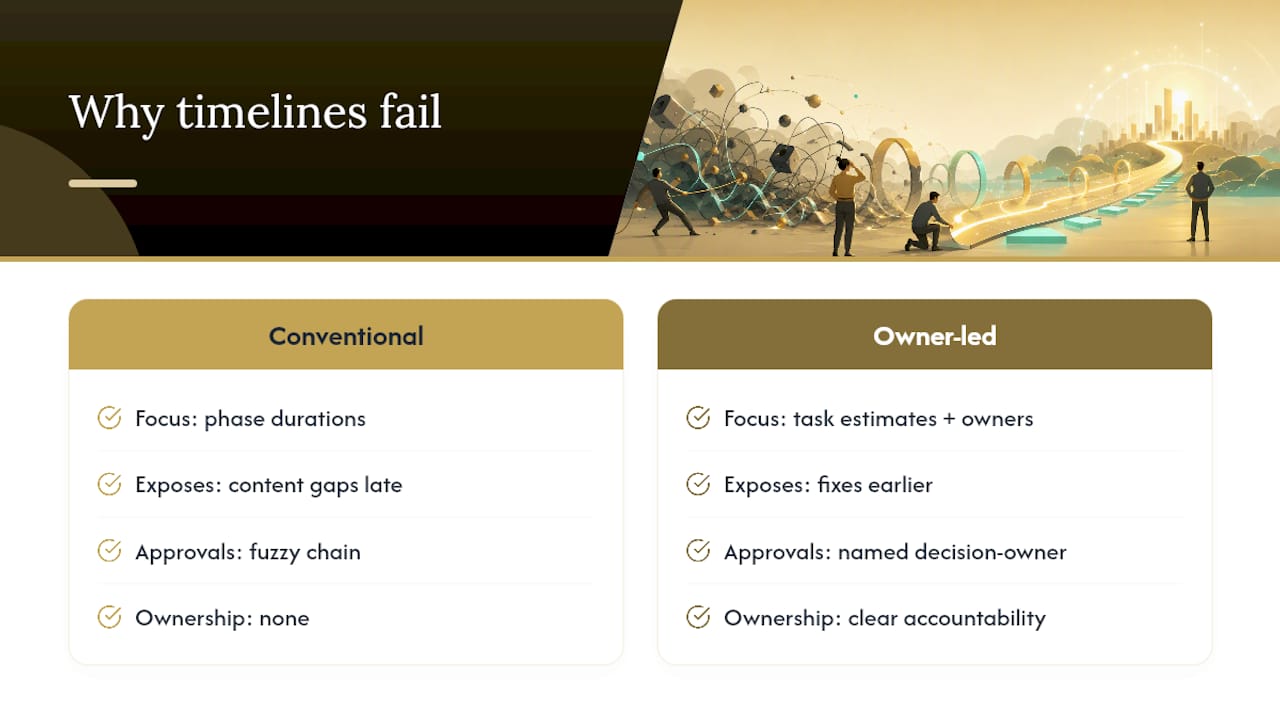
The industry data backs this up directly. Poor content readiness is the most cited cause of delay among designers, and named decision-owners measurably shorten timelines. Yet most planning guides still lead with phase percentages instead of ownership structure. That's backwards.
If you take one thing from this guide, make it the decision-owner rule. A timeline with clear task-level estimates and a fuzzy approval process will still slip. A rougher timeline with one accountable person per milestone will usually beat it. Templates and Gantt charts are useful, but they're bookkeeping. Ownership is what actually keeps a calendar honest.
— Elijah
Get a Website Timeline You Can Actually Trust
Building your own week-by-week schedule from these ranges works, but it still leaves you managing every hand-off, approval, and revision round yourself. This coordination can be managed by a dedicated team: projects run on a managed timeline with a single point of contact, clear sign-off checkpoints, and fewer review rounds than a self-managed build usually creates.

Custom websites are built for contractors, retailers, nonprofits, and home service businesses, with each project scheduled based on its actual complexity rather than a generic estimate. During kickoff, you'll walk through goals, sitemap, and content ownership before a single line of code gets written, which is exactly the discovery discipline this guide recommends. Check pricing plans or explore what a custom website build includes, then request a project estimate to see what your timeline would look like.
Sources
- How long does it take to build a website? | Forbes Advisor
- Website Build Timeline Guide | WERZ
- How Long Does It Take to Build a Website? | Verlua
FAQ
What Is a Website Project Timeline?
A website project timeline is the schedule mapping each build phase, discovery, design, content, development, testing, and launch, to specific week ranges, owners, and sign-off points. It turns a vague launch date into a chain of accountable milestones.
How Do I Create a Website Timeline?
Break each phase into individual tasks, estimate them separately, map which tasks depend on others, and add buffers at the phase level rather than at the end. Assign one decision owner and set a 48 to 72 hour feedback window for every review cycle.
What Are the 7 Stages of Web Development?
Most agencies define the stages as discovery, information architecture, design, content creation, development, testing and QA, and launch. Some add an eighth stage, ongoing maintenance, once the site goes live.
How Long Does It Take to Build a Website?
A typical business website takes about 10 to 14 weeks from kickoff to launch, though landing pages can finish in 1 to 2 weeks and custom web apps often run 12 to 20 weeks or longer. Content readiness and approval speed are the biggest variables in either direction.
What Are the 7 C's of Website Design?
Definitions vary across sources, but a common version includes clarity, consistency, credibility, content, compatibility, communication, and conversion. There's no single standardized list, so treat it as a helpful checklist rather than a fixed rule.