
For most U.S. small businesses that need a marketing site up and running quickly, WordPress is the pragmatic starting point. It gets you live in weeks, not months, and the ecosystem handles most standard needs without writing a single line of code. But when your site needs to function more like a product — with custom workflows, strict performance requirements, or bespoke integrations — a hand-coded custom build is the smarter long-term investment.
The WordPress vs custom website decision comes down to two core questions: How fast do you need to launch, and how much does your site need to do beyond publishing content and capturing leads? WordPress wins on speed and cost for straightforward marketing sites. Custom wins on control, performance, and long-term predictability for anything more complex.
When custom is the right call:
- Your site requires real-time data, complex booking logic, or proprietary integrations that no plugin handles cleanly.
- You operate in a regulated industry where data handling and security must be precisely controlled.
- Page speed is a direct revenue driver (e-commerce, lead gen with paid traffic) and you need sub-second load times by design, not by optimization.
- You've already outgrown a WordPress site and plugin conflicts or update cycles are costing you time and money.
Your immediate next step: Audit three things before you talk to any developer. First, list every integration your site must connect to (CRM, booking system, payment processor). Second, estimate your monthly traffic expectations and whether you'll run paid ads. Third, write down your first-year budget and your acceptable launch window. Those three answers will tell you which path fits before you spend a dollar.
WordPress powers roughly 43%+ of all websites globally, which tells you the platform is proven and widely supported. That market share also means the developer pool is deep and the plugin ecosystem is mature. Neither of those facts makes it the right choice for every project, but they do make it the lowest-risk starting point for most.
Key Takeaways
WordPress is the right default for most small-business marketing sites; custom is the right investment when your site is a revenue engine, requires bespoke integrations, or demands performance that plugins and themes cannot reliably deliver.
| Point | Details |
|---|---|
| WordPress suits most marketing sites | Fast to launch (Typically a few weeks), lower initial cost, and a large developer pool make it the practical default. |
| Custom wins on performance and control | Hand-coded sites have no plugin overhead, a smaller security surface, and a higher performance ceiling by design. |
| TCO matters more than initial cost | A low-cost WordPress build with high ongoing maintenance can cost more over three years than a well-scoped custom build. |
| SEO is achievable on both platforms | WordPress handles local SEO well with the right plugins; custom builds offer full markup control for competitive markets. |
| Kirk-co builds custom for Indiana businesses | Kirk-co hand-codes every site for local businesses, with monthly maintenance plans and local SEO built in from day one. |
Table of Contents
- How do WordPress and custom websites compare side by side?
- What does WordPress actually give you out of the box?
- What does a custom-coded website actually deliver?
- What do realistic budgets and timelines look like?
- Who is responsible for performance, security, and maintenance?
- How does your choice affect SEO and content management?
- How do you decide? A practical checklist
- How Kirk-co's custom builds have helped local businesses
- When custom is the right answer, not just the expensive one
- What Kirk-co offers for businesses ready to build right
- Sources
How do WordPress and custom websites compare side by side?
The table below maps both options across the eight dimensions that matter most to small-business owners. Generic labels are used for the custom column because the specifics vary by developer and stack.
| Dimension | WordPress | Custom (hand-coded) |
|---|---|---|
| Initial cost | Moderate initial cost for theme and setup | Higher initial cost depending on project scope |
| Ongoing cost / TCO | Monthly costs vary based on hosting, plugins, and maintenance | Monthly costs vary with hosting and developer support |
| Time to launch | Typically a few weeks | Often several weeks to months |
| Customization / design freedom | High with page builders; limited at code level | Unlimited — every pixel is intentional |
| Performance & speed | Good with optimization; ceiling exists | Engineered from the ground up for speed |
| Security & maintenance burden | Owner or agency manages core, plugin, and theme updates | Developer manages custom code; smaller attack surface |
| SEO headroom | Excellent for content sites; schema and speed achievable | Full control over markup, rendering, and structured data |
| Scalability | Scales well for content; struggles with complex logic | Scales to any requirement by design |
| Developer availability | Large global pool; easy to find help | Smaller pool; quality varies widely |
WordPress wins on cost, speed to market, and developer availability. Custom wins on design freedom, performance ceiling, scalability for complex logic, and long-term predictability. For most small-business marketing sites, the WordPress column is the right starting point. For product-like sites or businesses where the website is a primary revenue engine, custom is worth the investment.
What does WordPress actually give you out of the box?
WordPress ships with a capable CMS, a theme system, plugin APIs, a REST API, and custom post types. That combination means you can build anything from a simple brochure site to a membership platform without touching a database schema. The block editor (Gutenberg) makes content publishing accessible to non-technical staff, and page builders like Elementor extend that flexibility to full visual layout control.
Hosting is where most small-business owners underestimate the impact. WordPress publishes specific server requirements covering PHP version, MySQL or MariaDB, and web server environment. Shared hosting is cheap but slow under load. Managed WordPress hosting (think Kinsta, WP Engine, or Flywheel) handles server-level optimization, automated backups, and security scanning, which meaningfully reduces your operational overhead. A cloud VPS gives you more control but requires more technical management.
WordPress pros:
- Fast time to market, often typically a few weeks for a standard site.
- Massive plugin ecosystem. The official plugin repository covers SEO (Yoast, Rank Math), e-commerce (WooCommerce), forms (Gravity Forms), and hundreds of other needs.
- You own your content and code. WordPress is open source, so you can move hosts or modify the codebase freely.
- Non-technical staff can publish and update content without developer help.
- WooCommerce turns WordPress into a full e-commerce platform for most standard store needs.
WordPress cons:
- Plugin dependency creates risk. Every plugin is a potential security vulnerability and a source of update conflicts.
- Performance requires active management. Without caching, image optimization, and a quality host, WordPress sites get slow.
- The security surface area is wide. Core, themes, and plugins all need regular updates, and neglected sites get compromised.
- Heavy page builders like Elementor can bloat page weight if not used carefully.
Search Engine Journal's analysis argues WordPress remains safe, supported, and future-proof for the vast majority of content-first use cases. For a local service business, a nonprofit, or a small retailer that needs a clean, fast marketing site, that assessment holds up.
What does a custom-coded website actually deliver?
A custom build starts from a blank file. Every component — layout, navigation, forms, integrations, content management — is written specifically for your business. There are no unused plugin features loading in the background, no theme framework adding CSS you'll never use. The result is a leaner, faster site with behavior you can predict and control.
Modern custom builds typically use frameworks like Next.js, which supports both server-side rendering and static site generation. That flexibility means you can serve pre-rendered pages from a CDN for near-instant load times while still pulling in dynamic data where you need it. Jamstack architecture takes this further, using pre-rendering and API-driven content to reduce runtime server work and serve pages from edge locations worldwide. For a local business running paid search campaigns, that speed difference can directly affect your cost per lead.
| Dimension | Custom build advantage | Tradeoff |
|---|---|---|
| Performance | Engineered load times, minimal payload | Higher upfront development cost |
| Design freedom | Every element is intentional | Longer build timeline |
| Integrations | Bespoke API connections, no plugin limits | Requires developer for changes |
| Security | Smaller attack surface, no plugin vulnerabilities | Developer must maintain custom code |
| Scalability | Handles complex logic and traffic by design | Expensive to add features later without a retainer |
Custom is the right choice when:
- Your site needs to function as a product (booking engine, client portal, custom calculator).
- You have strict compliance requirements around data storage or user authentication.
- Page speed is a direct business metric and you need it guaranteed, not hoped for.
- Your brand requires a design that no theme or page builder can produce faithfully.
- You've been burned by plugin conflicts or a WordPress site that became unmanageable.
The honest tradeoff is time and money upfront. A custom build takes longer and costs more to launch. But for businesses where the website is a primary growth channel, the long-term predictability and performance often justify that investment.
What do realistic budgets and timelines look like?
Cost is where most small-business owners get surprised. Here are realistic ranges based on typical project scopes in the U.S. market.
WordPress build costs
| Scope | Initial cost | Monthly ongoing | three-year total estimated cost |
|---|---|---|---|
| Basic (5–10 pages, theme + Elementor) | Moderate range for basic site build costs | Monthly costs for basic hosting and services | Estimated total cost over three years for a basic build |
| Mid-range (custom theme, WooCommerce, integrations) | Range for mid-level custom theme and integrations | Typical monthly ongoing costs for mid-range sites | Three-year estimated total cost for mid-range projects |
| Advanced (complex plugins, custom post types, API work) | Range for advanced site builds with custom features | Monthly ongoing expenses at advanced level | Estimated three-year cost range for advanced sites |
Custom build costs
| Scope | Initial cost | Monthly ongoing | three-year total estimated cost |
|---|---|---|---|
| Small business marketing site (5–15 pages) | Custom build range for smaller marketing sites | Monthly costs for small business custom sites | Three-year total cost estimate for smaller custom sites |
| Mid-range (custom CMS, integrations, e-commerce) | Mid-range custom build cost ranges | Monthly cost range for mid-range custom builds | Estimated total three-year costs for mid-range custom builds |
| Complex product/app-like site | Higher-end for complex custom products or apps | Higher monthly expenses for complex custom builds | Estimated three-year costs for complex custom sites |
You can review Kirk-co's pricing structure for a concrete example of how a custom-focused agency packages these costs for local businesses.
Timeline expectations:
- WordPress basic site: 2–4 weeks.
- WordPress mid-range with WooCommerce: 4–8 weeks.
- Custom small business site: 6–12 weeks.
- Custom complex build: 12–20+ weeks.
Cost traps to watch for:
- Plugin license renewals that weren't quoted upfront (premium plugins often run $50–$200/year each).
- Hosting upgrades when traffic grows beyond a shared plan.
- Developer time for WordPress updates that break theme or plugin compatibility.
- Scope creep on custom builds when requirements aren't locked before development starts.
- "Cheap" custom quotes that don't include a content management interface, leaving you dependent on the developer for every text change.
Pro Tip: Ask any vendor to itemize year-two and year-three costs separately. A low initial quote with high ongoing costs often costs more over three years than a higher upfront investment with a predictable monthly plan.
Who is responsible for performance, security, and maintenance?
This is the question most small-business owners don't ask until something breaks. The answer differs significantly between the two options.
WordPress maintenance responsibilities
With WordPress, you or your agency manages core updates, theme updates, and plugin updates. Each update cycle carries a small risk of breaking something. A neglected WordPress site — one that hasn't been updated in six months — is a common target for automated attacks that exploit known plugin vulnerabilities.
Managed WordPress hosting reduces this burden substantially. Providers in this category handle server-level optimization, automated daily backups, malware scanning, and often push minor core updates automatically. You still need to manage plugin updates and test after major WordPress releases, but the operational floor is much higher.
Custom site maintenance responsibilities
A custom-coded site has a smaller attack surface because there are no third-party plugins to exploit. But the code itself needs maintenance. Dependencies (npm packages, framework versions, API libraries) require periodic updates, and any new feature requires a developer. If you don't have a care plan or retainer in place, changes can be slow and expensive.
Security checklist for both options:
- SSL certificate active and auto-renewing.
- Automated daily backups stored off-server.
- Strong admin passwords and two-factor authentication enabled.
- Login attempt limiting or a web application firewall (WAF) in place.
- Regular dependency or plugin updates on a documented schedule.
- Uptime monitoring with alerts to your phone or email.
Performance tips that apply to both:
- Serve images in WebP format and use lazy loading.
- Use a CDN (Cloudflare is free at the entry level) to serve assets from edge locations.
- Minimize render-blocking scripts in the page head.
- Test Core Web Vitals with Google PageSpeed Insights after every major update.
How does your choice affect SEO and content management?
WordPress has a well-earned reputation as an SEO-friendly platform. The block editor makes it easy to structure content with proper heading hierarchy, and plugins like Yoast SEO or Rank Math handle meta tags, XML sitemaps, and schema markup without developer involvement. For a local service business publishing regular blog content or service pages, WordPress gives your marketing team real independence.
Custom sites can reach a higher SEO ceiling, but only when built correctly. Server-side rendering with Next.js, for example, ensures search engines receive fully rendered HTML rather than a JavaScript shell that requires client-side execution. Clean, semantic markup and precise control over structured data (schema.org) give a well-built custom site an edge in competitive local search results.
SEO tips for both options:
- Implement LocalBusiness schema markup to support Google Business Profile signals.
- Keep page weight under 1MB for mobile users on average connections.
- Use descriptive, keyword-relevant URL slugs (not
/page?id=42). - Audit internal linking structure before launch — orphaned pages don't rank.
- If migrating from one platform to another, map every old URL to a 301 redirect before go-live.
The content management experience matters for long-term SEO. A WordPress site your team can update without calling a developer means you'll actually publish content consistently. A custom site with no admin panel means every blog post costs developer time. If you commission a custom build, confirm upfront whether a content management interface is included, and test it before signing off.
How do you decide? A practical checklist
Work through these questions before you commit to either path.
Priority questions:
- Is your site primarily a content and marketing channel, or does it need to function as a product or workflow tool?
- What integrations are mandatory on day one (CRM, booking, payment, ERP)?
- What is your realistic first-year budget, including ongoing costs?
- What is your acceptable launch window? Can you wait 12–16 weeks for a custom build?
- Who on your team will manage content updates after launch?
Red flags that point to custom:
- You need real-time data feeds, complex conditional logic, or multi-step user workflows.
- Your industry has compliance requirements (HIPAA, PCI-DSS) that demand precise data handling.
- You've been through two or more WordPress rebuilds and keep hitting the same performance or plugin walls.
- Your site is a direct revenue engine where a 1-second delay in load time has a measurable cost.
Questions to ask any developer or agency:
- Can you show me three live sites you've built in the last 18 months for businesses similar to mine?
- What does your update and maintenance process look like after launch?
- How do I make content changes — do I need to contact you, or is there an admin interface?
- What hosting environment do you recommend, and who manages it?
- How do you handle plugin or dependency updates, and what's your process when an update breaks something?
- What does your contract say about code ownership after the project is complete?
Quick selection rule:
- Content-first marketing site, budget under $10,000, launch needed within 8 weeks: WordPress.
- Product-like site, complex integrations, performance-critical, or budget over $15,000 with a longer runway: Custom.
- Both content publishing AND bespoke workflows: Hybrid (WordPress for the marketing front end, custom app or API for the product layer).
How Kirk-co's custom builds have helped local businesses
Kirk-co works with local businesses across Indiana, including contractors, home service providers, retailers, and nonprofits. The pattern across these projects is consistent: a business comes in with a slow, template-built site that isn't ranking locally and isn't converting visitors into calls or form submissions.
For one project, R.A.D. Construction, Kirk-co built a hand-coded site focused on fast load times and local SEO. The goal was straightforward: show up in local search results and turn those visitors into quote requests. The custom build gave the team precise control over page structure, schema markup, and mobile performance, none of which were achievable on the previous template site.
For NWTAG, the priority was a clean, professional presence that reflected the organization's credibility. A custom build allowed for a design that matched the brand exactly, with no theme constraints limiting the layout or typography.
Kirk-co's approach is to hand-code every site from scratch, which means no unused plugin weight, no theme framework overhead, and no guessing about what's running in the background. The result is a site that loads fast, ranks well locally, and stays that way with a monthly maintenance plan.
You can see the full range of completed projects at the Kirk-co portfolio, including live sites for Indiana businesses across multiple industries.
When custom is the right answer, not just the expensive one
There's a tendency in the web industry to frame this decision as "WordPress for small businesses, custom for enterprises." That framing is too simple, and it leads small-business owners to make the wrong call.
The real question isn't about company size. It's about what the website needs to do and how central it is to your revenue. A local contractor whose site needs to rank in three Indiana counties, load fast on a mobile phone, and turn visitors into phone calls has a performance-critical site. A template or a heavily plugged-up WordPress build may technically work, but it often underperforms in exactly the ways that cost that contractor leads every month.
What gets underestimated is the compounding cost of a slow or unreliable site. A page that takes four seconds to load on mobile loses a significant share of visitors before they ever see your offer. A site that goes down during a plugin update, or gets flagged for malware because a plugin wasn't patched, costs real business. These aren't hypothetical risks. They're the most common reasons small businesses end up rebuilding their sites within two years.
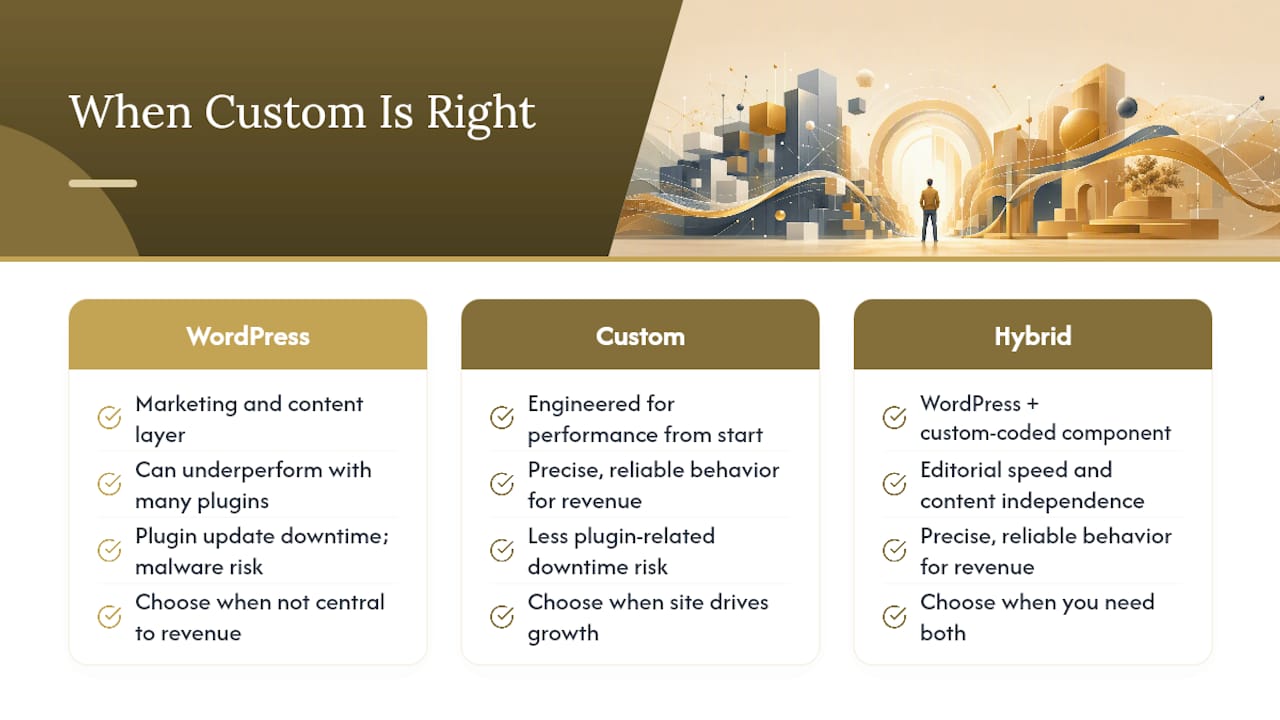
The hybrid path is also underused. WordPress for the marketing and content layer, with a custom-coded component for the workflow or product feature that actually drives revenue, is often the most pragmatic answer for businesses that need both. You get editorial speed and content independence on the WordPress side, and precise, reliable behavior on the custom side.
The honest recommendation: if your site is a genuine growth channel and you're in a competitive local market, invest in a build that's engineered for performance from the start. The cost difference over three years is smaller than most business owners expect, and the performance difference is larger.
What Kirk-co offers for businesses ready to build right
Faster load times and stronger local search rankings are the two outcomes Indiana small businesses most often come to Kirk-co for, and both start with the same thing: a site that's built from scratch, not assembled from templates.

Kirk-co hand-codes every website for local businesses in Indiana, covering everything from bespoke UI/UX and mobile optimization to local SEO implementation and ongoing maintenance. There are no page builders, no theme frameworks, and no plugin bloat. The monthly subscription plan bundles hosting, updates, and support into one predictable cost, so you're never caught off guard by a surprise maintenance bill.
The best fit for Kirk-co is a local business owner who wants a site that performs, looks professional, and keeps working without constant attention. Contractors, home service providers, retailers, and nonprofits across Indiana have used Kirk-co to replace underperforming template sites with custom builds that rank and convert.
Ready to see what a hand-coded site looks like for your business? View Kirk-co's custom website services or check the pricing page to get a clear picture of what a custom build costs for a business like yours.
Sources
These are the primary sources referenced throughout this article. Each one is worth bookmarking if you're doing deeper research before making a final decision.
For Indiana-specific examples and local business planning, the Kirk-co portfolio shows live custom builds across multiple industries with notes on the outcomes each project targeted.