
A best-practice 404 page is a recovery page, not a decorative error screen. It gets a lost visitor back on track instead of making them hit the back button. Four things separate a page that recovers traffic from one that just apologizes and shrugs:
- A plain-language message that says what happened, without technical jargon or blame
- Clear navigation back to the homepage and the main menu, always visible
- A search box on any content-heavy site, so visitors can find what they came for
- Analytics tracking and a true 404 HTTP status code, so you know the page is doing its job and search engines treat it correctly
The tone matters as much as the structure. A good 404 message sounds like a helpful employee, not a form letter blaming the customer for typing a URL wrong. And under the hood, the server response has to actually say "404," not "200 with an error graphic," or you've built a page that misleads both visitors and Google.
Key Takeaways
A best-practice 404 page combines plain-language messaging, working navigation, correct HTTP status codes, and ongoing monitoring to recover lost visitors instead of losing them.
| Point | Details |
|---|---|
| Cover the four essentials | Include a plain-language message, homepage/navigation links, a search box for content sites, and analytics tracking. |
| Match tone to design | Keep the page visually consistent with your site and write empathetic, non-blaming microcopy. |
| Prioritize fixes by impact | Redirect URLs with inbound links or referral traffic first; let low-value dead links return a true 404. |
| Verify the status code | Test that your server returns a real 404, not a soft 404 disguised as a 200 OK response. |
| Build it in from the start | Kirk & Co Web Design hand-codes 404 pages with correct headers and includes link monitoring in its maintenance plans. |
Table of Contents
- Core 404 Page Best Practices for Every Site
- Design Best Practices: Tone, Branding, and CTAs That Convert
- Preventing 404s and Monitoring Them Over Time
- Technical and SEO Rules Your 404 Page Can't Skip
- Accessibility and Performance Checklist
- Real 404 Pages Worth Studying
- How a Hand-Coded Site Handles 404s Differently
- What Actually Moves the Needle
- Get Your 404 Handling Built Right the First Time
- Sources
Core 404 Page Best Practices for Every Site
Every effective 404 page needs the same functional backbone: a clear explanation, a way back to the homepage, main navigation, and often a search bar for content recovery. Get these four right and you've covered most of what separates a helpful error page from a dead end.
- Write the headline and microcopy in plain language. Skip "Error 404: Resource Not Found" in favor of something like "We couldn't find that page" followed by a single sentence explaining the likely cause: a moved page, a typo, or an outdated link. Nielsen Norman Group's guidance is blunt on this point: error messages should be precise and constructive, never phrased in a way that implies the visitor did something wrong.
- Build navigation into the page itself, not just the header. A homepage link is the floor, not the ceiling. Add links to your most-visited categories or a handful of popular pages, especially on sites with deep content libraries.
- Add a search box when your site has enough content to justify it. A small five-page brochure site doesn't need one. A blog, a catalog, or a resource hub does, because visitors landing on a 404 are often hunting for something specific.
- Surface a contact option, but only if it earns its spot. A support link makes sense for SaaS products or membership sites where a broken page might signal an account issue. For most local business sites, it's clutter.
Pro Tip: Test your 404 page's search box with a deliberately misspelled query before launch. If it returns nothing useful, visitors will bounce exactly the way you built the page to prevent.
Design Best Practices: Tone, Branding, and CTAs That Convert
Your 404 page should look like it belongs on your site, not like a placeholder someone forgot to finish. Reuse your actual header and footer. Keep the color palette and typography consistent with the rest of the experience. A visitor who lands on a 404 with a mismatched design starts wondering if they've been redirected somewhere sketchy, and that hesitation costs you the recovery.
Tone is where most 404 pages fail quietly. Compare "You broke something" to "This page moved or no longer exists. Here's how to find what you need." The second version is empathetic and non-blaming, and that framing measurably improves how much a visitor trusts the rest of the site after the error.
CTA hierarchy matters more than most designers give it credit for:
- Primary CTA: "Return to Homepage" or "Browse [Category]" for content sites; "Call Us" or "Get a Quote" for service businesses where the goal is a lead, not a page view
- Secondary CTA: search box, sitemap link, or a short list of popular pages
- Tertiary: contact/support link, kept small and out of the way
For a home service or contractor site, the primary CTA should point toward booking or calling, since that's the actual business goal. For an ecommerce or resource-heavy site, point toward the category tree or search instead.
Mobile deserves its own pass. Tap targets on a 404 page get overlooked constantly because designers build and test on desktop first. Buttons need enough padding to hit reliably with a thumb, and any search input needs a font size that doesn't force iOS to zoom the page on focus.

Pro Tip: Keep the 404 layout to a single column on mobile. A two-column desktop layout that collapses awkwardly on a phone is one of the fastest ways to lose a visitor who was already frustrated.
Preventing 404s and Monitoring Them Over Time
The most effective 404 strategy isn't a better error page. It's fewer errors to begin with.
- Run a link audit on a fixed schedule, not just when someone complains. Tools like Screaming Frog crawl your own site for broken internal links, while Google Search Console flags 404s that search engines have actually encountered.
- Check backlinks regularly. A broken page with inbound links from other sites is bleeding both traffic and link equity, and that's a different priority than a typo nobody outside your team will ever type.
- Decide redirect vs. 404 based on real signals. If a URL has incoming links, referral traffic, or ranking history, a 301 redirect to its closest live equivalent preserves that value. If it never had traffic or links, let it 404 or return a 410 instead of manufacturing a fake redirect target.
- Track 404 hits as an analytics event, not just a server log line. Recording which URLs triggered the error, and whether the visitor then clicked your recovery links, tells you whether the page is actually working.
Set a monthly cadence for smaller sites, weekly for anything publishing new content constantly. Whoever owns the CMS should own this check, since prioritizing fixes by inbound links or referral traffic captures the highest return for the least effort. A structured internal linking audit also catches a lot of these problems before they ever generate a 404 in the first place.
Technical and SEO Rules Your 404 Page Can't Skip
A custom 404 page has to return an actual HTTP 404 status code, not a 200 OK with an error graphic slapped on top. That mismatch, known as a soft 404, is one of the most common and most damaging misconfigurations in web development, and it's often invisible until you check the response headers directly.
Google has said plainly that 404s themselves don't hurt rankings when the URL is genuinely gone. The damage comes from soft 404s and from redirecting every broken URL to your homepage, which confuses search engines about what actually lives at that address.
- Reserve 301 redirects for pages that moved to a specific new location, not as a blanket catch-all
- Never block your 404 page in robots.txt; crawlers need to see it to confirm the status code
- Skip canonical tags on 404 pages entirely, since there's no content to canonicalize
- Run a
curl -Ior browser dev tools check on your live 404 URL before launch to confirm the header actually reads 404
One misconfigured redirect rule can quietly convert your entire error-handling system into a soft-404 machine, which is exactly the kind of issue a structured SEO-minded build is designed to catch before it ships.
Accessibility and Performance Checklist
A 404 page fails half its visitors if it loads slowly or a screen reader user can't tell what happened. USWDS accessibility guidance treats the error page like any other page: it needs the same rigor, not less.
- Give the page a descriptive, unique title so screen readers immediately announce it's an error page, not a mystery blank screen
- Use a real H1 heading that states the error in plain language, matching WCAG's page-title requirement
- Write link text that describes the destination ("Browse Services") instead of vague text like "Click here"
- Maintain sufficient color contrast and a logical keyboard tab order through every link and the search input
- Keep the page lightweight: optimized images, minimal JavaScript, and fast load times, since a slow error page adds insult to injury
- Size buttons and inputs for mobile taps, with enough spacing that a frustrated visitor doesn't mis-tap on the first try
Performance issues here compound fast, and a Core Web Vitals audit applied to your error pages usually surfaces the same bloated scripts and oversized images hurting the rest of your site.
Real 404 Pages Worth Studying
The best 404 pages share a pattern: a clear explanation, a working recovery path, and a status code that matches what actually happened. Sites that get this right typically combine a short, human headline with one obvious next action, whether that's a search box, a homepage button, or a link to the category the visitor was probably looking for.
- A retail site that pairs "This page wandered off" with a live search box pre-focused for typing recovers far more sessions than a static apology
- A SaaS product that lists its top five help-center articles directly on the 404 page turns a dead end into a support deflection
- A local service business that puts its phone number and a "Return to Homepage" button above the fold keeps the page's one real goal, the phone call, front and center
Three microcopy templates worth adapting directly:
Playful copy works for consumer brands with a casual voice. Utilitarian, direct copy works better for service businesses and B2B sites, where visitors want a fast fix, not a joke.
How a Hand-Coded Site Handles 404s Differently
Template-based sites often inherit generic 404 handling that returns the wrong status code or skips analytics entirely. A hand-coded build avoids that by treating the error page as a real page, not an afterthought bolted onto a theme.
- Custom-coded templates mean the 404 page matches the actual site design, header, and navigation, not a generic fallback
- Server configuration is built to return a true 404 status, avoiding the soft-404 trap that misleads both visitors and search engines
- Ongoing maintenance plans catch broken links and outdated redirects before they pile up into a visible problem
- Performance stays fast on error pages the same way it does everywhere else on the site, since there's no bloated builder framework to slow it down
That combination lowers soft-404 risk and keeps recovery paths working exactly as designed, month after month.
What Actually Moves the Needle
Most of the advice around 404 pages focuses on the page itself: better copy, a nicer layout, a search box. That's fine, but it treats the symptom. The bigger lever is knowing which broken URLs actually matter.
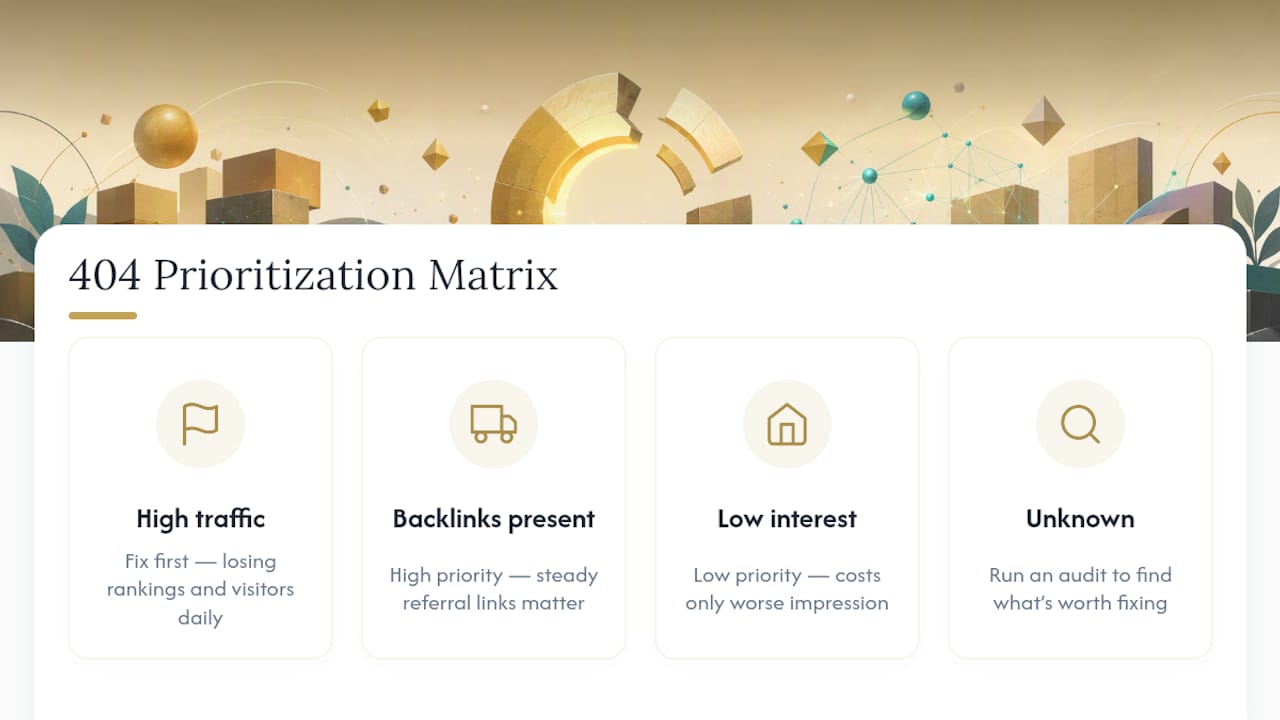
A 404 on a page nobody links to and nobody visits costs you nothing beyond a slightly worse impression. A 404 on a page with backlinks from other sites or steady referral traffic is actively losing you rankings and visitors every single day it sits unfixed. Fix that one first, always.
Elijah's take, unqualified by anything but the pattern in the data: teams spend too much time polishing 404 copy and not enough time running the audit that tells them which broken links are actually worth fixing.
— Elijah
Get Your 404 Handling Built Right the First Time
You've seen what a best-practice 404 page requires: correct status codes, real navigation, fast load times, and ongoing monitoring. That's a lot to maintain manually, and it's exactly where template-based builders quietly fall short, since generic themes often return the wrong status code without anyone noticing until traffic drops.

Kirk & Co Web Design hand-codes every site, including the error pages, so 404 handling isn't an afterthought bolted onto a theme. That means correct headers from launch day, a 404 design that matches your actual brand instead of a generic template, and a monthly maintenance plan that catches broken links before they cost you rankings or customers. If your current site is already live and you're not sure whether it's quietly serving soft 404s, a performance and technical review will tell you exactly where the gaps are. If you're starting fresh, take a look at the custom website development process to see how this gets built in from the start, not patched on afterward.