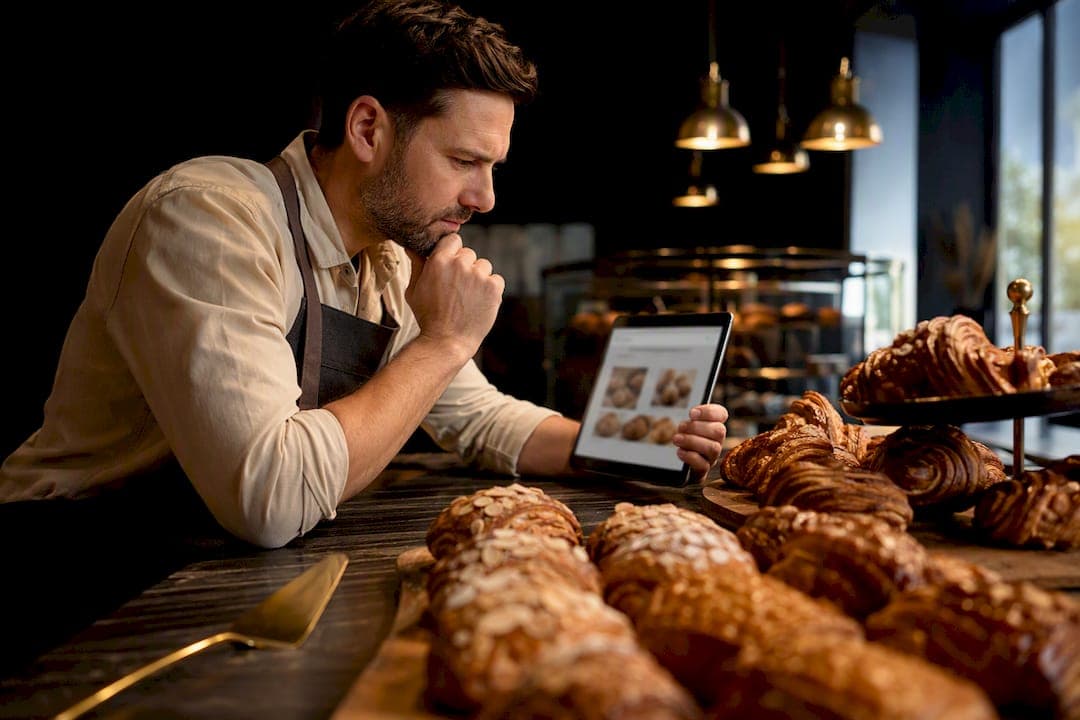
For most bakeries, the winning look is warm and photo-forward, whether that means rustic artisan minimalism, a playful donut-shop palette, or a heritage patisserie feel. Whichever direction fits your brand, two features matter more than any color choice: a clear order-or-pickup button visible above the fold, and a live, easy-to-scan menu or counter display. Everything else on the site supports those two jobs.
TL;DR:
- Most bakery websites should prioritize a visible order or pickup button and a clear, scannable menu above the fold to maximize conversions.
- Templates with built-in menu, gallery, and ordering modules speed up launch, but integrations like POS sync and local SEO are crucial for ongoing success.
- Using high-quality, mobile-optimized photos with descriptive alt text and accurate inventory or pickup time information builds trust and reduces customer frustration.
- Accessibility practices such as contrast testing, keyboard navigation, and clear labels are essential for broad customer inclusion.
- For multi-location or complex operations, custom-coded websites with tailored forms and dynamic features often outperform template-based solutions long-term.
Table of Contents
- Bakery Website Design Inspiration Worth Copying
- What Makes a Bakery Website Actually Convert
- Choosing the Right Builder and Integrations for Your Bakery
- A Launch Checklist for Your Bakery Website
- The Site Features Every Bakery Needs
- Making Your Bakery Website Work for Every Customer
- Turning Reviews Into Trust on Your Bakery Site
- Local SEO Moves That Matter for Bakeries
- Using Social Media to Extend Your Bakery Website
- What Bakery Owners Get Wrong About Their Own Website
- When a Custom Bakery Website Makes More Sense Than a Template
- Where to Find More Bakery Website Examples
- Sources
- FAQ
Bakery Website Design Inspiration Worth Copying
Good bakery websites tend to fall into a handful of recognizable visual camps, and knowing which one fits your bakery makes every other design decision easier. Roundups covering dozens of bakery websites consistently group examples this way, noting the platform or template behind each build. Here's what to steal from each direction.
Artisan and minimal bakeries
This look favors negative space, muted neutrals, and one hero photo doing all the talking. Think a single close-up of a sourdough crumb shot or a cooling rack of croissants, paired with a simple sans-serif logo.
- What to copy: a full-bleed hero photo with a short headline and a clear CTA button, no clutter competing for attention.
- What to copy: generous white space between sections so the eye rests between the menu and the story block.
- What to copy: a muted, earthy color palette that photographs well against pastry shots.
Sites in this camp tend to run on large-hero templates built for portfolio or restaurant use, where the layout is basically a frame for photography.
Boutique patisserie and heritage bakeries
These sites lean into old-world craft: serif typography, gold or burgundy accents, and a sense of history. They work especially well for bakeries built around a founder's story or a family recipe.
- What to copy: a founder or family story section placed right below the hero, humanizing the brand fast.
- What to copy: a portfolio-style slider for wedding cakes or custom orders, letting past work sell the next booking.
- What to copy: small typographic flourishes (a script accent font for headlines) used sparingly, never on body text.
Portfolio-first templates suit this direction because the site's job is showcasing craftsmanship, not just listing prices.
Playful and bright (donut shop, cupcake, kids' bakery)
Bold color blocking, rounded typography, and a bit of motion define this style. It's common among donut shops, cupcake studios, and bakeries chasing a younger, social-media-active customer.
- What to copy: a bright, high-contrast color palette (hot pink, mango, mint) that photographs well on Instagram Stories.
- What to copy: a short video hero loop showing frosting being piped or a donut glaze drip, which holds attention longer than a static photo.
- What to copy: playful microcopy on buttons ("Grab a Dozen" instead of "Order Now") that matches the brand's voice.
These sites often sit on e-commerce-first templates since impulse ordering and gifting drive a big share of revenue.
Commercial and multi-location bakery brands
Bakeries with more than one location or a wholesale arm need a structure that scales: consistent branding across locations, a store locator, and clear separation between retail and wholesale inquiries.
- What to copy: an interactive map or location switcher that updates hours and menu per store.
- What to copy: a sticky order CTA that follows the visitor down the page instead of disappearing after the hero.
- What to copy: a distinct wholesale or catering page, kept separate from the retail ordering flow so the two audiences never collide.
Across all four directions, the common thread is that templates with built-in menu, gallery, and ordering CTA modules get bakeries to launch faster than starting from a blank page. The visual style changes; the underlying page architecture barely does.
What Makes a Bakery Website Actually Convert
A bakery homepage has exactly one job in the first three seconds: tell the visitor who you are, what you sell, and where to click next. Design guidance on bakery sites consistently points to the same formula: name the bakery, show the product, and put several CTAs above the fold (order now, book a custom cake, find our location). Bury any of those and visitors bounce to a competitor's Google listing instead.
Your counter or product page needs its own logic. Separate today's rotating case items from your standing menu, since customers checking "what's fresh today" and customers browsing "what do you always have" are asking different questions. Attach prices directly next to each item, and give every product a quick-add or "order this" button rather than forcing a trip back to a separate ordering page.
A custom cake page is where bakeries lose the most money to friction. The form should ask exactly what your kitchen needs to quote a job: occasion, event date, headcount, dietary restrictions, a design reference upload, and a budget range. Practitioner guidance recommends setting clear lead-time and deposit expectations right on that form, so nobody submits a request for a wedding cake three days out and gets disappointed.
Here's the sequence that tends to work across bakery types:
- Hero photo and headline naming the bakery and its specialty.
- Two or three CTAs above the fold (order, custom cake, location).
- Rotating "today's case" section, updated daily or weekly.
- Full menu with prices and quick-order buttons.
- Custom cake enquiry form with triage fields and deposit terms.
- Reviews or gallery section.
- Hours, address, and a map.
Photography carries more weight on a bakery site than on almost any other small-business site type, since images are the primary driver of appetite and conversion in gallery after gallery. Use high-resolution shots, crop for mobile so a wide hero doesn't turn into a sliver on a phone screen, and lazy-load image-heavy galleries so the page doesn't stall before it finishes loading.
Be honest about pickup windows and inventory. Avoiding dark patterns like fake countdown timers or vague "limited quantities" language matters more for a bakery than most businesses, because your customers are local and repeat. A fake scarcity message that gets caught once costs you a regular.
Pro Tip: Put your custom cake deposit policy in writing on the form itself, not buried in a separate FAQ page. Customers who see the deposit expectation upfront rarely dispute it later.
Choosing the Right Builder and Integrations for Your Bakery
Your business model should drive your platform choice, not the other way around. A single-location counter bakery selling coffee and pastries needs a simple menu-and-CTA layout. A cake studio needs a portfolio-first, form-heavy setup for custom quotes. A bakery-cafe hybrid needs both a menu and a reservation or waitlist feature. A wholesale supplier needs a login-gated pricing page that retail customers never see.
Whatever the model, a few integration choices matter more than the color scheme:
- Real-time POS sync. Connecting your ordering system directly to your point of sale (platforms like Square, BentoBox, or Shopify are common choices) keeps your online menu from selling items the counter already ran out of, and operators using synced systems report far fewer oversells and less manual double-checking.
- Pickup windows and inventory caps. Set a maximum number of pre-orders per pickup slot so your kitchen isn't scrambling at 6 a.m. on a Saturday.
- CRM or contact capture. A simple system for tracking repeat customers and custom-order history (something like Kirk CRM) saves real time once you're juggling more than a handful of wedding cake requests a month.
- CDN-backed hosting. Image-heavy bakery pages load faster and more reliably when photos are served through a content delivery network rather than a single server.
Templates speed up the launch. Integrations determine whether the site still works smoothly six months later, once order volume actually grows.
A Launch Checklist for Your Bakery Website
Before you touch a single template, gather what you already have: logo files, brand colors, and every decent photo of your products (even phone shots work if they're well lit). Map your core pages now, since retrofitting page structure later is far more work than planning it upfront.
- Pre-launch: Collect photography, pick your top two CTAs, and sketch five pages: homepage, counter/menu, custom cake, pre-order/pickup, and locations.
- Homepage content: Bakery name, specialty line, hero photo, and three CTA buttons.
- Counter page content: Today's case, standing menu, prices, and a quick-order button per item.
- Custom cake page content: Occasion, date, headcount, dietary needs, design upload, and deposit terms.
- Pre-order page content: A dedicated landing page mirroring your daily cabinet inventory, with clear caps and pickup windows for seasonal launches like holiday pie orders.
- Mobile test: Load every page on a phone and check that buttons are thumb-sized and photos aren't cropped awkwardly.
- Order flow test: Place a real test order start to finish, including what a sold-out item looks like to a shopper.
- Speed check: Aim for a homepage that loads in under three seconds on mobile data.
- Post-launch: Set up analytics goals for order clicks, A/B test your CTA wording, and confirm your hours, address, and Google Business Profile all match.
Pro Tip: Test the "sold out" state on purpose before launch. A vague error message where a product should be is one of the fastest ways to make a customer assume your site is broken instead of just out of croissants.
The Site Features Every Bakery Needs
Four features do most of the heavy lifting on a bakery website, and skipping any one of them creates a gap customers notice immediately.
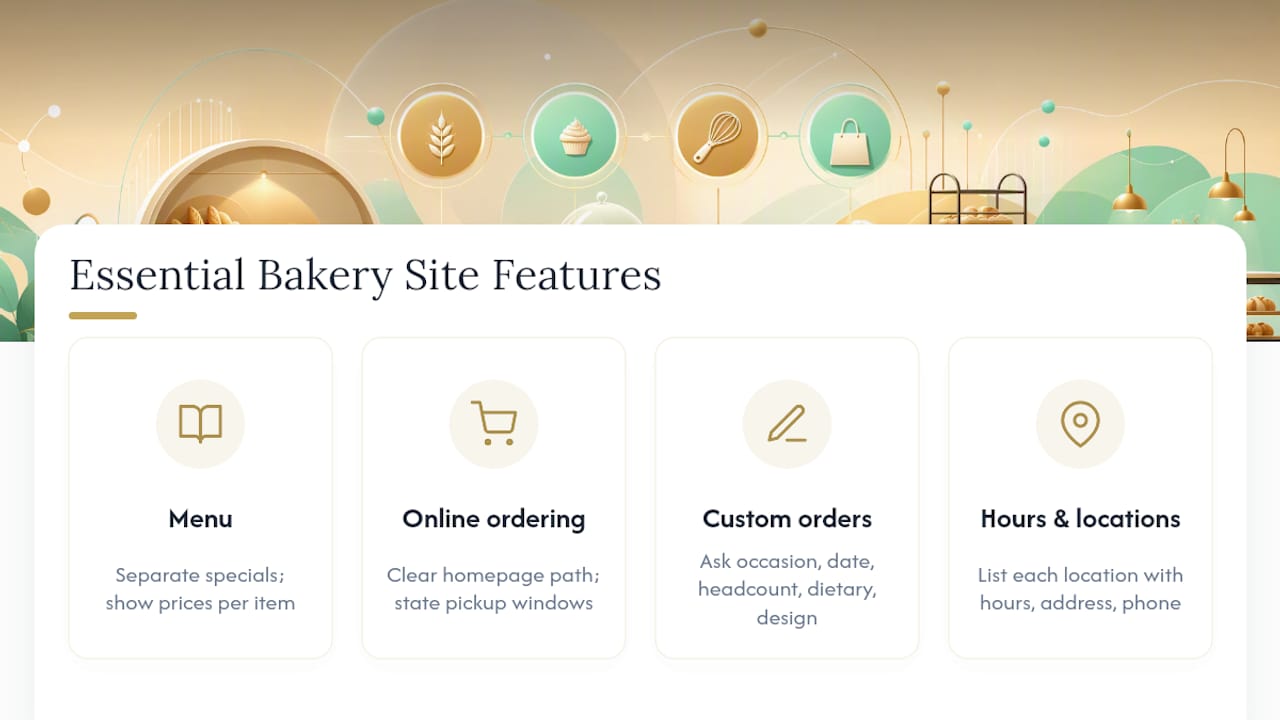
Your menu page should separate daily specials from the standing lineup, with prices attached to every listed item, not just a general price range. Customers checking a bakery's menu on their phone in the parking lot want an answer in seconds, not a PDF download.
Online ordering and pickup needs its own clear path from the homepage, not a link buried in a footer. State pickup windows plainly (for example, "Order by 2 p.m. for next-day pickup") rather than vague language like "orders take some time."
A custom-order form exists to triage requests before they hit your phone or inbox. Ask for occasion, date, headcount, dietary restrictions, and a design reference, and state your lead time and deposit requirement right there on the form.
Hours and locations sound basic, but this is the section customers check most often, especially around holidays when hours shift. List every location separately if you have more than one, with its own hours, address, and phone number, and make sure that information matches what's on your Google Business Profile exactly. A mismatch between your website and your Google listing is one of the more common reasons a customer shows up to a locked door.
Making Your Bakery Website Work for Every Customer
Accessibility on a bakery site isn't a legal checkbox exercise. It's the difference between a customer with low vision being able to read your menu prices or giving up and calling a competitor instead.
Start with contrast. A lot of bakery sites lean on light, pastel color palettes because they photograph beautifully, but pale gray text on a cream background can be nearly unreadable for someone with even mild vision loss. Run your color choices through a contrast checker before you commit to a palette.
Every product photo needs descriptive alt text, not just for screen readers but because it helps search engines understand what's in the image too. "Fresh sourdough loaf on wooden board" beats "IMG_4821" every time.
Menu items and forms should work with a keyboard alone, no mouse required, since some customers navigate exclusively that way. Test your custom-cake form by tabbing through every field without touching a trackpad.
Font size matters more on a bakery site than people expect, since a good share of your customers are checking hours or a menu quickly on a small phone screen in bright sunlight. Keep body text at a readable size by default rather than shrinking it to fit more content above the fold.
Finally, don't rely on color alone to communicate something important, like a sold-out item. Pair a red "sold out" label with actual text, not just a red dot, so the message comes through regardless of how someone perceives color.
Turning Reviews Into Trust on Your Bakery Site
A five-star Google rating sitting on Google alone does almost nothing for a visitor already on your website. Pull your best reviews onto the page itself, right where the decision is happening.
Place a short review or two directly on your homepage, ideally near your CTA buttons rather than buried at the bottom of the page. A visitor deciding whether to trust an unfamiliar bakery with a wedding cake deposit wants proof close to the moment they're about to click.
Specificity beats star ratings. A review that says "the almond croissants sold out by 8 a.m. three Saturdays in a row, worth the early alarm" tells a far better story than a generic five-star badge with no text attached.
Match reviews to the page they support. Put wedding and celebration cake reviews on your custom cake page, and put reviews about daily bakery items on your counter or menu page. A review about a birthday cake experience does little for someone browsing your morning pastry case.
Keep reviews current. A testimonial section frozen at three reviews from two years ago reads as a business that's stalled, even if that's far from true. Rotate in newer reviews every few months, and don't be afraid to include a photo alongside a written review when a customer shares one.
Local SEO Moves That Matter for Bakeries
Your Google Business Profile carries more weight for a bakery's search visibility than almost anything on the website itself, but the two need to work together. Keep your name, address, phone number, and hours identical across your website footer, your Google listing, and any directory you appear in. Search engines penalize inconsistency between those sources, and customers get frustrated by it too.
Build a dedicated page for each physical location if you operate more than one, with its own hours, address, and locally relevant content, rather than one generic "locations" page listing everything in a table. Each of those pages has a real shot at ranking for searches like "bakery near [neighborhood]."
Use the specific product names customers actually search for as page headings and image alt text: "sourdough bread," "custom wedding cakes," "gluten-free cupcakes," rather than vague category labels. Local search leans heavily on matching the exact language a nearby customer types into Google.
Collect and respond to Google reviews consistently, since review volume and recency both factor into local ranking. A bakery with 40 recent reviews tends to outrank one with 200 reviews that stopped coming in two years ago.
Using Social Media to Extend Your Bakery Website
Your website and your social accounts should point at each other constantly, not operate as two separate businesses. Embed a live feed of your Instagram grid on your homepage so new visitors see your most recent bakes without leaving the site.
Announce limited runs and specials on social media first, then link straight to the relevant order page on your site. A Wednesday morning post about a small batch of maple bacon donuts works far better with a direct link to that day's pre-order page than a vague "check our website" caption.
Add simple share buttons to your gallery or product pages so happy customers can post a photo of their order back to their own following. That kind of organic sharing brings in customers your ads never would have reached.
Keep your social bios updated with your current hours and ordering link, especially around holidays when hours shift. A customer checking Instagram on a Sunday morning shouldn't find a broken or outdated link sitting there.
What Bakery Owners Get Wrong About Their Own Website
Most bakery owners obsess over finding the perfect template before they've thought through what their customers actually need to do on the site. That's backwards. A gorgeous hero photo with no visible order button loses more sales than a plain page with a working one.
The bigger mistake is treating the website like a brochure instead of a working piece of the business. A menu page that hasn't been updated in eight months, a custom cake form with no deposit terms, a pickup window that says "usually ready by afternoon" instead of a real time: these aren't small oversights. They're the exact friction points that push a customer to call a competitor instead of finishing an order on your site.
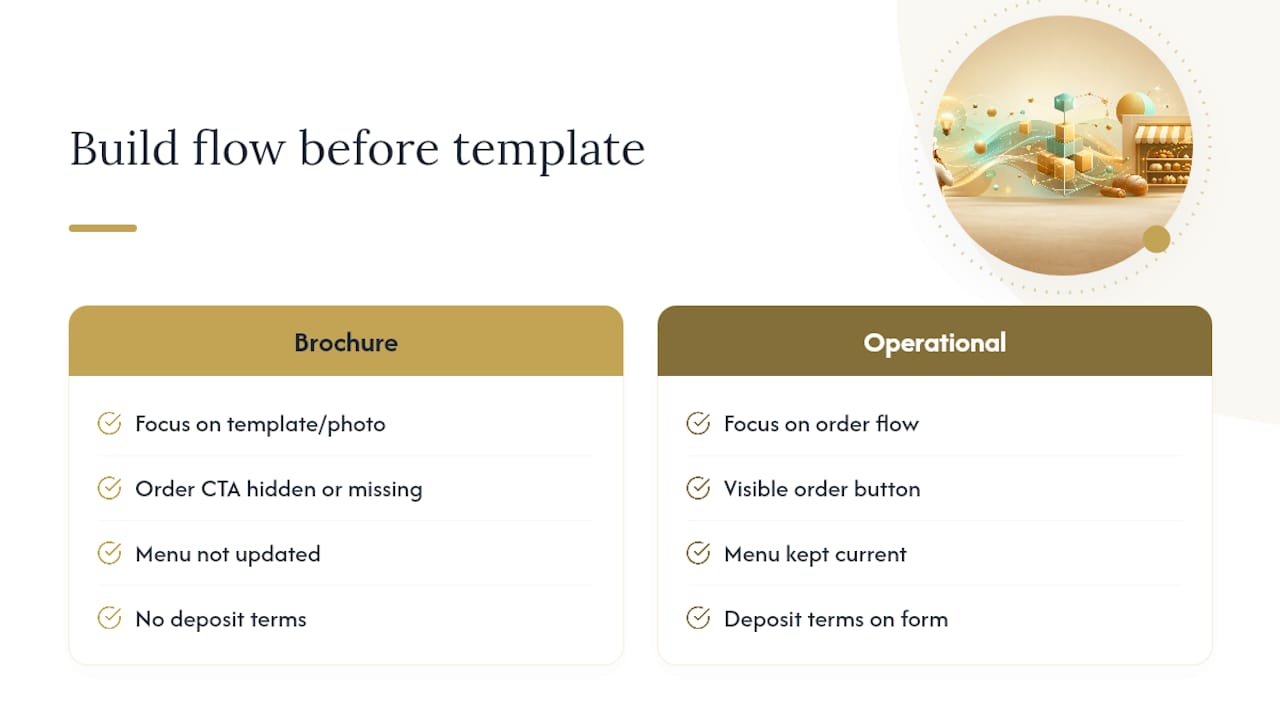
Templates and platforms get treated as the whole decision when they're really just the frame. The businesses that actually convert well built a clear operational flow first (how orders get placed, confirmed, and picked up) and then found a template that supported that flow, not the other way around. [brand_signal] Kirk & Co has watched this pattern play out across portfolio work for local Indiana businesses: the sites that perform well are the ones where every page has a clear job, not just a nice photo. [testimonial] [case_study] [brand_signal]
The lesson that carries across every bakery site worth studying: decide what you want a visitor to do on each page before you decide what it should look like.
— Elijah
When a Custom Bakery Website Makes More Sense Than a Template
A template gets a small bakery online fast, and for a single counter shop with a short menu, that's often enough. But once you're juggling a rotating daily case, custom cake orders with deposits, wholesale accounts, or more than one location, a template's rigid structure starts working against you instead of for you.
That's where a hand-coded site pays for itself. 
Custom-coded websites for local businesses often include hosting, ongoing maintenance, and local SEO setup to keep the site fast and accurate without the need to manage plugins or platform updates. If your order flow, custom cake form, and multi-location hours are outgrowing what a builder template can handle cleanly, a conversion-focused custom build solves the structural problems a template can't. Check current pricing for a custom Indiana bakery website and see whether a built-for-you site fits where your business is headed next.
Where to Find More Bakery Website Examples
For more visual inspiration beyond what's covered here, a few galleries stand out. HubSpot's roundup of 36 bakery website examples groups sites by style and notes the template behind each build. Onyxarro's breakdown of bakery page structure digs into the six core pages most bakeries need. Colorlib's gallery of bakery designs leans heavily on photography-driven layouts worth studying for hero image treatment.
Sources
- Bakery Website Design Inspiration: 36 Examples I Couldn't Resist
- Bakery Website Design Examples That Sell the Counter
- 26 Best Bakery Website Design Examples 2026 - Colorlib
- How to make a bakery website that takes the cake
FAQ
What's the best layout for a small bakery's homepage?
A hero photo of your best-selling item, a one-line description of your specialty, and two or three CTA buttons (order, custom cake, find us) above the fold.
Do I need online ordering if I only sell in-store?
Yes, even a simple pickup-order form reduces phone call volume and lets customers reserve limited items like weekend croissants before they sell out.
Which builder is best for a bakery website?
It depends on your model: menu-focused builders suit a single counter shop, while portfolio-style templates work better for cake studios with custom-order galleries.
How important is POS integration for a bakery site?
Very important once you take online orders regularly, since real-time POS sync prevents your website from selling items your counter already ran out of.
Should I hire a designer or use a template?
A template works well for a simple single-location bakery, but once you have custom cake forms, multiple locations, or wholesale accounts, a custom-coded site like those built by Kirk & Co handles that complexity more reliably.
How many photos does a bakery website actually need?
Enough high-resolution images to clearly show every core product category, including hero shots, menu items, and some behind-the-scenes or storefront photos.