
Conversion-focused web design is the practice of building a website around one clear job: turning visitors into leads or customers, not just impressing them. Businesses that apply it typically see measurable lifts in leads or sales because every element, from headline to button color, gets built to move a visitor toward a single action. The rest of this guide covers the principles behind it, the tactics that work, and the process to put it into practice.
TL;DR:
- Focusing on a single goal per page and maintaining a 1:1 attention ratio significantly reduces visitor confusion and increases conversion rates.
- Placing key elements such as headlines, CTAs, testimonials, and trust signals along the visible eye scan path boosts engagement and action.
- Improving page load speed by compressing images and optimizing mobile design can cut conversion losses by up to 7% per second of delay.
- Regular measurement using heatmaps, analytics, and structured A/B tests ensures design changes effectively increase conversions rather than relying on guesses.
- Prioritizing low-cost, high-impact fixes such as headline rewriting, CTA contrast, and targeted page rebuilds yields faster results than complete overhauls.
Table of Contents
- What Is Conversion-Focused Web Design, Really?
- What Design Principles Actually Move the Needle?
- Which Tactics Actually Increase Conversions?
- Does Page Speed Really Affect Conversions?
- How Do You Measure Whether Your Design Is Working?
- What Does a Real Implementation Process Look Like?
- What Do Real Conversion-Focused Projects Look Like?
- What Should You Actually Do in the Next 30 to 90 Days?
- Why Most Redesigns Fail to Move the Needle
- Ready to Build a Website That Actually Converts?
- Sources
What Is Conversion-Focused Web Design, Really?
Standard web design asks "does this look good?" Conversion-focused web design asks "does this get the visitor to do the one thing I need them to do?" That distinction changes almost every decision on the page.
The clearest framework for this comes from conversion-centered design, which argues that a page should have one primary goal and an attention ratio of roughly 1:1, meaning one action available for every one goal on the page. Compare that to a typical homepage with a navigation bar, six links, three CTAs, and a rotating carousel. Visitors on that page have a dozen possible next steps, and choice paralysis kills conversions faster than bad copy ever could.
This matters most on pages where you're spending money or effort to drive traffic: landing pages for ads, service pages for specific trades like plumbing or landscaping, quote request forms, and booking pages. A homepage can afford to be a little exploratory. A page built to convert cold traffic cannot. If you're running a Google Ads campaign or referral traffic to a specific offer, that page needs one job and needs to do it well.
What Design Principles Actually Move the Needle?
Visitors scan before they read. Eye-tracking research on web pages consistently shows an F-shaped or Z-shaped scanning pattern, meaning your headline, subheadline, and CTA need to sit along that path, not buried in a sidebar or below three paragraphs of company history.
A few principles show up again and again in high-converting pages:
- One page, one goal. Every extra link or competing CTA pulls attention away from the action you actually want.
- Attention ratio. Pages that stick close to a 1:1 attention ratio consistently reduce exits and lift conversions, according to research from Unbounce.
- White space and contrast. Cramming more onto a page rarely helps. Research on effective web design principles shows that reducing visual density, more white space, fewer competing fonts, often increases perceived quality even when a busier layout feels more "branded" to the client.
- Action color for CTAs. Your button color should contrast hard against the page, not match your brand palette for its own sake.
- Trust signals near the decision point. Testimonials, certifications, and guarantees work best when they sit right next to the button, not on a separate "About Us" page.
Pro Tip: Try drawing a literal box around your CTA area in your wireframe. Containment, visually separating the action zone from the rest of the page, is one of the simplest tricks for pulling the eye where you want it, and it costs nothing to test.
Tactics like a strong headline, a clear value proposition, and a contrasting CTA consistently show up across conversion optimization case studies as the difference between a page that converts and one that just sits there.
Which Tactics Actually Increase Conversions?
Principles tell you what to aim for. Tactics tell you what to build. Here's the order of operations that tends to produce the biggest gains fastest:
- Put your value proposition above the fold. Visitors decide whether to keep scrolling within seconds. If they can't tell what you do and why it matters to them without scrolling, you've already lost some of them.
- Make your CTA impossible to miss. Size, color, and placement all matter more than clever button copy. "Get a Free Quote" beats "Submit" every time, but a gray button beats no button regardless of the words on it.
- Shorten your forms. Every extra field is a reason to abandon. If you need more information for qualification, use progressive disclosure or a multi-step form so the first screen feels short even when the full flow isn't.
- Use real photos, not stock imagery. A real photo of your team, your storefront, or a finished job builds more trust than a polished stock photo of strangers in an office.
- Place testimonials near the decision point, not in a separate section visitors may never scroll to.
- Use directional cues. An arrow, a person's gaze in a photo, or simple visual flow can point attention straight at your CTA.
For a deeper breakdown of contact and form design specifically, see this guide on contact page templates that convert, and this resource on writing CTAs that boost conversions covers microcopy in more depth than we have room for here.
Does Page Speed Really Affect Conversions?
Yes, and the effect is bigger than most business owners assume. A one-second delay in page load time can cut conversions by roughly 7%. That's not a rounding error. On a page generating $10,000 a month in leads, a two-second slowdown could be costing you real revenue every single month.
Speed and layout stability aren't cosmetic details anymore. Google's Core Web Vitals, particularly Largest Contentful Paint (LCP) and Cumulative Layout Shift (CLS), map directly to conversion risk, so treat them as design constraints, not an afterthought for the developer to fix later.
Practical fixes that move the needle fast:
- Compress and properly size every image before upload; oversized hero images are the most common speed killer.
- Design mobile-first, since most local service traffic arrives on a phone, and touch targets need real spacing, not cramped desktop buttons shrunk down.
- Limit custom fonts to one or two families and preload them.
- Fix obvious accessibility gaps, like low-contrast text and missing alt tags, since these often overlap with the same fixes that help conversions for everyone.
Statistic to remember: a single second of load delay can mean a 7% drop in conversions. Speed isn't a nice-to-have here; it's a line item.
How Do You Measure Whether Your Design Is Working?
You can't improve what you don't measure, and guessing which version of a page performs better wastes both time and traffic. A pragmatic testing process looks like this:
- Track the right KPIs. Conversion rate matters, but so does raw conversion volume and micro-conversions like scroll depth, video plays, or form starts, which show you where visitors stall before they leave.
- Watch real behavior with heatmaps and session recordings. These tools show you exactly where visitors click, how far they scroll, and where they hesitate, which is often more revealing than any survey.
- Run structured A/B tests. Change one variable, a headline, a CTA color, a form length, and run it long enough to reach a real sample size before declaring a winner.
- Set a decision rule before you start. Decide in advance what counts as a meaningful lift so you're not tempted to call a test early because the numbers look good on day two.
A/B testing, heatmaps, and session recordings remain the core toolkit conversion teams rely on to validate whether a design change actually worked or just felt like an improvement.
What Does a Real Implementation Process Look Like?
Turning these principles into an actual project means working through them in order, not tackling everything at once. Here's the sequence that keeps a project from stalling out in endless revisions:
- Discovery: Map your conversion funnel and identify the single highest-impact page, usually the one with the most traffic and the clearest commercial intent, like a quote request or booking page.
- Design: Wireframe for hierarchy first, then layer in your value proposition, CTA placement, and trust signals.
- Build: Code for speed from the start rather than trying to optimize a bloated page after launch.
- Measure: Set up analytics and heatmap tracking before you launch, not after, so you have a real baseline.
- Iterate: Run prioritized tests based on where visitors actually drop off, not on hunches about what "looks better."
Businesses that skip straight to "build" without discovery tend to end up with a page that looks great and converts poorly, because nobody mapped where visitors were actually getting stuck in the first place.
What Do Real Conversion-Focused Projects Look Like?
Theory only goes so far. What matters is whether a redesign actually changes behavior on a live site.
Kirk & Co's portfolio includes live projects like The Clip Joint, a local business site rebuilt around a clear booking path instead of a generic homepage layout, and Allsum Vending, where the redesign focused on making the inquiry path obvious for a business that lives and dies on quote requests.
A few patterns show up across these projects:
- Contractors and home service businesses convert best when the quote request or "Call Now" action is visible without scrolling on mobile.
- Retail and nonprofit sites benefit more from trust signals, reviews, certifications, donor impact, placed right at the decision point.
- Follow-up speed matters as much as the page itself. This is where Kirk CRM fits into the picture: it captures inquiries the moment they come in, tracks follow-ups, and keeps a visual pipeline so leads generated by a well-designed page don't go cold waiting on a callback.
For a small service business, a fast, focused website paired with a system that actually tracks the leads it generates is the combination that turns design work into booked jobs, not just better analytics.
What Should You Actually Do in the Next 30 to 90 Days?
Prioritization matters more than perfection here. Start with the changes that cost the least and pay off the fastest, then build up to structural fixes.
- This week: Rewrite your homepage headline to state your value proposition plainly, increase CTA color contrast, and compress your largest images.
- Within 30 days: Install a heatmap tool and basic analytics if you haven't already, and set up your first A/B test on your highest-traffic page.
- Within 60 to 90 days: Rebuild your highest-value page (quote form, booking page, contact page) around a single goal, then re-test.
- When you need outside help: If you don't have the time or the internal skill to run this process yourself, bring in a specialist. Hand them a clear brief: your top page, your current conversion rate if known, and your single most important action.
Pro Tip: Before hiring anyone, pull your last 90 days of analytics. A specialist working from real numbers will prioritize better than one working from a guess about what "looks off."
Why Most Redesigns Fail to Move the Needle
Most website redesigns fail to increase conversions for one reason: they optimize for how the site looks in a client presentation, not how it performs with real traffic. I've seen the pattern repeat across small service businesses again and again. A new homepage ships, everyone's happy with the visuals, and three months later the lead count hasn't budged.
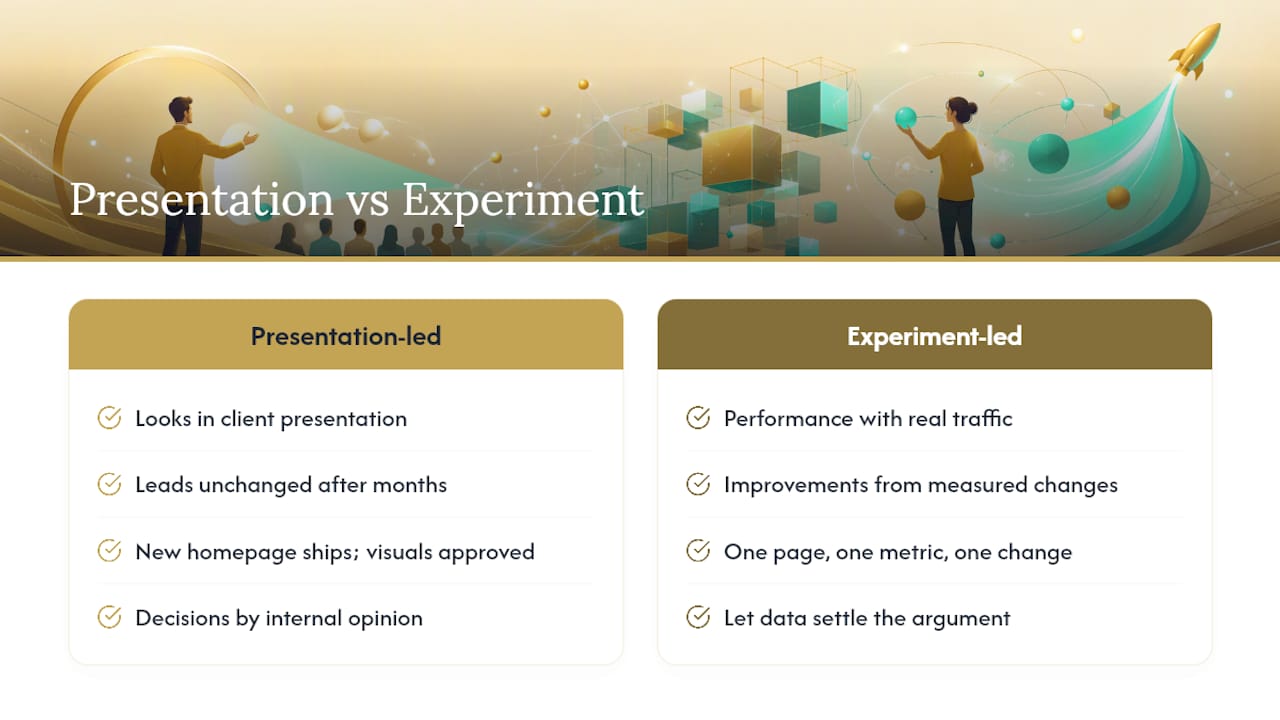
The businesses that actually see results treat their website as a working experiment, not a finished product. They pick one page, one metric, and one change at a time, and they let the data settle the argument instead of internal opinion. That's a harder discipline than it sounds, especially when a stakeholder is convinced their favorite color scheme is the problem. But conversion work rewards patience and measurement over taste, every time.
If there's one thing worth stealing from this approach, it's this: stop asking whether a design looks professional, and start asking whether it gets visitors to do the one thing you need them to do.
— Elijah
Ready to Build a Website That Actually Converts?
Web design providers build hand-coded, conversion-focused websites for contractors, retailers, nonprofits, and home service businesses, sites designed around one goal per page instead of a generic template stretched to fit your business. That means faster load times, clearer calls to action, and a design process built around what actually gets visitors to call, book, or buy, not just what looks nice in a mockup.

Once your site is generating leads, the next problem is making sure none of them slip through the cracks. Kirk CRM gives small service businesses a simple pipeline to capture inquiries, track follow-ups, and see revenue opportunities in one view, starting at $49 a month after a free seven-day trial. If you run a trade business specifically, take a look at how this approach applies to plumbing company websites built around calls and booked jobs. Check the pricing page and start your trial to see what a properly connected front end and back end can do for your close rate.
Sources
- Conversion-Centered Design - Unbounce
- Master Website Design for Conversion Optimization – VWO
- The Complete Guide to Conversion Design: Why Pretty Pages Don't Convert (And What Does) | Jackson Yew
- 2026 Ultimate Conversion Focused Web Design - Technology Aloha