
The single highest-impact change you can make to a donation page is cutting friction: a short, single-step form with only name, email, amount, and payment fields. Pair that with an outcome-driven headline, a 3 to 5 gift array with an open amount field, and a visible monthly toggle for recurring donations. Since most web traffic now arrives on mobile devices, test on a phone first. Confirm PCI security cues and your nonprofit credentials sit near the payment fields before you touch anything else. The anatomy below breaks down why each piece matters.
TL;DR:
- Using a default mid-range gift amount in your array can significantly increase average donations through subtle framing influence.
- Placing a visible toggle for monthly recurring donations above the gift options improves sign-ups for sustained giving.
- Ensuring your donation page loads quickly on mobile devices and removing unnecessary fields boosts completion rates and reduces drop-off.
- Security cues such as trust badges and nonprofit credentials should be placed near payment fields to reassure donors at the critical moment of card entry.
- Running structured A/B tests on headlines, gift array defaults, and form design elements consistently leads to measurable conversion improvements.
Table of Contents
- Donation Page Best Practices: The 7-Part Anatomy That Converts
- Form Design and UX: The Exact Fields and Layout That Keep Donors Moving
- Payments and Trust: Which Methods to Offer and Where Security Cues Belong
- Ask Strategy: Designing Gift Arrays That Encourage Bigger and Recurring Gifts
- Mobile-First Testing and Performance Checklist
- Measurement and A/B Tests That Reliably Increase Donations
- Three Donation Page Examples and a 10-Minute Micro-Checklist
- Who's Behind This Guidance and Where Small Teams Should Start
- Why Donor Experience Beats Feature Creep Every Time
- Getting Hands-On Help When Your Team Is Stretched Thin
- Authoritative Standards Worth Bookmarking
- Sources
- FAQ
Donation Page Best Practices: The 7-Part Anatomy That Converts
A donation page that consistently converts isn't a creative accident. It follows a repeatable structure, and nonprofit conversion research keeps landing on the same seven components regardless of cause or campaign size. Treat this as an audit checklist you can run against your own page in about fifteen minutes.
- Outcome-focused headline. Skip "Donate Now" and name the result instead. "Feed a Family for a Week" or "Fund Ten Rescue Surgeries" tells a visitor exactly what their money accomplishes before they scroll an inch. Place it above the fold, in a font size that outweighs your logo.
- Gift array with an open field. Show 3 to 5 suggested amounts, one pre-selected, plus a blank field for donors who want to type their own number. A page with no suggested amounts leaves donors guessing, and guessing kills momentum.
- Visible monthly/recurring toggle. Recurring giving shouldn't live behind a checkbox buried under the submit button. Put a one-time versus monthly toggle directly above the gift array where it's impossible to miss.
- Short, single-step form. Every field you add is a reason to abandon. A one-step form with four fields will consistently outperform a three-step wizard collecting ten.
- Trust signals near the payment fields. Security badges, your EIN, and your 501(c)(3) status belong beside the card entry box, not in a footer nobody scrolls to. Donors make their final decision while entering card details, which is exactly where reassurance needs to live.
- Fast mobile performance. Compress images, defer non-critical scripts, and keep the page lean enough to load before a donor's patience runs out on cellular data.
- A planned thank-you flow. The moment after the gift clears is your best shot at turning a one-time donor into a repeat one. Confirm the amount, state the impact, and set expectations for a receipt.
Miss any one of these and you're not failing at fundraising strategy. You're failing at basic nonprofit website design, and the fix is usually a few hours of work rather than a redesign.
Form Design and UX: The Exact Fields and Layout That Keep Donors Moving
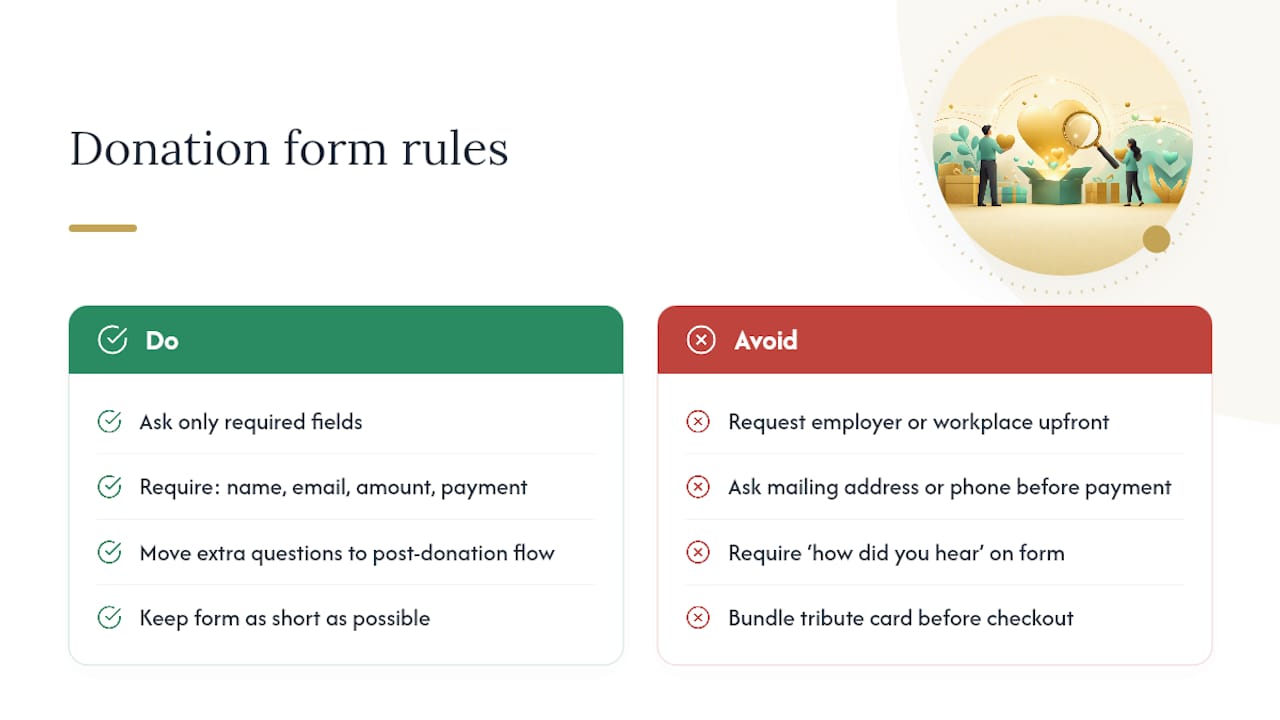
Every optional field on a donation form is a toll booth. Ask only for what's required to process the gift: full name, email address, donation amount, and payment details. Everything else, employer information, how they heard about you, whether they want a tribute card, belongs in a post-donation flow where it can't cost you a completed transaction.
Nonprofit conversion research consistently finds that shorter forms with fewer required fields produce meaningfully higher completion rates, and the pattern holds across cause categories. The instinct to capture more data upfront is understandable. Development teams want mailing addresses for direct mail, phone numbers for stewardship calls, and workplace details for matching gifts. All of that is legitimate. None of it needs to happen before the credit card clears.
Layout choices that reduce hesitation
Structure the form as a single column. Multi-column layouts force a donor's eye to jump around the page, and on a phone screen that jump often means pinching and zooming, which is exactly the kind of friction that ends in an abandoned tab. Order fields in the sequence a donor naturally thinks: amount first, since that's the decision they've already made in their head, then contact information, then payment.
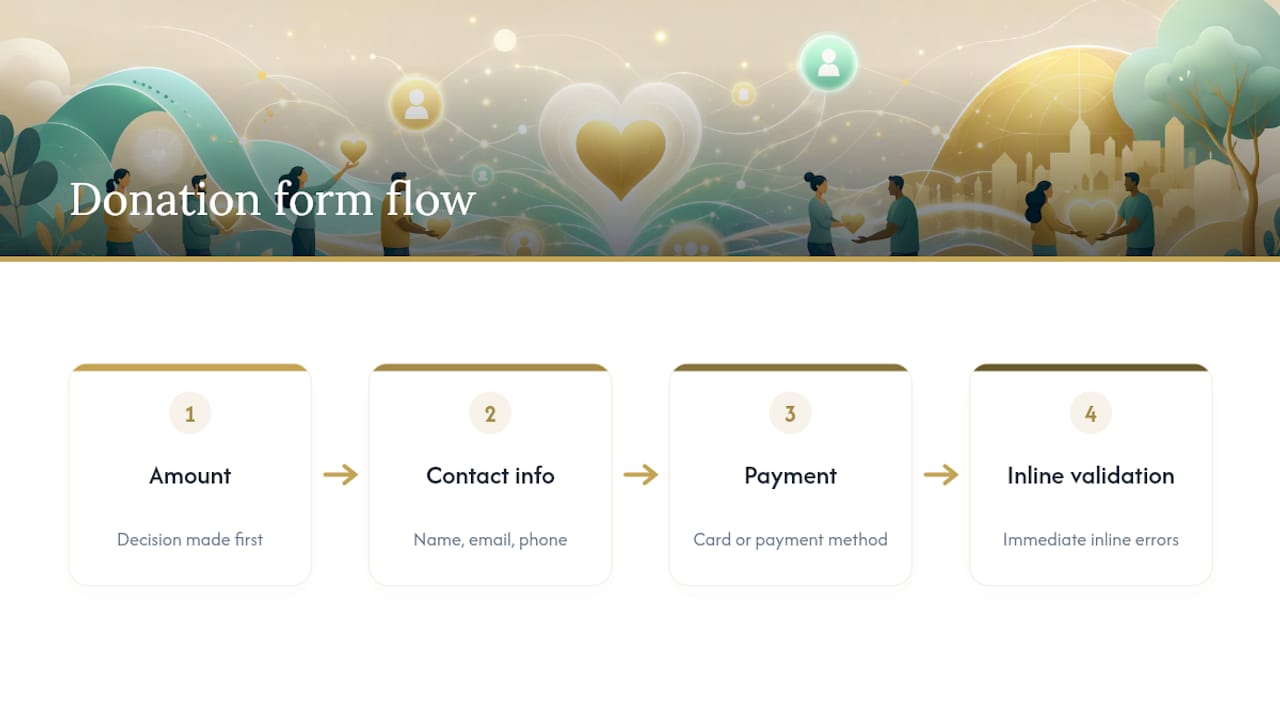
Inline validation matters more than most teams assume. If a donor mistypes an email address, tell them immediately, not after they've hit submit and waited for a page reload. A red border and a one-line message ("Check this email address") keeps the donor in flow instead of bouncing them out to start over.
Reducing typing on mobile
- Turn on express-payment options like Apple Pay and Google Pay wherever your processor supports them, since they let a returning donor complete a gift in two taps instead of typing sixteen digits on a phone keyboard.
- Prefill known information for returning donors when your platform allows it. If someone clicks through from an email with a tracking token, there's no reason to make them retype their name.
- Use numeric keypads automatically for amount and card fields rather than the default alphabetic keyboard. This is a small technical setting most platforms support but few nonprofits bother to check.
- Keep the "amount" field format forgiving. A donor typing "$50" or "50.00" should both work without an error message.
- Avoid CAPTCHA on the final payment step. If spam is a real problem, handle it server-side rather than adding a visual puzzle at the exact moment a donor is most likely to quit.
Accessibility checks that take twenty minutes
Accessibility isn't a separate initiative from conversion. A form that's hard to use with a screen reader is often the same form that's confusing for a donor rushing through on a lunch break. Run through the WCAG quick reference with these basics in mind:
- Every input needs a visible, programmatically associated label, not just placeholder text that disappears once someone starts typing.
- Tab order should follow the visual layout top to bottom, left to right, with no jumps that confuse keyboard-only users.
- Tap targets, buttons and radio buttons especially, need to be large enough for a thumb, not just a mouse cursor.
- Color contrast between text and background should meet WCAG minimums so donors with low vision can read amount labels and error messages.
- Error messages should be announced by screen readers, not just displayed visually as a color change.
Pro Tip: Schedule a quarterly "form validation audit" where someone on your team completes a full donation using only a keyboard, no mouse, and again using a phone's screen reader with the sound on. You'll catch more real problems in twenty minutes of that exercise than in a month of staring at analytics dashboards.
Field-level design borrows heavily from other high-friction forms across a nonprofit's site. The same layout and usability principles that make contact page forms convert apply almost directly to donation forms, since both are asking a stranger to trust you with personal information in exchange for a promised outcome.
Payments and Trust: Which Methods to Offer and Where Security Cues Belong
Offer credit and debit cards as the baseline, add at least one express mobile wallet like Apple Pay or Google Pay, and consider ACH bank transfer for donors making larger gifts who want to avoid card processing fees eating into their contribution. International donors deserve attention too. If your organization draws gifts from outside the country, a processor that supports multiple currencies and regional payment methods prevents a lost donor at the worst possible moment, checkout.
Security cues only work if donors see them at the right time. A padlock icon in the footer does nothing for someone hesitating over whether to type their card number. Trust signals placed directly beside the payment fields reduce last-moment abandonment far more effectively than site-wide trust badges, because that's the exact moment doubt creeps in.
- Display a PCI compliance badge or a one-line statement ("Your payment is processed securely") right next to the card entry box, not just at checkout confirmation.
- Show your nonprofit's 501(c)(3) status and EIN somewhere visible on the donation page itself, not buried three clicks deep on an "About" page.
- Add a short impact sentence near the payment area, something like "Your gift supports 200 meals delivered weekly," to remind donors why they're here right as they commit.
- Keep donors on your own branded domain through the entire payment process where possible. If you use a hosted checkout page, choose one that lets you customize colors and logo so the transition doesn't feel like leaving your site.
- Use HTTPS across every page in the giving flow, not just the final payment step, since browsers now flag non-secure pages visibly.
The PCI Security Standards Council sets the technical rules for how payment card data must be handled, and working with a PCI-aware processor keeps you compliant without building that infrastructure yourself. Most modern donation platforms handle this automatically, but it's worth confirming rather than assuming.
Since a majority of nonprofit web traffic now arrives on mobile devices, every trust cue and payment option on this list needs to render cleanly on a small screen, not just look good on a designer's laptop. A security badge that's illegible at phone width isn't reassuring anyone.
Ask Strategy: Designing Gift Arrays That Encourage Bigger and Recurring Gifts
The amounts you suggest shape the gift you get. A gift array with a pre-selected default in the middle of your range, not the lowest option, anchors donor thinking toward a realistic target instead of a minimum. Testing which amount sits in that default position is one of the fastest, highest-return experiments a fundraising team can run.
- Show 3 to 5 suggested amounts, spaced meaningfully apart ($25, $50, $100, $250), rather than clustering them close together where the choice feels arbitrary.
- Pre-select a middle-tier amount by default rather than the smallest, since testing gift-array defaults and button order consistently produces measurable uplift in average gift size.
- Pair every amount with a one-line impact statement. "$50 provides a week of tutoring" turns an abstract number into something a donor can picture funding.
- Always include an open amount field beneath the suggested tiers, since donors who want to give above or below your range shouldn't be forced into a number that doesn't match their intent.
- Place the one-time versus monthly toggle above the gift array, not below it, so donors decide on frequency before they decide on amount.
- For acquisition campaigns specifically, test pre-selecting the monthly option by default. Some organizations see meaningfully higher recurring signups this way, though it's worth A/B testing rather than assuming it will work identically for your donor base.
Recurring gifts matter more than their per-transaction size suggests. A $20 monthly donor is worth far more over a year than most one-time gifts, and the mechanism for capturing that value is entirely a design choice: how visible and how attractively framed you make that toggle.
Mobile-First Testing and Performance Checklist
The fastest way to find out whether your donation page actually works is to complete a real gift on your own phone using cellular data, not office WiFi. Office connections mask the exact loading delays and layout shifts that cause a donor on a train platform to give up and close the tab.
- Complete an end-to-end test donation on a phone using cellular data, replicating the exact conditions most of your donors will face.
- Compress and lazy-load images so nothing above the payment form blocks rendering while a hero photo downloads.
- Remove or defer third-party scripts, chat widgets, tracking pixels, social embeds, that aren't essential to completing the gift.
- Monitor Core Web Vitals and aim for the page to feel interactive almost immediately after it loads, not after a multi-second delay.
- Prioritize fixes that reduce felt friction first: larger buttons, form fields that are visibly tappable, and a numeric keyboard that triggers automatically for amount entry.
| Mobile factor | Why it matters | Quick fix |
|---|---|---|
| Page load speed | Slow pages lose donors before the form even renders | Compress images, defer non-critical scripts |
| Tap target size | Small buttons cause mis-taps and abandoned forms | Increase button padding and spacing |
| Keyboard type | Wrong keyboard slows down amount and card entry | Force numeric keypad on amount/card fields |
| Layout shift | Content jumping as it loads frustrates donors mid-tap | Reserve space for images and ads before they load |
Run your page through PageSpeed Insights to get a concrete read on where the biggest mobile delays are hiding. Most nonprofit sites lose more donors to a slow-loading hero image than to any weakness in their copywriting.
Measurement and A/B Tests That Reliably Increase Donations
Track four numbers before you track anything else: donation conversion rate, average gift size, recurring conversion rate, and the exact step where donors abandon the form. Everything else is secondary until those four are stable and improving.
- Test your headline first. An outcome-focused headline against a generic "Donate Now" is usually the single highest-leverage experiment available, and it takes almost no development time to run.
- Test gift-array defaults next. Change which amount is pre-selected and which position it occupies in the button row, then measure average gift size over at least a few hundred completed transactions per variant.
- Test the monthly toggle's default state, on versus off, particularly on acquisition-focused landing pages where recurring signups compound in value over time.
- Test single-step versus multi-step forms if you're currently running a wizard-style flow, since shorter single-step forms tend to produce higher completion rates across most nonprofit contexts.
Don't call a test early. Wait for a sample size large enough that a lucky Tuesday doesn't skew your results, and always run variants simultaneously rather than sequentially, since seasonal giving patterns will contaminate a before-and-after comparison. Make sure your analytics setup ties every completed gift back to the specific campaign, email, or ad that drove the click, so budget decisions are based on real attribution rather than a hunch about which channel is working. These same testing principles, control your variables and measure long enough to trust the result, apply directly to broader website conversion work beyond just the donation form.
Three Donation Page Examples and a 10-Minute Micro-Checklist
The evergreen page. Built for year-round giving, this style leads with an outcome headline like "Provide Clean Water to a Family," keeps the monthly toggle visible above the fold, and offers a steady 3 to 5 gift array. Large, established nonprofits running always-on donation pages tend to favor this stripped-down structure precisely because it doesn't rely on urgency to convert.
The campaign page. Built around a specific fundraising push, this version adds urgency cues, a countdown or a matching-gift deadline, alongside a visible progress thermometer showing how close the campaign is to its goal. The form itself stays just as short as the evergreen version. Urgency belongs in the messaging, not in extra fields.
The mobile-first emergency page. Disaster response and urgent appeals demand the fastest possible path to a completed gift. That means a single-click wallet option front and center, a headline naming the crisis in plain language, and near-zero above-the-fold content beyond the ask itself.
Run this ten-item check against your own page in the next ten minutes:
- Headline names a specific outcome, not a generic call to give.
- Gift array shows 3 to 5 amounts with one sensible default.
- Open amount field exists for donors who want to type their own number.
- Monthly toggle is visible without scrolling.
- Form asks for name, email, amount, and payment only.
- Trust badges and EIN sit near the payment fields.
- Page loads and completes cleanly on a phone using cellular data.
- Thank-you page confirms the amount and states the impact.
- A receipt or acknowledgment email goes out automatically.
- At least one A/B test is currently running on the page.
Who's Behind This Guidance and Where Small Teams Should Start
This guide draws on established nonprofit conversion research, including the anatomy work published by Elevation and accessibility standards maintained by the W3C, applied through the lens of what actually gets built and shipped on real nonprofit websites. For teams wondering what a realistic budget looks like before committing to a redesign, nonprofit website cost guidance breaks down where funds typically go and what's worth paying for first.
If your team has limited time, sequence the work this way:
- Quick wins (this week): Trim form fields, add trust signals near payment, write an outcome headline.
- Mid-term (this month): Rebuild the gift array with impact statements, fix mobile load speed, add the monthly toggle.
- Long-term (this quarter): Start running structured A/B tests and build out a real thank-you and follow-up sequence.
Why Donor Experience Beats Feature Creep Every Time
Nonprofits chase personalization engines and predictive-giving tools before fixing a four-field form that's actually costing them donations. That's backwards. Form length, trust cues, and mobile speed produce more measurable lift than any advanced tooling, and they cost almost nothing to fix.
Give yourself two months: weeks one and two for form and trust fixes, weeks three through six for gift-array and mobile testing, and the remaining time for measurement. Test everything. A page that "feels right" to your board isn't the same as one that converts.
— Elijah
Getting Hands-On Help When Your Team Is Stretched Thin
Every fix in this guide is doable in-house, but plenty of nonprofit teams are running lean with no developer on staff and a fundraiser who's also handling the newsletter. Web design specialists build conversion-focused websites custom-coded from scratch, aiming to ensure form logic, mobile performance, and trust-signal placement are implemented correctly the first time instead of patched together in a template.

Beyond the donation page itself, nonprofits juggling donor follow-up often find that a simple, affordable CRM built for tracking relationships and communication closes the gap between "gift completed" and "donor properly thanked and stewarded." Kirk & Co Software's services extend into ongoing site maintenance too, so pages stay fast and secure long after launch rather than degrading quietly over a couple of years. If you'd rather have a specialist handle the audit checklist above than tackle it solo, take a look at Kirk CRM pricing and request a quote to see what a custom-built donation flow would cost for your organization.
Authoritative Standards Worth Bookmarking
For primary-source detail beyond this guide: the PCI Security Standards Council covers payment data handling, the W3C's WCAG guidelines cover accessibility, and the IRS outlines written acknowledgment rules for tax-deductible gifts. Test your own page speed with PageSpeed Insights before making design changes.
Sources
- Charitable contributions: written acknowledgments — IRS
- PCI Security Standards Council
- Web Content Accessibility Guidelines (WCAG) — W3C
- Share of website traffic coming from mobile devices — Statista
- Donation Page Best Practices: The Anatomy of a Page That Converts — Elevation
FAQ
What are some examples of effective donation pages?
Effective pages typically pair an outcome-focused headline with a visible monthly toggle, a 3 to 5 gift array, and trust signals near the payment fields, a pattern seen across evergreen, campaign, and emergency-response page types.
What is the 80/20 rule in fundraising?
The 80/20 rule in fundraising generally suggests that roughly 80% of total donations come from around 20% of donors, a pattern that supports prioritizing major-donor relationships alongside broad online appeals.
What should you put on a donation page?
At minimum: an outcome-focused headline, a gift array with an open amount field, a visible monthly giving option, a short single-step form, trust signals like your EIN and security badges near payment, and a planned thank-you flow.
How short should a donation form actually be?
Ask only for name, email, donation amount, and payment details to complete the gift itself; move every other question, employer info, tribute details, communication preferences, to a post-donation follow-up.