
A nonprofit website in 2026 typically runs $1,500 to $4,000 for a small organization, $4,000 to $10,000 for a mid-size build, and $10,000 to $50,000 or more for large or highly custom projects. Scope drivers like donation integrations, CRM sync, and accessibility work push costs toward the top of each range. Budget an added $50 to $300 a month for hosting, maintenance, and processor fees once the site launches.
TL;DR:
- Smaller nonprofits typically spend $1,500 to $4,000 for a basic website with 5 to 10 pages, while large organizations may pay $10,000 to $50,000 for custom features.
- Integration complexity, such as donation systems and CRMs, significantly impacts costs more than organizational size alone.
- Building a site with a DIY approach costs $0 to $500 upfront, premium templates range from $1,500 to $5,000, and custom builds exceed $4,000, depending on scope.
- Content migration often causes budget overruns due to underestimating existing content volume and legacy formats, necessitating careful inventory and pruning.
- Ongoing costs include hosting ($10-$75/month), maintenance (15-20% of initial build yearly), and compliance expenses, with accessibility and donor trust being key priorities.
Table of Contents
- How Much Does a Nonprofit Website Cost by Size?
- DIY, Premium Template, or Hire an Agency: Which Fits Your Budget?
- What Line Items Make Up a Nonprofit Website Budget?
- How Do You Budget and Schedule a Nonprofit Website Project?
- What Grants and Funding Help Cover Website Costs?
- Why Does Content Migration Blow Up Nonprofit Web Budgets?
- What Ongoing Costs Come After Launch?
- What Should Be in Your Website Procurement Checklist?
- Nonprofit vs. For-Profit Website Costs: What's Different?
- Do ADA and Privacy Rules Add to Your Website Budget?
- Prioritize Donor Conversion and Accessibility First
- Sources
How Much Does a Nonprofit Website Cost by Size?
Your budget tier depends less on your organization's size and more on how many systems your site needs to talk to. A ten-person food pantry with a recurring-donation form and a volunteer sign-up can cost more than a fifty-person arts council running a simple brochure site, because integrations drive price far more than staff count does.
Small nonprofits (local charities, single-program organizations, small arts groups) typically need 5 to 10 pages, a basic donation button, and a contact form. Expect $1,500 to $4,000 and a four to six week timeline. One realistic example: a five-page site with an embedded PayPal or Stripe donation widget, a volunteer contact form, and a photo gallery, built on a template with light customization.
Mid-size nonprofits (regional organizations, multi-program agencies, nonprofits with active event calendars) generally need 10 to 20 pages, CRM integration, and a more developed donor journey. This tier lands around $4,000 to $10,000, with builds taking eight to twelve weeks. A typical project here includes a recurring-donation setup synced to a donor database, an events calendar with registration, and a blog for impact stories.
Large and enterprise nonprofits (statewide or national organizations, universities, hospital foundations) often require custom development, multiple integrations, and dedicated accessibility work. Costs run $10,000 to $50,000 or more, with timelines stretching three to six months. This tier covers things like a custom-coded volunteer portal, multi-tier donation processing with tax-receipt automation, and a full content migration from a legacy CMS.
| Tier | Page count | Typical cost | Timeline |
|---|---|---|---|
| Small | 5–10 pages | $1,500–$4,000 | 4–6 weeks |
| Mid-size | 10–20 pages | $4,000–$10,000 | 8 weeks |
| Large/enterprise | 20+ pages, custom features | $10,000–$50,000+ | 3–6 months |
CauseHouse's cost calculator breaks this down even further by page bands. It shows one to five pages landing around $4,000 to $8,000 and six to fifteen pages running $8,000 to $16,000, which tracks closely with the small and mid-size numbers above once you account for integration complexity.
DIY, Premium Template, or Hire an Agency: Which Fits Your Budget?
Three paths dominate nonprofit web projects, and each one trades cost against control, speed, and long-term reliability.
- DIY or free/low-cost template builders (Squarespace, Wix, WordPress with a free theme) cost $0 to $500 upfront plus $15 to $40 a month in platform fees. You can launch in a weekend, but you'll spend hours wrestling with plugin conflicts, and accessibility usually needs manual fixing after the fact. This path fits organizations with a tech-savvy staff member and a genuinely simple site: a handful of pages, one donation button, no CRM.
- Premium templates with light customization run $1,500 to $5,000 and take two to four weeks. A designer or freelance developer adapts an existing template to your brand, adds your content, and configures basic integrations. This is the sweet spot for organizations that want something that looks professional without full custom development, though you're still limited by the template's underlying code.
- Hiring an agency or freelance developer for a custom build costs $4,000 to $50,000+ depending on scope, with four to twenty-four week timelines. You get a site built around your actual donor journey, accessibility baked in from the start, and someone accountable for fixing problems after launch. Custom web design companies build hand-coded sites for nonprofits to avoid template code bloat that slows load times and hurts local search rankings.
Choose DIY only if your budget is genuinely near zero and your feature list stays simple. Choose a premium template when you need a fast, decent-looking launch on a modest budget. Choose custom development when donation conversion, accessibility compliance, or long-term site performance actually matter to your mission.
What Line Items Make Up a Nonprofit Website Budget?
A nonprofit site development cost breaks into distinct phases, and knowing the typical range for each (helps) you evaluate vendor proposals without guessing whether a quote is fair.
- Discovery and strategy ($500–$2,500): stakeholder interviews, competitor review, sitemap planning. Costs climb when multiple departments need separate input sessions.
- Information architecture and copywriting ($800–$4,000): organizing content and writing new page copy. Rises sharply if your organization has no existing copy to work from.
- Design ($1,000–$6,000): wireframes, mockups, brand application. Custom illustration or photography direction adds to the high end.
- Development ($2,000–$20,000+): actual build, whether template-based or hand-coded. This is usually the single largest line item.
- Integrations ($500–$5,000 per integration): donation gateways, CRM sync, event registration, email marketing connections. Each new system you connect adds both cost and long-term maintenance risk.
- Accessibility audit and remediation ($750–$5,000+): testing against WCAG standards and fixing violations. Skipping this early almost always costs more later, since remediating an already-built site takes longer than building accessibly from the start.
- Quality assurance and testing ($500–$2,500): cross-browser and mobile testing, form testing, load testing.
- Staff training ($300–$1,500): teaching your team to update content and manage the CMS.
- Launch and post-launch support ($500–$3,000): DNS cutover, monitoring the first weeks, quick-fix window.
Pro Tip: Ask any vendor to itemize donation gateway setup and CRM sync as separate line items. These two integrations account for a disproportionate share of change orders because they touch financial data and require testing that generic "integration" quotes often skip.
Recurring donation setup alone can add $500 to $2,000 depending on whether it needs to sync donor records back into your CRM automatically or just process one-time gifts.
How Do You Budget and Schedule a Nonprofit Website Project?
Building in a contingency buffer matters more here than in most project types, because nonprofit sites frequently discover legacy content or undocumented integrations mid-project.
- Small projects: budget 10% contingency; most surprises are minor content gaps.
- Mid-size projects: budget 15% contingency to cover CRM sync issues and unexpected content volume.
- Large or custom projects: budget 20% contingency, since multiple integrations compound the risk of scope surprises.
This structure protects both sides and gives you natural checkpoints to catch scope drift before it becomes expensive.
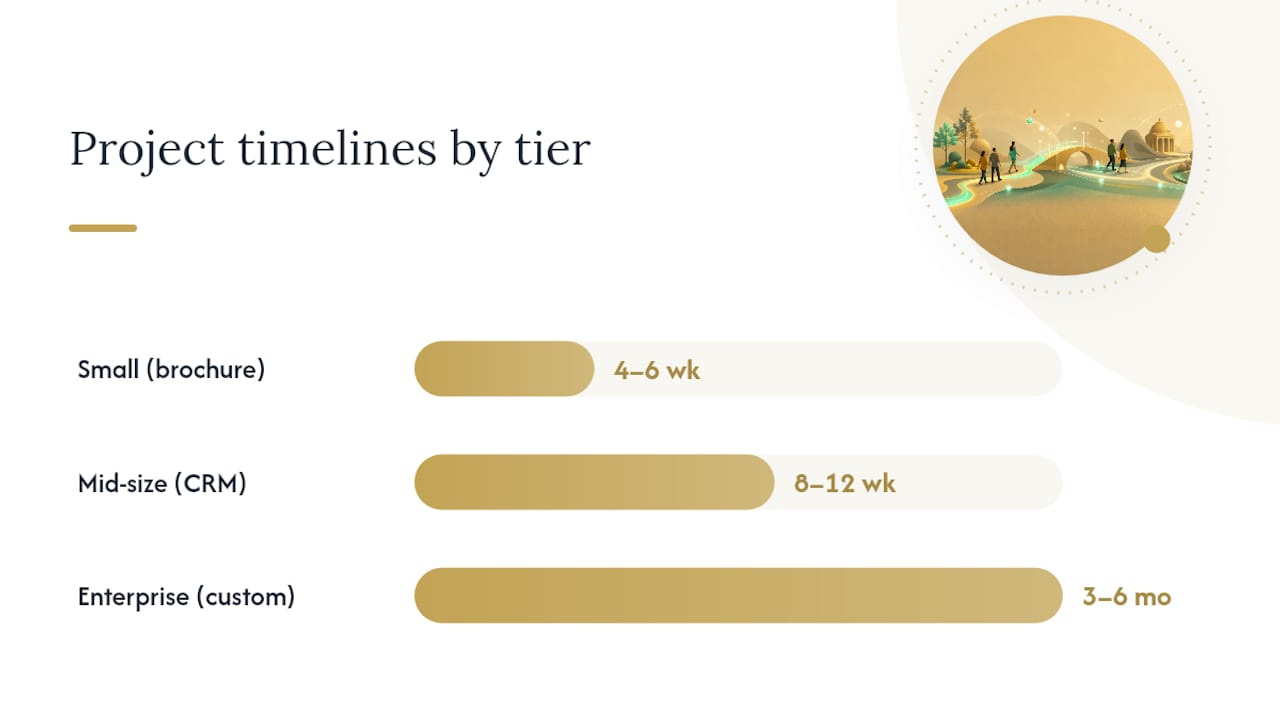
Timelines scale predictably with tier. A brochure-style small site runs four to six weeks from kickoff to launch. A mid-size build with a donor CRM sync needs eight to twelve weeks to allow for integration testing. Enterprise projects with custom portals or multi-language support often need three to six months, particularly when content migration from an old CMS is part of the scope.
Pro Tip: Build your contingency into the contract, not just your internal budget. Vendors who see a stated contingency line tend to flag risks earlier instead of absorbing them into change orders later.
What Grants and Funding Help Cover Website Costs?
Grant funding can meaningfully offset a nonprofit website budget, but nearly every program pays the vendor directly rather than reimbursing your organization, so you need a signed proposal or invoice ready before you apply.
- Indiana Arts Commission's Arts Project Support (APS) grants commonly award around $3,000 to $4,000 for public-facing arts projects, which can cover a campaign microsite or a full site refresh for arts nonprofits.
- LISC Verizon Small Business Digital Ready has awarded $10,000 grants in Indiana specifically for digital upgrades, website builds included.
- INTAP (Indiana Technical Assistance Program) can fund up to $15,000 for services from qualified vendors, making it one of the larger state-level options for a full custom build.
- County-level economic development grants, like the Washington County Economic Growth Partnership's small business grant, often cap out around $2,000 but require far less paperwork than state programs.
Apply early. Most of these programs require you to name your vendor and quote a specific project scope in the application, so get a proposal in hand before you submit.
Why Does Content Migration Blow Up Nonprofit Web Budgets?
Content migration is the most consistently underestimated line item in a nonprofit website project, because organizations rarely audit how much content they actually have before requesting quotes. Volume, file formats (PDFs, old blog posts, event archives), and the number of broken links needing redirects all drive labor hours up fast.
- Inventory every page, PDF, and blog post on your current site.
- Sort content into keep, update, or archive.
- Count how many URLs need 301 redirects to preserve search rankings.
- Flag any content locked in outdated formats (Flash, old PDFs, embedded videos).
- Decide whether migration is included in your main quote or billed as a separate line item.
- Get a per-page-type estimate, not a blanket "per page" number, since a landing page and a 40-page annual report take very different amounts of time to migrate.
Pro Tip: Archive rather than migrate anything older than two years that gets fewer than a handful of visits a month. Pruning legacy content before migration routinely cuts the line item by a third or more.
What Ongoing Costs Come After Launch?
Launch day isn't the finish line.
- Hosting: $10 to $75 a month for most nonprofit sites, more for high-traffic organizations with heavy media libraries.
- Maintenance retainer: 15% to 20% of build cost annually, covering plugin updates, security patches, and small content changes.
- Donation processor fees: typically 2.2% to 2.9% plus a per-transaction fee, plus staff time for monthly reconciliation against your CRM.
- CRM and email platform fees: $20 to $200+ a month depending on donor list size and feature tier.
- Accessibility monitoring: budget a minimum of $300 to $1,000 a year for periodic WCAG rechecks, since sites drift out of compliance as content gets added.
Mobile traffic deserves its own line in your planning conversation. Donors increasingly complete gifts from a phone, which means a slow mobile checkout costs you conversions long before it costs you a support ticket. Factor mobile performance testing into your annual monitoring budget rather than treating it as a launch-day afterthought.
What Should Be in Your Website Procurement Checklist?
Before you request proposals, prepare a page inventory, a list of priority donor journeys (one-time gift, recurring gift, volunteer sign-up), and every integration you currently use or plan to add.
- Compile a full page and content inventory, including PDFs and archived posts.
- Map your top three donor and volunteer journeys end to end.
- List required integrations: CRM, email platform, donation gateway, event registration.
- Request itemized proposals covering design, development, and training separately.
- Confirm what post-launch support and training are included, and for how long.
- Set acceptance criteria before signing: page speed benchmarks, mobile testing, and a WCAG spot check.
- Define how you'll measure ROI after launch (donation conversion rate, average gift size, volunteer sign-ups per month).
Nonprofit vs. For-Profit Website Costs: What's Different?
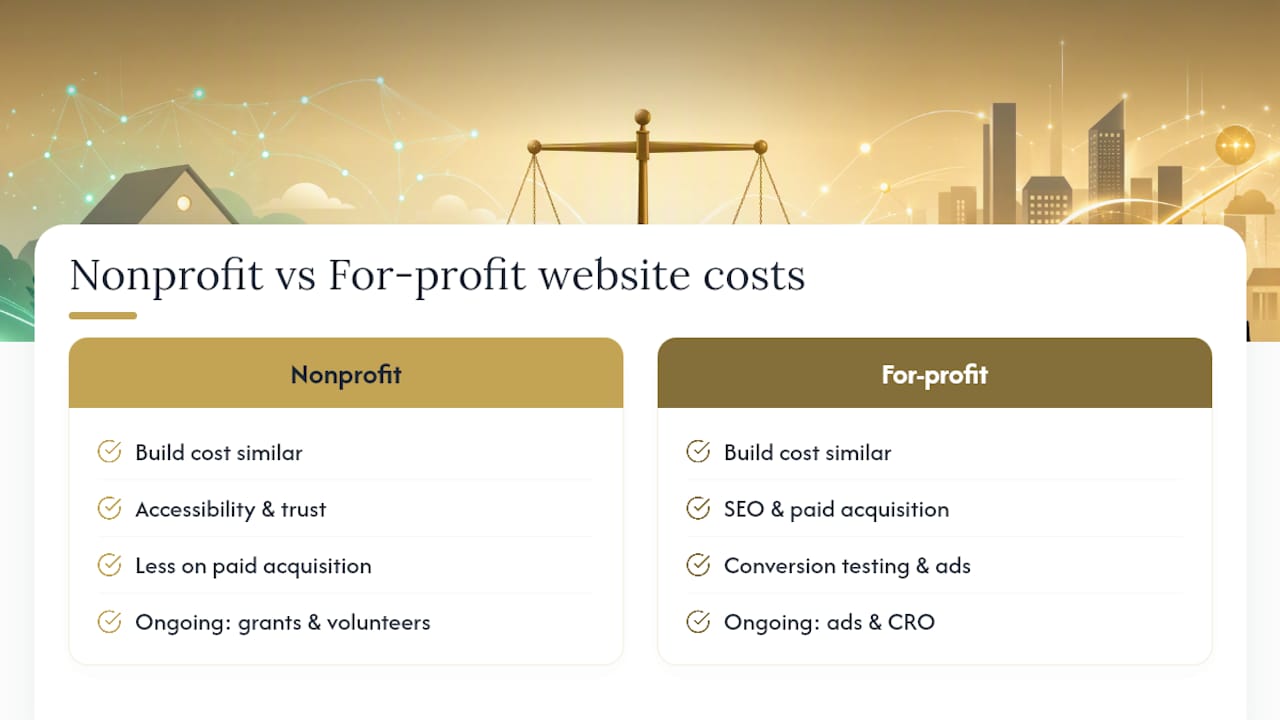
Nonprofit and for-profit websites cost roughly the same to build feature-for-feature. A donation form isn't fundamentally cheaper to code than an e-commerce checkout, and a volunteer portal takes about as much development time as a customer account dashboard. The real difference is what each sector prioritizes and what gets cut when budgets tighten.
For-profit small businesses typically weight budget toward SEO and paid acquisition, since every visitor is a potential sale. Nonprofits often weight budget toward accessibility and donor trust signals, since a donor who hits a confusing or inaccessible form simply leaves without giving. That shift in priorities changes where the money goes, not the total.
Nonprofits also tend to run leaner ongoing budgets. A for-profit business might spend heavily on conversion-rate testing and paid ads; a nonprofit is more likely to spend on grant-writing time and volunteer coordination instead, leaving less in-house capacity for iterative site improvements. This is exactly where realistic budgeting matters most: a nonprofit that underfunds its site maintenance line will see accessibility and performance drift within a year, even if the initial build was excellent.
The honest expectation to set with your board: a nonprofit site isn't inherently cheaper than a comparable small-business site, but it needs to work harder per dollar because donor trust converts differently than retail purchase intent.
Do ADA and Privacy Rules Add to Your Website Budget?
Yes, and the costs go beyond a one-time accessibility audit. Title III of the Americans with Disabilities Act has been applied to nonprofit websites in ongoing litigation and settlement activity, which means WCAG conformance isn't a nice-to-have design choice. It's risk management with a real budget line attached: expect $750 to $5,000 for initial audit and remediation, plus that annual monitoring cost to catch drift as new content gets added.
Privacy compliance adds a smaller but real line item. If your nonprofit collects donor data from residents of the European Union, GDPR-style consent management and data-handling practices may apply, typically adding $500 to $2,000 for cookie consent tools and privacy policy updates. Most US-focused nonprofits face lighter obligations here than international organizations, but state-level privacy laws are expanding, so a basic privacy policy review during development is worth the modest cost.
The pattern across both areas is the same: build compliance in during development rather than retrofitting it. Remediating an inaccessible site or bolting on consent management after launch almost always costs more in developer hours than designing for it from the first wireframe.
Prioritize Donor Conversion and Accessibility First
If your budget can't cover everything on your wish list this year, and most nonprofit budgets can't, spend first on donor conversion flows and accessibility, then phase in custom features like volunteer portals or advanced reporting dashboards later.
A staged rollout stretches grant dollars further because it lets you apply for a second round of funding once you can point to real results: a donation conversion rate, a volunteer sign-up count, a WCAG conformance report. Boards and grant committees respond to evidence, not promises. Building the donor-facing core first, and building it accessibly, gives you that evidence within months instead of waiting for a fully custom build to finish.
The mistake I see most often isn't overspending. It's spreading a tight budget evenly across every feature request instead of concentrating it where it actually moves the mission forward.
— Elijah
Ready to see what a hand-coded nonprofit site would cost for your organization? Kirk & Co Software's small business web design service builds custom, accessible sites for Indiana nonprofits and small businesses, with hosting and maintenance bundled into a straightforward monthly plan. Get a proposal that itemizes every line above before you commit a single grant dollar.
Sources
- ProjectCostEstimator — Nonprofit website cost estimates
- CauseHouse — Nonprofit website cost calculator
- Indiana Arts Commission — Arts Project Support (APS)
- Washington County Economic Growth Partnership — Small Business Grant Program