
Google Analytics 4 (GA4) is the right tool for almost every small business, and it's free. Create a GA4 property, paste your Measurement ID onto your site, confirm Realtime shows visitors, and mark one conversion event. That's the whole starting job. It takes about half an hour, costs nothing, and a 20 to 30 minute monthly check-in afterward is enough to keep the data useful.
TL;DR:
- Tracking thank-you page views, call clicks, and final booking screens are simple yet effective ways to measure meaningful conversions for most small businesses.
- Ensure your GA4 conversion events are set up and tested in Realtime within the first week to avoid missing critical lead data.
- Linking Search Console and Google Ads provides insights into search terms and ad spend efficiency, which are crucial for optimizing marketing ROI.
- Most analytics failures stem from not tracking conversions, not filtering out internal traffic, or ignoring mobile performance issues.
- For better sales follow-up, integrate GA4 with a CRM that supports event forwarding, lead source tracking, and accurate timestamps to close more jobs.
Table of Contents
- Setting Up Google Analytics for Small Business Websites
- How Do You Track Conversions Like Forms and Calls?
- Which GA4 Reports Actually Matter for Small Business Metrics?
- Should You Link Search Console and Google Ads to GA4?
- What Mistakes Make Small Business Analytics Useless?
- Turning Analytics Data Into Actual Sales Follow-Up
- Your First 90 Days With Small Business Analytics
- When DIY Analytics Isn't Enough: A Managed Alternative
- Sources
Setting Up Google Analytics for Small Business Websites
You don't need a marketing degree to get GA4 running correctly. You need about 30 minutes and the login to whatever platform runs your site.
Start at Analytics and create an account, then a property, inside your Google Analytics dashboard. Name the property after your business, set your time zone and currency, and answer the short business-description prompts. GA4 then generates a Measurement ID, a string that starts with "G." That ID is the key that connects your website's data to your Analytics account, and every install method below is really just a different way of getting that ID onto your pages.
Installing correctly on most platforms takes 15 to 30 minutes, whether you're doing it yourself for the first time or you've done it a dozen times before.
- WordPress: Install the official Site Kit by Google plugin, sign in with your Google account, and connect your GA4 property. Site Kit installs the tag automatically and shows basic stats right in your WordPress dashboard.
- Shopify: Go to Online Store, then Preferences, and paste your Measurement ID into the Google Analytics field. Shopify handles the rest.
- Squarespace: Under Settings, then Marketing, add your Measurement ID directly in the built-in Google Analytics field. No plugin needed.
- Wix: Go to Marketing Integrations, find Google Analytics, and enter your Measurement ID there.
- Custom-coded or hand-built sites: Paste the GA4 tag snippet directly into the
<head>section of every template, or use Google Tag Manager if you plan to add more than one tracking tool down the road.
Should you use Google Tag Manager instead of pasting the tag directly? If you only need GA4, skip it. If you expect to add call tracking, ad conversion tags, or a heat-mapping tool eventually, Google Tag Manager gives you one control panel for everything instead of hunting through your website's code each time. Most small businesses running a single site with one analytics tool don't need the extra layer.
Once the tag is live, open GA4 and click Realtime under Reports. Visit your own site in another tab. You should see yourself show up as an active user within a minute or two.
Pro Tip: If Realtime shows nothing after ten minutes, check three things first: a cookie consent banner blocking the tag before a visitor accepts it, the tag pasted into a staging template instead of your live site, or a mismatched Measurement ID copied from the wrong property. These three causes explain most installs that don't show data.
How Do You Track Conversions Like Forms and Calls?
Traffic numbers feel good, but they don't pay bills. A landing page with 2,000 visitors and zero conversions is worth less to your business than a page with 200 visitors and 15 booked jobs. Conversions, not visits, are the metric that connects your website to your revenue.
Three conversion events cover most small businesses:
- Thank-you page views. After someone submits a contact form, redirect them to a dedicated thank-you page. In GA4, create an event that fires whenever that URL loads, then mark it as a conversion. This is the simplest reliable method for most small businesses and it usually requires no code.
- Click-to-call tracking. For any service business where the phone rings more than the contact form fills, set up an event that fires when someone taps your phone number on mobile. Phone calls are often the primary lead source for local service businesses, so skipping this one leaves your biggest channel invisible.
- Booking or quote-request completions. If you use a scheduling tool or a multi-step quote form, track the final confirmation screen the same way you'd track a thank-you page.
To build any of these, go to Admin, then Events, then create a new event based on the URL or button click you want to track. Flip the "Mark as conversion" toggle once the event fires correctly. Test it in Realtime first, then check DebugView (also under Admin) for a more detailed look at whether the event is firing with the right parameters.
If your phone volume is high enough that GA4's native click tracking feels incomplete, a dedicated call-tracking provider can forward call events into GA4 and populate lead-source fields automatically, which also makes it easier to push that data into a CRM later.
Pro Tip: Set up your first conversion event today, even before your dashboards look polished. A single working conversion beats a perfectly organized account with none.
Which GA4 Reports Actually Matter for Small Business Metrics?
GA4 has dozens of reports. You need three: Acquisition, Pages and Screens, and Conversions. Everything else is optional exploration once these three become second nature.
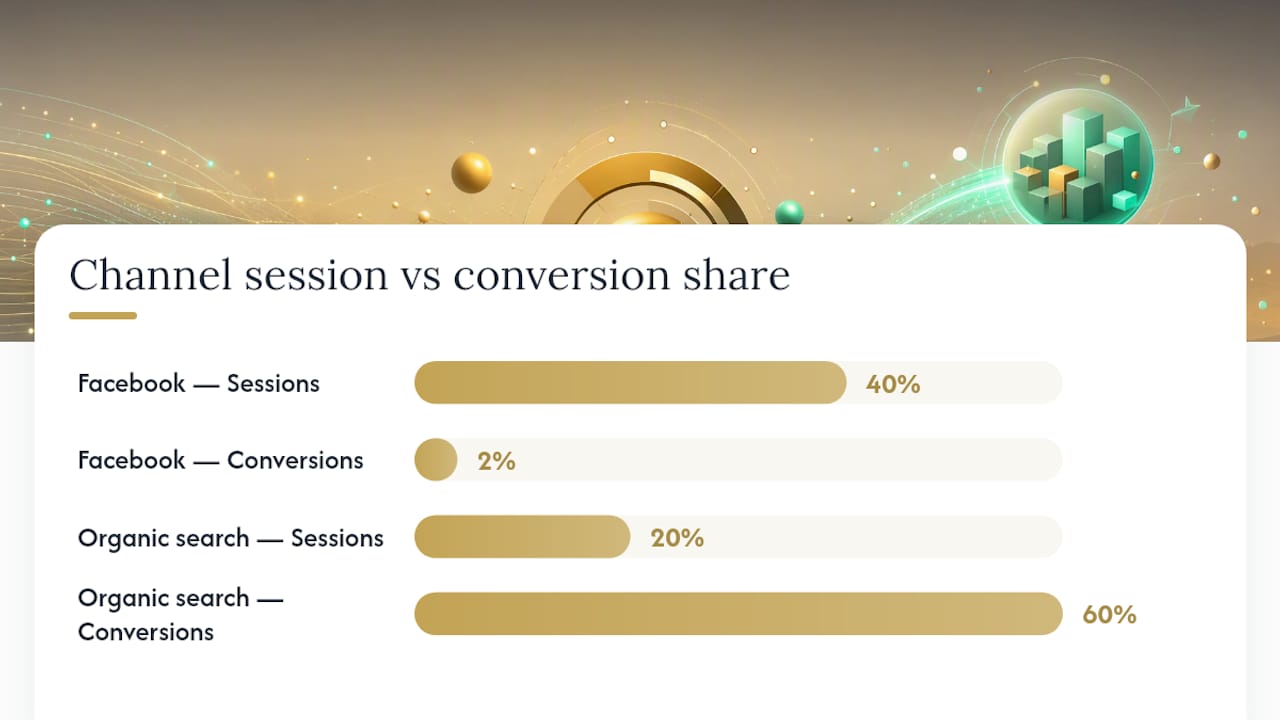
Acquisition tells you where your traffic originates: organic search, paid ads, social, direct visits, or referrals. The action here is reallocation. If Facebook sends 40% of your sessions but only 2% of your conversions while organic search sends 20% of sessions and 60% of conversions, that's a budget conversation, not a coincidence.
Pages and Screens (landing pages specifically) show which URLs bring people in and how they behave once they arrive. Watch for pages with heavy traffic and thin conversions. A landing page converting under 1% is usually a red flag worth testing against: is the call-to-action visible without scrolling, does the page load fast on a phone, and does it include a trust signal like a review count or a licensing badge?
Conversions ties the first two together. It shows which channels and which pages actually produce leads, not just visits, letting you calculate a rough return on each channel by comparing what you spent against what came through.
A few numbers worth watching every month:
- Total sessions by channel, compared to last month
- Conversion rate by landing page
- Conversion rate on mobile versus desktop (a wide gap almost always points to a mobile usability problem, not a traffic problem)
- Your single best-converting page, and whether that page's traffic is growing or shrinking
Run these five checks each time you review data: Did total conversions go up or down? Which channel changed the most? Is any high-traffic page still converting under 1%? Is mobile conversion meaningfully behind desktop? And did last month's one experiment move the number it was supposed to move? If you can answer all five in ten minutes, your setup is doing its job. For deeper tactics on fixing an underperforming page, practical conversion tactics can help you decide what to test first.
Should You Link Search Console and Google Ads to GA4?
Yes, and both take under five minutes each. In GA4, go to Admin, then Product Links, and connect both.
Linking Search Console matters because GA4 alone can't tell you which search terms brought someone to your site. Search Console fills that gap. Combining query data from Search Console with GA4's behavior data shows you exactly which searches lead to a page, and whether that page then converts. If a page ranks well for "emergency plumber near me" but converts at 0.5%, that's a page-level problem, not a search-visibility problem. For a broader look at combining these two data sources, this guide to tracking SEO performance walks through the mechanics in more detail.
Linking Google Ads matters for a simpler reason: it lets you see cost data next to conversion data in one place, so you can measure whether ad spend is actually producing leads instead of just clicks.
For businesses that want leads to move automatically into a sales process, a few integration patterns work well:
- Forward GA4 conversion events to a webhook that creates a new lead record.
- Use a form tool that already writes directly into your CRM, with the GA4 event firing in parallel for reporting.
- Import GA4 event data into a CRM like Kirk CRM so a form submission becomes a tracked opportunity with a source label attached.
One reminder before you connect anything: if your site uses a cookie consent banner, confirm your tracking respects that choice before firing, and keep a basic privacy policy posted that explains what you collect. Readers who prefer full control over their own data sometimes look at privacy-focused platforms like Matomo, which offers self-hosting and unsampled data as an alternative to Google's model; that's a legitimate option worth a mention if data ownership matters to your business, and our own comparison of Google Analytics alternatives breaks down the tradeoffs.
What Mistakes Make Small Business Analytics Useless?
Most bad analytics setups don't fail because of a complicated technical error. They fail because of three predictable habits.
- No conversions tracked. This is the single most common mistake small business owners make, and it's the reason GA4 accounts sit open for months without anyone learning anything useful. Fix it by creating one conversion event today, even a basic thank-you page view. Everything else in your reports becomes more meaningful once you have at least one.
- Internal traffic isn't filtered out. If you, your employees, or your web developer visit the site regularly without filtering, your own visits inflate session counts and quietly distort every report. Set up an internal traffic filter under Admin using your office's IP address or a browser extension flag.
- Mobile performance gets ignored. Most small business websites see more mobile traffic than desktop traffic, but owners still judge their site by how it looks on a laptop. If mobile sessions convert at half the rate of desktop, that gap usually points to a slow-loading page, a hard-to-tap phone number, or a form that's awkward on a small screen.
Pro Tip: If your conversion numbers suddenly look wrong, run three quick checks before you panic: confirm the conversion toggle is still switched on for that event under Admin, check whether a recent site update accidentally removed or moved the thank-you page redirect, and look in Realtime to see if the event still fires when you test it yourself.
Turning Analytics Data Into Actual Sales Follow-Up
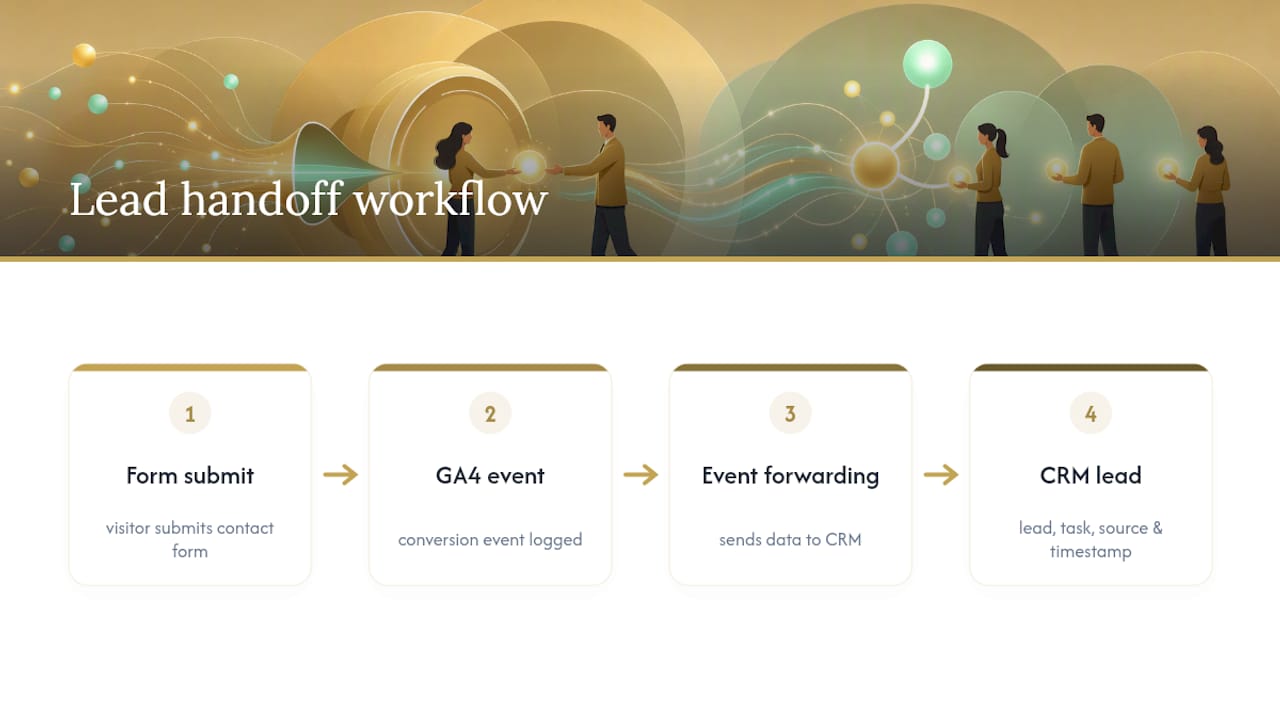
Data that stays in a dashboard doesn't close jobs. Data that reaches a salesperson does. A practical workflow looks like this: a visitor fills out your contact form, GA4 logs the conversion event, and that same submission creates a new lead automatically inside Kirk CRM, complete with a follow-up task and the page or channel it came from.
That last part matters more than it sounds. When a lead carries its source and timestamp into your CRM, you can see which marketing channel is actually producing paying customers, not just form fills. Business owners using this kind of connected setup report faster follow-up and clearer job tracking, because nothing sits in an inbox waiting to be manually logged. If you're evaluating any CRM for this purpose, ask specifically whether it supports event forwarding, lead-source fields, and accurate timestamps. Without those three, you're back to guessing where your leads came from.
Your First 90 Days With Small Business Analytics
Spread the work out and it stops feeling like a project. Month one: install GA4, confirm Realtime shows activity, and mark one conversion event. Month two: link Search Console and Google Ads, then run your first monthly 20 to 30 minute review using the three-report routine above.
Month three: pick exactly one underperforming page and test one change against it, a new headline, a clearer call-to-action, a faster-loading image. Measure the result before you touch anything else.
The pattern that works isn't ambitious. It's one metric, one change, one month at a time. Owners who try to overhaul their entire site based on one week of data usually chase noise. Owners who commit to a single monthly adjustment build a website that improves steadily instead of randomly.
— Elijah
When DIY Analytics Isn't Enough: A Managed Alternative
Setting up GA4 yourself is the right move for most small businesses, and everything above will get you there without hiring anyone. But if your contact forms aren't converting well no matter what your data says, or you'd rather have someone else own the follow-up process entirely, that's a different problem than a tracking problem.

Kirk CRM turns every tracked lead into a managed sales pipeline: client history, follow-up reminders, and a visual view of every open opportunity, starting at $49 a month with a seven-day free trial. If your GA4 data shows conversions coming in but leads going cold before anyone calls them back, that's a workflow gap Kirk CRM was built to close.
If the data points to a page problem instead, a landscaping or plumbing company website built by Kirk & Co is designed around mobile speed, clear contact flows, and calls-to-action placed where GA4 shows visitors actually look. Whether the fix is better lead management or a better-converting page, start with a look at our small business services to see which one fits what your analytics are already telling you.
Sources
- How to Set Up Google Analytics for Your Small Business — Bree Sharp
- Google Analytics for Small Businesses: What to Track and Why — MainStreetROI
- Matomo — Alternative analytics platform