
Run a mobile PageSpeed Insights test right now, then attack three things in order: shrink or defer your blocking JavaScript, optimize the image loading of your Largest Contentful Paint, and put a CDN with proper caching in front of your server. Prioritize Core Web Vitals as you go: Largest Contentful Paint (LCP) under 2.5 seconds, Interaction to Next Paint (INP) under 200 milliseconds, and Cumulative Layout Shift (CLS) under 0.1.
TL;DR:
- Fix caching, use a CDN, and reduce server response time to under 600 milliseconds to improve all downstream page load components.
- Prioritize optimizing the Largest Contentful Paint resource by compressing, resizing, and preloading key images or fonts for faster rendering.
- Defer non-essential JavaScript and adopt next-generation image formats like WebP or AVIF to cut load times and minimize layout shifts.
- Measure mobile speed with both lab and field data, simulating a mid-range Android device on Slow 4G for accurate results, especially for responsiveness metrics.
- Conduct structured diagnostics with tools like WebPageTest or Lighthouse and systematically fix issues, focusing first on TTFB and images before addressing JavaScript.
Table of Contents
- What Is the Fastest Path to Better Mobile Page Speed?
- How Do You Measure Mobile Speed Correctly?
- How Do You Diagnose What's Actually Slowing You Down?
- What Are the Highest-Priority Fixes, Step by Step?
- How Do You Verify Fixes and Stop Regressions?
- When Should You DIY vs Bring in a Pro?
- Where Mobile Speed Advice Usually Gets It Wrong
- Get a Mobile Speed Audit Instead of Guessing at Fixes
- Where to Verify These Recommendations Yourself
- Sources
- FAQ
What Is the Fastest Path to Better Mobile Page Speed?
You don't need a six-month roadmap to see mobile gains. You need a ranked list, in the order that actually pays off first.
- Fix caching, your CDN, and TTFB. If your server takes more than 600 milliseconds to respond, everything downstream is delayed before a single pixel renders. Route static assets through a CDN and set aggressive
Cache-Controlheaders. - Optimize the LCP resource. For most sites this is a hero image or a headline font. Compress it, resize it for mobile viewports, and load it early.
- Defer noncritical JavaScript. Anything not required for the first paint (chat widgets, analytics, social embeds) should load after the page is interactive, not before.
- Switch to responsive images in WebP or AVIF. Serving a 2,400-pixel-wide image to a 375-pixel-wide phone screen is one of the most common, and most fixable, waste patterns in mobile audits.
- Inline your critical CSS. Let the browser paint above-the-fold content without waiting on a full stylesheet download.
When you run a Lighthouse or PageSpeed Insights mobile report, each "opportunity" it lists maps almost directly to one of these five fixes. "Eliminate render-blocking resources" points to your CSS delivery. "Reduce unused JavaScript" points to your third-party script list. "Serve images in next-gen formats" points straight to item four.
Pro Tip: If you're a small team with limited engineering hours, fix caching and the LCP image first. That single pairing usually accounts for the largest share of the visible speed improvement, because it addresses both server delay and the resource users are actually waiting to see. A practical triage checklist can help you sequence the rest without guessing.
How Do You Measure Mobile Speed Correctly?
Three metrics matter now: LCP, INP, and CLS. LCP tracks how long it takes your main content to render. INP measures how responsive your page feels when someone actually taps something. CLS catches the jarring layout jumps that happen when fonts or ads load late. Google's own thresholds set the bar at 2.5 seconds for LCP, 200 milliseconds for INP, and a 0.1 score for CLS, and it recommends minimizing your critical rendering payload so above-the-fold content shows up fast.
Lab data and field data tell different stories, and you need both:
- Lab tools (PageSpeed Insights, Lighthouse, WebPageTest) run a single controlled test, ideal for debugging a specific page.
- Field data (Chrome UX Report, real user monitoring) aggregates what actual visitors experienced, reported at the 75th percentile, or p75, so one fast connection doesn't mask a slow one for most of your traffic.
To test realistically, don't rely on desktop hardware and Wi-Fi. Chrome DevTools and Shopify's mobile performance guidance both recommend simulating a mid-range Android phone with a 4x CPU slowdown and Slow 4G network throttling. That combination exposes JavaScript costs and layout problems that a fast desktop connection simply hides.
Run WebPageTest with these settings and pull the filmstrip view alongside the main-thread trace. The filmstrip shows you exactly when content becomes visible, frame by frame. The main-thread trace shows you what's blocking the browser from responding to a tap during that window, which is where INP problems usually live.
How Do You Diagnose What's Actually Slowing You Down?
A Lighthouse report or WebPageTest waterfall gives you raw signals. Turning those signals into a fix requires knowing what each pattern usually means.
- A large, late-loading image or web font at the top of the waterfall is almost always your LCP culprit, especially if it's not preloaded and the browser has to discover it mid-render.
- Long yellow or red blocks in the main-thread trace point to JavaScript execution eating time the browser needs for rendering and input handling. This is the primary driver behind poor INP scores, and it's a bigger problem on mobile than desktop; mobile responsiveness lags behind desktop pass rates in most device-level performance measurements, largely because phone CPUs simply have less headroom.
- Multiple third-party script tags (chat widgets, ad tech, tracking pixels) stacking up in the network panel usually means you're paying a JavaScript tax for tools that aren't part of your core page experience.
- Render-blocking CSS files listed high in the request chain delay first paint, particularly when a full stylesheet has to download before anything appears.
- Fonts swapping in late without
font-displayset cause visible text reflow, a common and easily fixed cause of CLS. - A slow response before any content downloads at all signals a Time to First Byte (TTFB) problem: unoptimized server code, no caching layer, or a CDN that isn't actually caching your HTML.
Matching the signal to the cause is the whole game here. A slow LCP with a fast TTFB means your image or font strategy needs work. A slow LCP and a slow TTFB means your hosting and caching setup needs attention before anything else will matter.
What Are the Highest-Priority Fixes, Step by Step?
Once you know what's broken, here's how to fix it.
- Solve TTFB with caching and a CDN. Set
Cache-Controlheaders with sensible max-age values, place a CDN edge node close to your visitors, and enable Brotli compression over Gzip wherever your server supports it (Brotli typically shaves more bytes off text-based assets). Use consistent cache keys so you're not accidentally serving stale or duplicate variants. - Rebuild your image pipeline around the LCP element. Identify the exact image or block driving your LCP score, then generate a responsive
srcsetfor it, convert it to WebP or AVIF, and add a<link rel="preload">tag for that specific asset. Never lazy-load the LCP image; that delays the one resource Google explicitly wants prioritized, and Google's own mobile speed research lists next-gen image formats among the highest-impact fixes available. - Extract and inline your critical CSS. Tools like Critical or PurgeCSS can generate the above-the-fold styles automatically; defer the rest with a preload-and-swap pattern.
- Cut your JavaScript weight. Split bundles by route, strip unused code, and add
deferorasyncto anything that isn't needed immediately. Where possible, delay third-party tags until after first user interaction. JavaScript execution time is one of the single biggest multipliers of mobile slowdown, which makes trimming it worth doing before almost anything else on this list. - Fix your fonts. Set
font-display: swap, addpreconnecthints to your font host, and reserve layout space with CSS so text doesn't jump when the font finally loads. - Set a performance budget and enforce it in CI. A reasonable starting budget: LCP under 2.5 seconds, INP under 200 milliseconds, and total JavaScript under roughly 300KB compressed. Fail the build if a pull request breaks the budget.
Pro Tip: Fix TTFB and images before you touch JavaScript. If your server is slow or your hero image is 2MB, no amount of script trimming will make the page feel fast.
How Do You Verify Fixes and Stop Regressions?
Fixing mobile speed once is easy. Keeping it fixed is where most teams slip.
Follow a four-step loop: reproduce the problem in a lab tool like WebPageTest using the filmstrip and main-thread trace, ship the fix, then confirm the real-world improvement through field data (RUM or Chrome UX Report) at the p75 level, not just your own test device. Once the number holds steady, lock it in with automated checks.
- Set budget thresholds in CI: LCP ≤ 2.5s, INP ≤ 200ms, total JS ≤ 300KB compressed.
- Fail builds that exceed the budget rather than flagging them as warnings.
- Monitor field data weekly, and set alerts for any p75 regression past your thresholds.
- Re-run a full lab audit after any major redesign, plugin update, or third-party script addition.
| Stage | Tool | What it confirms |
|---|---|---|
| Lab | WebPageTest, Lighthouse | Root cause, reproducibility |
| Field | Chrome UX Report, RUM | Real-world p75 experience |
| CI | Automated budget checks | No regression on deploy |
Budgets enforced through continuous integration are one of the more effective ways teams keep a fast site fast, because they catch a regression before it ships, not months later when traffic already dropped.
When Should You DIY vs Bring in a Pro?
Page builders, shared hosting, and plugin-heavy stacks make DIY mobile speed work genuinely harder than it looks on paper. You can chip away at images and caching yourself, but stacked plugins and inherited templates often need a structural fix, not another setting toggle.
If your site was built on a page builder with a dozen plugins layered on top, incremental tweaks hit a ceiling fast. Past that point, a real audit that looks at the actual code and hosting setup will outperform another round of manual settings changes.
Where Mobile Speed Advice Usually Gets It Wrong
Most mobile speed guides treat every fix as equally urgent, and that's the mistake. Compressing an image while your server takes 1.5 seconds to respond is polishing a doorknob on a house that's still on fire. The order matters more than the checklist itself, and TTFB plus the LCP resource should almost always come before you touch a single line of CSS.
The other blind spot: mobile-friendly and mobile-fast are not the same thing. A responsive layout that looks fine on a phone can still choke a mid-range Android processor with unoptimized JavaScript, and that gap is exactly why Core Web Vitals for small businesses deserves more attention than another round of design tweaks. INP problems in particular get ignored because they're invisible in a screenshot; you only feel them when you tap something and nothing happens for half a second.
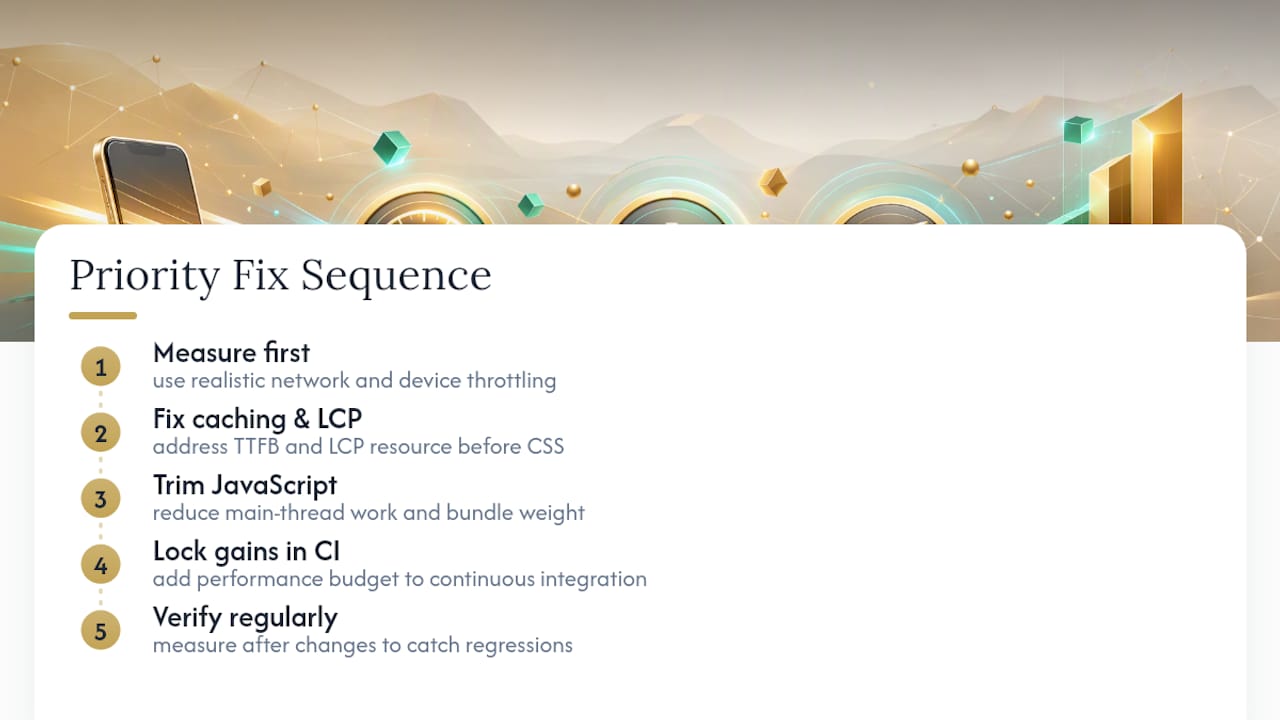
What actually works is the boring, sequential approach: measure with realistic throttling, fix caching and the LCP resource first, trim JavaScript second, then lock every gain behind a CI budget so a future update can't quietly undo it. Skipping the verification step is the single most common reason a "fixed" site slows back down within a few months.
— Elijah
Get a Mobile Speed Audit Instead of Guessing at Fixes
Diagnosing a waterfall and rewriting your image pipeline yourself is doable, but it eats hours most business owners don't have, and one missed setting can undo the gains a month later. Kirk & Co Software's Website Performance service handles the audit, the prioritized fix list, and the ongoing monitoring so regressions get caught before customers notice.

The engagement flow is straightforward: an audit identifies exactly what's slowing your mobile pages down, our team implements the prioritized fixes (caching, images, JavaScript, fonts), and we monitor your Core Web Vitals afterward so a plugin update or new script doesn't quietly erase the improvement. If you'd rather start with a full rebuild instead of patching an older site, custom-coded builds can be engineered for speed from the first line of code. Pricing for Starter Business Manager and Business Manager Premium plans starts at $49 a month, bundling hosting and ongoing care so performance doesn't slide once the initial fix is done. Reach out for a mobile speed audit and see exactly what's costing you conversions.
Where to Verify These Recommendations Yourself
- Mobile web performance guidance — Google's official rendering budget and mobile testing standards.
- WebPageTest — free filmstrip and main-thread trace diagnostics.
- Device mode and throttling — Chrome DevTools setup for realistic mobile emulation.
Sources
- Mobile web performance guidance — Google Developers
- Mobile Site Speed Playbook — Think with Google
- Improve mobile page load speed — Shopify dev
- WebPageTest
FAQ
Is It Worth Optimizing Mobile Speed on My Site?
Yes. To see practical marketing benefits, you can boost SEO and conversions with faster website speed. Mobile visitors typically make up the majority of traffic for most local business sites, and a one-second mobile load improvement can meaningfully increase conversion rates according to Google's own playbook data. Slow mobile pages also hurt your Core Web Vitals scores, which factor into how Google ranks you in mobile search results.
How Do I Increase My Mobile Page Speed Quickly?
Start with a PageSpeed Insights mobile test, then fix caching and TTFB, optimize your LCP image, and defer noncritical JavaScript. Those three changes typically account for the largest share of a visible speed improvement, ahead of smaller tweaks like minifying HTML.
Can I Do SEO Work on Mobile Devices?
You can review rankings, check indexing status, and audit basic on-page elements from a phone, but detailed technical SEO work, like editing code, running Lighthouse audits, or adjusting server caching, needs a desktop environment and proper developer tools.
Why Do Websites Load So Slowly on My Phone?
Phones have weaker processors, less memory, and often unreliable network connections compared to desktops, so JavaScript-heavy pages and unoptimized images that load fine on a laptop can crawl on a mid-range Android device. Testing with 4x CPU slowdown and Slow 4G throttling reveals exactly where that gap comes from.
What Does Kirk & Co Charge for Website Performance Work?
Kirk & Co's Website Performance service pricing is available on request, while its bundled website plans (which include hosting and ongoing care) start at $49 a month for Starter Business Manager or $79 a month for Business Manager Premium.