
For most small business sites, start with UptimeRobot's free plan and add Better Stack if you need developer-friendly logging. If your site drives leads or sales, run 1 minute checks through StatusCake or Pingdom with technical SEO tools and route alerts straight to Slack or PagerDuty. Add your critical pages first, set your check interval, and connect a second alert channel before you do anything else.
TL;DR:
- Most small businesses should start with UptimeRobot's free plan, but sites with revenue impact need checks as short as 30 seconds on critical pages.
- Monitoring tools with multiple regional check points, confirmation checks, and detailed diagnostics like traceroute reduce false alarms and improve incident resolution.
- Paid plans offering fast response support, SLA reporting, and data retention are essential for revenue-critical sites and larger agencies managing multiple clients.
- Different monitor types, such as transactional or SSL expiry checks, target specific outage causes, but alert noise can be minimized with secondary checks and escalation policies.
- Outsourcing monitoring and incident response to managed plans, like Kirk & Co, can save time and prevent revenue loss for businesses that depend on high uptime.
Table of Contents
- What Is Website Uptime Monitoring, and Which Service Should You Pick?
- How Do You Choose the Right Uptime Monitoring Service?
- What Do Different Monitor Types Actually Check?
- How Do You Cut False Alarms and Speed Up Fixes?
- Which Uptime Monitors Are Actually More Reliable?
- How Good Is Support When Something Actually Breaks?
- What Should You Know About Data Retention and Reporting?
- When Does a Managed Maintenance Plan Beat DIY Monitoring?
- Kirk & Co's Maintenance Plans Handle the Monitoring So You Don't Have To
- Why the "Set It and Forget It" Promise of Monitoring Tools Is Half True
- Sources
What Is Website Uptime Monitoring, and Which Service Should You Pick?
Website uptime monitoring works by sending automated requests to your site on a set schedule and alerting you the moment one fails. The right pick depends less on brand recognition and more on factors such as how fast you need to know about a problem, what kind of endpoints you're checking (a homepage is different from a checkout flow), and where those alerts need to land.
Here's the honest shortlist, built from what each service actually does well rather than marketing copy.
- UptimeRobot is the default starting point for small websites because its free tier is generous and setup takes minutes.
- Pingdom earns its keep with root-cause diagnostics, including traceroute and response logs, plus real user monitoring (RUM) for teams that need to see what actual visitors experience.
- StatusCake combines fast check intervals with page speed monitoring, so you're not running two separate tools.
- Uptrends stands out for its checkpoint network, useful when you need to confirm an outage isn't just a regional routing issue.
- Uptime.com leans into notification strategy, built for teams that already run PagerDuty or Slack for incident response.
- HetrixTools covers uptime and blacklist monitoring at a price that fits hobby projects and lean budgets.
- Better Stack (Uptime) appeals to engineering teams that want programmable, Playwright-based transaction checks instead of a simple ping.
- UptimeRadar keeps things simple: a free tier, verification checks, and a setup process that doesn't require a manual.
- IsItDown / IsItDown.io is built for instant, on-demand checks you can later save as a lightweight monitor.
If you're running a single site, UptimeRobot's free plan is the sensible first move. A small business with a handful of important pages does better on StatusCake or HetrixTools, where the paid tiers stay cheap but the intervals drop. An agency managing client sites should look at Uptime.com or Better Stack, since both are built around integrations that scale across multiple accounts.
How Do You Choose the Right Uptime Monitoring Service?
Run through this checklist before you commit to a vendor:
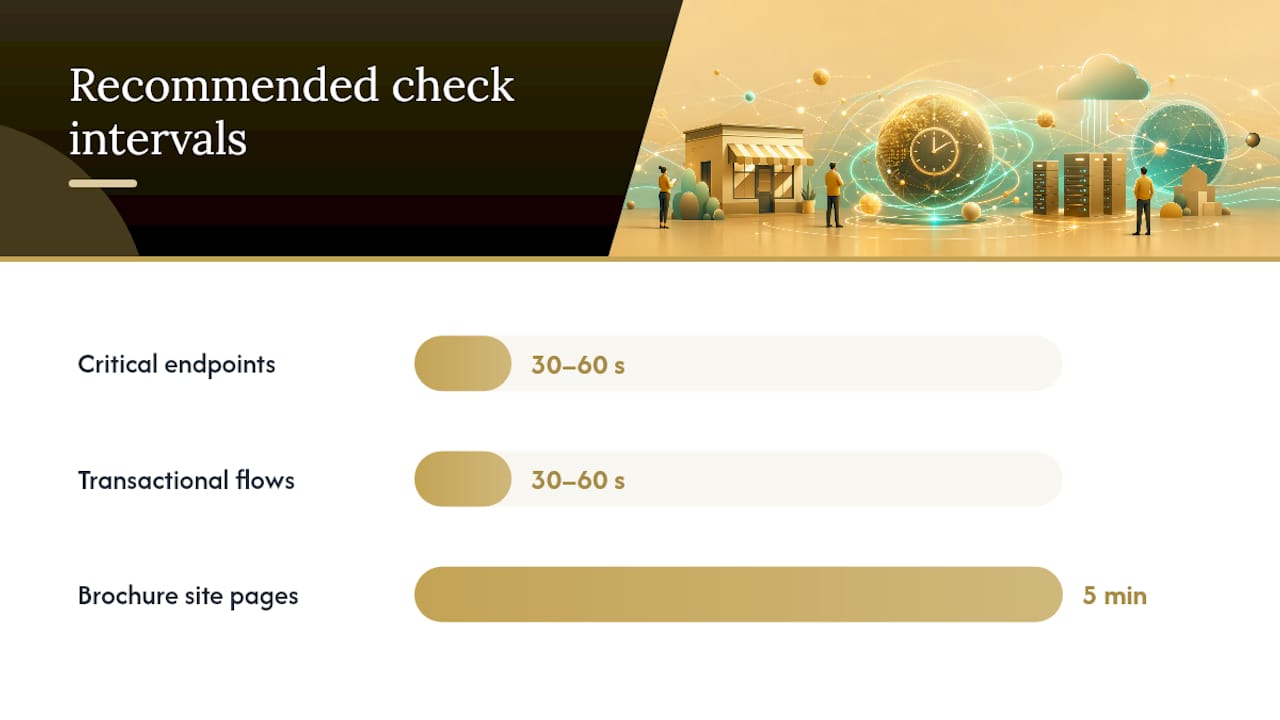
- Detection speed. Does the plan you'd actually pay for check every 30 to 60 seconds, or does it drop to 5 minute intervals unless you upgrade?
- Confirmation checks. Does the service verify from a second location before alerting, or does one blip trigger a false alarm?
- Integrations. Can it push alerts to Slack, PagerDuty, SMS, or a webhook, not just email?
- Monitor types. Does it support the checks you actually need. HTTP, port, cron/heartbeat, or transactional flows?
- Status pages. Can you publish one to keep customers informed during an incident without fielding twenty support tickets?
- Reporting and SLA. Does the vendor publish uptime history and, if relevant, its own SLA?
- Support and escalation. Is there a real support channel, or just a help center?
For a simple brochure site, a 5 minute interval with email alerts is fine. For a site that takes orders or bookings, you want 30 to 60 second checks on critical endpoints, a transactional check on your checkout or login flow, and at least two alert channels feeding into your on-call process, according to UptimeRobot's own monitoring guidance.
When you're comparing vendors directly, ask three blunt questions: Does the plan include a confirmation check before alerting? Does it support webhooks, not just email? Is pricing published, or do you have to talk to sales to find out what the next tier costs? A vendor that dodges any of these is a red flag.
Pro Tip: Set your critical pages (checkout, contact form, booking calendar) to the shortest interval your plan allows, and leave everything else on a longer cycle. This cuts alert noise without missing the outages that actually cost you money.
What Do Different Monitor Types Actually Check?
Not every monitor tests the same thing, and picking the wrong type is how outages slip through undetected.
- HTTP(S) monitors confirm your page loads and returns the right status code.
- Ping monitors check whether a server responds at the network level, useful for infrastructure that doesn't run a website.
- Port monitors verify a specific service (email, database, custom app) is listening and responding.
- Cron/heartbeat monitors confirm a scheduled job actually ran, rather than silently failing.
- Transactional/API monitors walk through a real flow, like logging in or completing checkout.
- Keyword monitors flag when a page loads but the content is wrong, such as an error message replacing your homepage copy.
- SSL and DNS expiry monitors catch a certificate or domain about to lapse, one of the more common causes of avoidable downtime, according to UptimeRobot.
Integrations matter as much as the checks themselves. Slack and Microsoft Teams work for team visibility, PagerDuty and SMS for anyone who needs to be woken up, and webhooks or the vendor's API for custom routing into your own systems. Synthetic transaction checks and RUM aren't the same tool. Synthetic checks test a specific scripted flow, while RUM shows what actual visitors experienced by browser, device, and location, per Pingdom's product documentation. Add RUM once you have enough traffic that "it's slow for someone" becomes a real support ticket.
How Do You Cut False Alarms and Speed Up Fixes?
A single failed check from one location usually means nothing. That's why top monitoring services run a second confirmation check, often from a different region, before sending an alert, a practice Pingdom documents directly and one StatusCake builds into its verification process as well.
- Turn on multi-location or regional retry settings if your plan offers them.
- Prefer tools with traceroute, response logs, or screenshots. They cut diagnosis time dramatically compared to a bare "site is down" alert.
- Set escalation policies so a missed first alert automatically pages a second contact.
- Use suppression windows during planned maintenance so you're not drowning your team in noise.
Pro Tip: If your alerts regularly turn out to be false positives, the fix usually isn't a better tool. It's a longer confirmation delay or an added secondary check location.
Which Uptime Monitors Are Actually More Reliable?
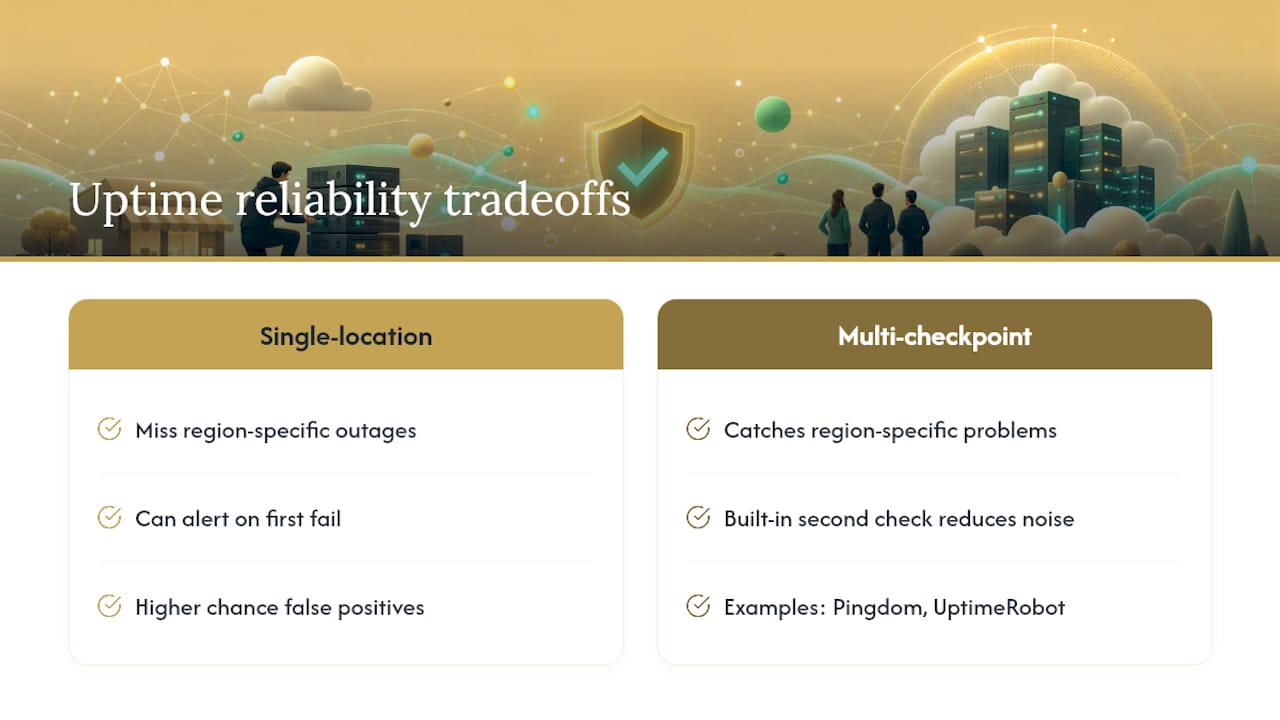
Reliability here means two different things: how accurately a tool detects a real outage, and how consistently it avoids crying wolf. Services that run checks from multiple global checkpoints, like Uptrends and Pingdom, tend to catch region-specific problems that a single-location checker misses entirely. If your site serves customers across several countries, a monitor that only pings from one data center can miss an outage that's very real for a chunk of your visitors.
Accuracy also comes down to confirmation logic. A tool that fires an alert on the first failed request will generate more noise, full stop, regardless of how polished its dashboard looks. The vendors that build in a second check before alerting, as Pingdom and UptimeRobot both do, report fewer false positives because a temporary network blip at your host doesn't get mistaken for a real outage.
Free plans are a reasonable starting point for detection, but they typically skip the short intervals and deeper diagnostics that make a difference during an actual incident. If your site is revenue-critical, that gap between "detected it" and "understood why" is exactly where a paid plan earns its cost.
How Good Is Support When Something Actually Breaks?
Support quality only matters at the exact moment you don't want to be figuring it out for the first time. Free tiers across nearly every vendor on this list route you to a help center and a ticket queue. That's fine for a false alarm you can debug yourself, but it's a real limitation if your monitoring service itself has an issue during a live outage.
Paid plans generally unlock faster response times and, on the higher tiers from vendors like Uptime.com and Pingdom, a named account contact instead of a shared inbox. If your business depends on the site staying up, ask a vendor directly what their support response time looks like on your plan, not their highest one. Published SLAs are worth checking too. A vendor willing to put a number on its own reliability is telling you something about how it thinks about yours.
What Should You Know About Data Retention and Reporting?
Uptime history is only useful if you can actually pull it later, whether that's for a client report, an SLA dispute, or your own postmortem. Retention windows vary widely between vendors and between plan tiers on the same vendor, so check this before an incident forces you to.
Reporting features worth confirming include exportable uptime percentages, incident timelines with timestamps, and response time trends over weeks or months rather than just the last 24 hours. If you manage sites for clients, a status page with historical uptime baked in does a lot of the reporting work for you automatically, saving you from building a manual report every time someone asks how reliable their site has been.
When Does a Managed Maintenance Plan Beat DIY Monitoring?
Running your own monitoring stack costs time, not just money. Someone has to configure the checks, tune the alert thresholds, and actually respond at 2 a.m. when something breaks. For a business that lives on inbound leads, a slow response to a down site isn't an inconvenience. It's lost revenue every hour the page stays broken.
A managed maintenance plan bundles monitoring with the fix itself: someone watching for the alert, applying updates, running backups, and resolving the issue instead of just reporting it exists. If you don't have the time or staff to own that loop, a bundled plan is worth serious consideration.
Kirk & Co's Maintenance Plans Handle the Monitoring So You Don't Have To
Monitoring can be included as part of a larger maintenance plan, rather than a standalone alert system you need to configure and monitor yourself. Instead of choosing a monitoring vendor, tuning intervals, and then still doing the actual fix work when something breaks, you get updates, backups, and incident response handled as part of the plan.

This matters most if your site brings in inbound leads or bookings, the kind Kirk & Co's client portfolio shows across contractors and home service businesses in Indiana. A down site during business hours isn't a technical inconvenience for those businesses. It's a missed job. If you'd rather have someone watching your site and fixing what breaks, rather than staring at a dashboard yourself, take a look at Kirk & Co's website maintenance and support plans and get a quote for what your site actually needs.
Why the "Set It and Forget It" Promise of Monitoring Tools Is Half True
Every uptime monitoring vendor sells the same implicit promise: set up a check, and you'll know the moment something goes wrong. That part is true. What most of these tools quietly leave out is that knowing about a problem and fixing it are two entirely different skill sets, and most small business owners have neither the time nor the appetite to build the second half themselves.
The real gap isn't detection. Every service on this list, from UptimeRobot's free tier to Uptime.com's enterprise dashboards, will tell you when your site is down within a minute or two. The gap is what happens in the fifteen minutes after that alert fires. Someone has to read the traceroute, figure out whether it's your host, your DNS, or your code, and actually push a fix. For a solo contractor or a two-person retail shop, that person often doesn't exist, and the alert just sits in an inbox until someone happens to notice.
That's the part conventional monitoring advice glosses over. Picking the "best" tool matters less than most comparison articles suggest, because the tool only ever does the first half of the job. If you have the technical staff to close that loop yourself, build the stack described in this article and route it aggressively. If you don't, the smarter move is pairing monitoring with someone who actually answers the alert and fixes the problem, which is a different purchase decision entirely than choosing between a 30 second and a 60 second check interval.
— Elijah